> ## Documentation Index
> Fetch the complete documentation index at: https://docs.openlayer.com/llms.txt
> Use this file to discover all available pages before exploring further.

# Connect a data source

> Learn how to connect your warehouse or lakehouse to Openlayer

To monitor data quality, Openlayer needs access to the **tables you want to track**.
You do this by connecting a data source (e.g., BigQuery, Snowflake, Databricks) and selecting the tables of interest.

Once connected, Openlayer will run automated tests directly on top of those tables.

## How to connect

<Info>
  **Prerequisites**:

  * An [Openlayer project](/workspace-and-projects/creating-and-loading-projects) with monitoring mode enabled
  * Appropriate credentials for your data source (see the provider-specific guides)
</Info>

<Steps>
  <Step title="Choose a provider">
    In your project, go to **Data sources** and click **Connect a data source**.
    Select your provider:

    <Columns cols={3}>
      <Card
        title="BigQuery"
        href="/integrations/bigquery"
        icon={
      <svg
        width="30"
        height="30"
        viewBox="0 0 80 80"
        fill="none"
        xmlns="http://www.w3.org/2000/svg"
      >
        <path d="M14.48 58.196L.558 34.082c-.744-1.288-.744-2.876 0-4.164L14.48 5.805c.743-1.287 2.115-2.08 3.6-2.082h27.857c1.48.007 2.845.8 3.585 2.082l13.92 24.113c.744 1.288.744 2.876 0 4.164L49.52 58.196c-.743 1.287-2.115 2.08-3.6 2.082H18.07c-1.483-.005-2.85-.798-3.593-2.082z" fill="#4386fa"/><path d="M40.697 24.235s3.87 9.283-1.406 14.545-14.883 1.894-14.883 1.894L43.95 60.27h1.984c1.486-.002 2.858-.796 3.6-2.082L58.75 42.23z" opacity=".1"/><path d="M45.267 43.23L41 38.953a.67.67 0 0 0-.158-.12 11.63 11.63 0 1 0-2.032 2.037.67.67 0 0 0 .113.15l4.277 4.277a.67.67 0 0 0 .947 0l1.12-1.12a.67.67 0 0 0 0-.947zM31.64 40.464a8.75 8.75 0 1 1 8.749-8.749 8.75 8.75 0 0 1-8.749 8.749zm-5.593-9.216v3.616c.557.983 1.363 1.803 2.338 2.375v-6.013zm4.375-2.998v9.772a6.45 6.45 0 0 0 2.338 0V28.25zm6.764 6.606v-2.142H34.85v4.5a6.43 6.43 0 0 0 2.338-2.368z" fill="#fff"/>
      </svg>
  }
      />

      <Card
        title="Snowflake"
        href="/integrations/snowflake"
        icon={
      <svg height="30" viewBox="0 0 24 24" width="30" xmlns="http://www.w3.org/2000/svg">
        <path clip-rule="evenodd" d="M23.252 10.365l-2.843 1.636 2.843 1.631a1.47 1.47 0 01.697.903 1.492 1.492 0 01-.15 1.135c-.202.342-.53.591-.912.693a1.498 1.498 0 01-1.132-.15l-5.09-2.924a1.473 1.473 0 01-.68-.851 1.446 1.446 0 01-.068-.485 1.5 1.5 0 01.745-1.248l5.09-2.921a1.496 1.496 0 012.044.547 1.479 1.479 0 01-.544 2.034zm-2.692 7.927l-5.087-2.92a1.477 1.477 0 00-.867-.195 1.478 1.478 0 00-.982.468c-.257.276-.4.639-.403 1.017v5.847A1.49 1.49 0 0014.718 24c.828 0 1.497-.668 1.497-1.491v-3.27l2.849 1.636a1.493 1.493 0 002.044-.544 1.49 1.49 0 00-.548-2.04zm-5.87-5.719l-2.116 2.102a.42.42 0 01-.265.112h-.621a.427.427 0 01-.265-.112l-2.115-2.102a.42.42 0 01-.11-.262v-.62a.43.43 0 01.11-.265l2.114-2.102a.426.426 0 01.264-.11h.623a.422.422 0 01.265.11l2.116 2.102a.43.43 0 01.109.265v.62a.428.428 0 01-.11.262zM13 11.99a.442.442 0 00-.113-.266l-.612-.607a.431.431 0 00-.266-.11h-.024a.426.426 0 00-.264.11l-.612.607a.436.436 0 00-.107.266v.024c0 .085.047.202.107.262l.612.61c.061.06.179.11.264.11h.024a.434.434 0 00.266-.11l.612-.61a.429.429 0 00.112-.262v-.024zM3.436 5.704l5.089 2.924c.274.157.578.219.868.195.375-.026.726-.194.983-.47.256-.275.4-.64.403-1.017V1.489C10.78.667 10.11 0 9.284 0c-.829 0-1.498.667-1.498 1.49v3.27l-2.85-1.639a1.496 1.496 0 00-2.045.546 1.489 1.489 0 00.546 2.037zm11.17 3.119c.29.024.594-.038.866-.195l5.087-2.923a1.474 1.474 0 00.697-.903 1.496 1.496 0 00-.149-1.135 1.496 1.496 0 00-2.044-.545L16.215 4.76V1.489C16.215.667 15.546 0 14.718 0c-.83 0-1.497.667-1.497 1.49v5.845a1.491 1.491 0 001.385 1.487zm-5.213 6.354a1.479 1.479 0 00-.868.194l-5.089 2.92a1.476 1.476 0 00-.696.905 1.498 1.498 0 00.148 1.135 1.496 1.496 0 002.044.543l2.851-1.636v3.27c0 .825.67 1.491 1.498 1.491.826 0 1.496-.667 1.496-1.49v-5.847a1.5 1.5 0 00-.401-1.017 1.477 1.477 0 00-.982-.468zm-1.38-2.74c.05-.156.072-.32.068-.484a1.497 1.497 0 00-.751-1.248l-5.084-2.92a1.499 1.499 0 00-2.045.547 1.481 1.481 0 00.549 2.034l2.841 1.636L.75 13.633a1.47 1.47 0 00-.698.903 1.492 1.492 0 00.15 1.135c.202.343.53.592.912.693.382.102.789.048 1.132-.15l5.086-2.924c.345-.195.577-.505.684-.852z" fill="#249EDC" fill-rule="evenodd"></path>
      </svg>
  }
      />

      <Card
        title="Databricks"
        href="/integrations/databricks"
        icon={
  <svg
    width="30"
    height="30"
    viewBox="0 0 80 80"
    fill="none"
    xmlns="http://www.w3.org/2000/svg"
  >
    <path
      fill-rule="evenodd"
      clip-rule="evenodd"
      d="M19.9066 10.3818C1.09874 20.2565 0.205848 20.7762 0.0847186 21.9268C-0.0423615 23.1292 -0.000858761 23.1537 19.5677 33.3716C30.3531 39.0039 39.5588 43.6126 40.0248 43.6131C40.4907 43.6138 48.6108 39.5704 58.0694 34.6276C67.5284 29.6851 75.3902 25.6407 75.5407 25.6407C75.6909 25.6407 75.814 27.2989 75.814 29.3256V33.0107L58.1426 42.2323C48.4232 47.304 40.2693 51.4538 40.0227 51.4538C39.7761 51.4538 31.1736 47.0681 20.9053 41.7081C10.6373 36.3479 1.96179 31.9624 1.62629 31.9624C0.170687 31.9624 0 32.8143 0 40.0701V47.2301L19.5888 57.4696C30.363 63.1011 39.5588 67.7094 40.0248 67.7096C40.4907 67.7101 48.4305 63.7571 57.6684 58.9254C66.9062 54.0934 74.7686 50.0318 75.1394 49.8987C75.7273 49.6885 75.814 50.136 75.814 53.3731V57.0895L58.1458 66.322C48.4279 71.4003 40.274 75.5547 40.0253 75.5547C39.7766 75.5547 31.1803 71.1692 20.9222 65.8092C10.6643 60.449 1.97452 56.0633 1.61121 56.0633C0.613283 56.0633 -0.0775219 57.0694 0.07539 58.3009C0.200339 59.3091 1.86537 60.2645 20.1036 69.7918C31.0439 75.5074 40.1926 80.1004 40.4335 79.9983C40.6744 79.8965 49.6392 75.2201 60.355 69.6066L79.8377 59.4L79.9531 52.0211C80.0643 44.8938 80.0381 44.6277 79.186 44.2022C78.418 43.8189 75.8528 45.0405 59.3139 53.666C48.8692 59.1135 40.188 63.5702 40.0227 63.5702C39.6017 63.5702 5.41764 45.7743 4.74794 45.2066C4.35942 44.8769 4.23702 43.7028 4.32434 41.1382L4.44726 37.5333L22.2263 46.817C37.5429 54.8148 40.1243 56.0405 40.8621 55.665C41.3335 55.4257 50.2956 50.7496 60.7783 45.274L79.8377 35.3178V28.0584C79.8377 21.2303 79.7873 20.7673 78.9887 20.2722C78.219 19.7956 76.3606 20.6771 59.2939 29.6124C48.9289 35.0385 40.1417 39.4107 39.7664 39.3278C39.0817 39.1765 7.2438 22.6385 6.69546 22.1488C6.45481 21.9348 19.9095 14.7307 36.8389 6.00871L40.0515 4.35368L53.9703 11.6196C67.7932 18.8349 67.8982 18.881 69.1248 18.2897C70.0845 17.8262 70.3306 17.465 70.228 16.6669C70.1121 15.7614 68.3231 14.7127 55.0969 7.79975C46.8473 3.48774 39.9858 -0.0220292 39.8493 0.000104111C39.7132 0.0226253 30.7385 4.69429 19.9066 10.3818Z"
      fill="#ED3C2C"
    />
  </svg>
  }
      />
    </Columns>

    Each provider has its own authentication flow. For example, BigQuery supports both
    **service account impersonation** and **service account key** uploads.
    Follow the provider guide linked above for details.
  </Step>

  <Step title="Enter credentials">
    You will be prompted for connection details, such as:
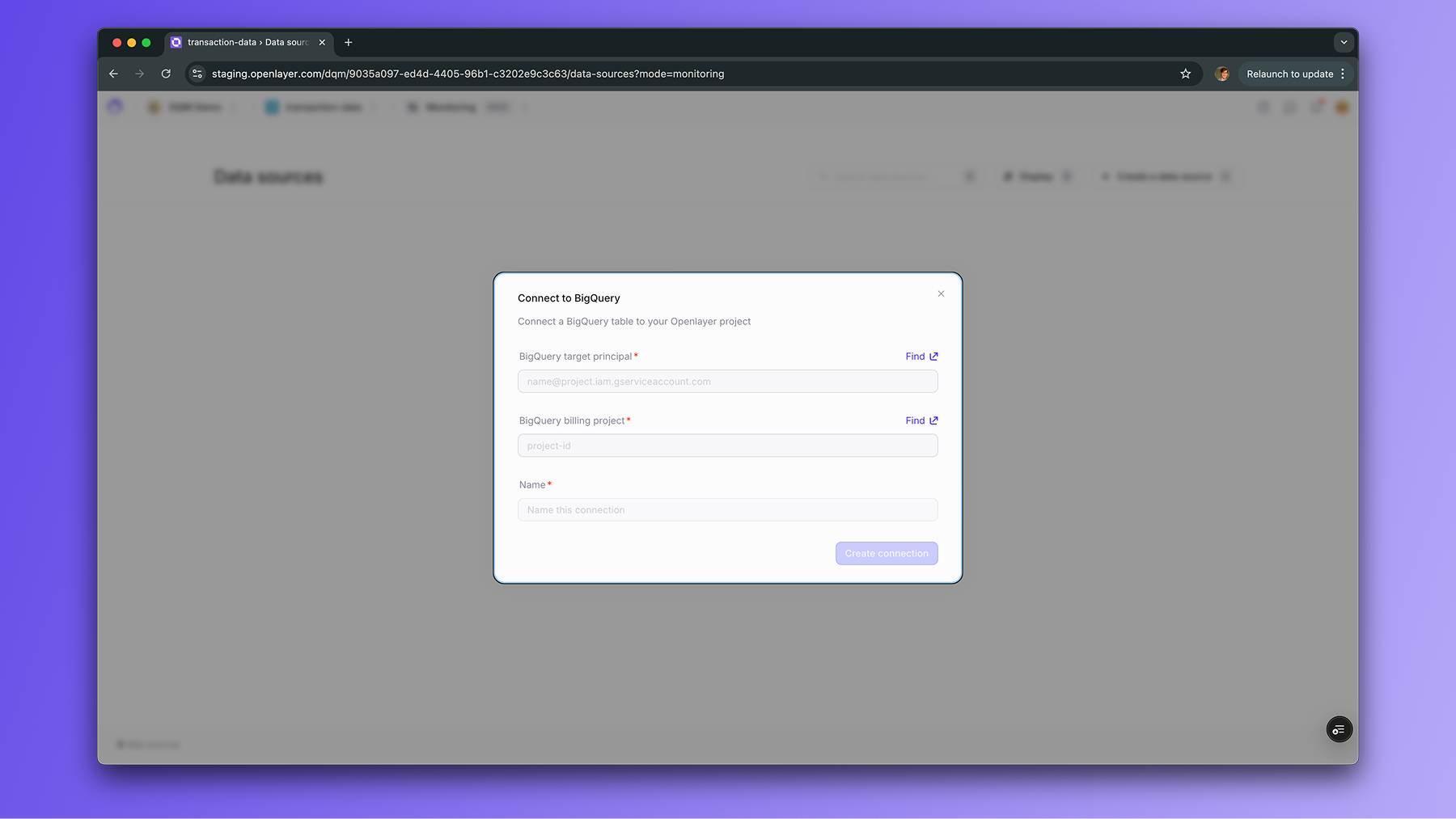
    <img height="300" src="https://mintcdn.com/openlayer-44/uwZVy8AI1ZEo3Xtn/images/documentation/bq_connection.png?fit=max&auto=format&n=uwZVy8AI1ZEo3Xtn&q=85&s=e1b22dbc07d8395b7404ce11c0550884" alt="Configure BigQuery connection" data-path="images/documentation/bq_connection.png" />

    Openlayer stores these securely and uses them only to run queries on your behalf.
  </Step>

  <Step title="Select tables">
    Once credentials are verified, you can browse the available databases/schemas and choose which tables to monitor.

    For each table, you’ll also configure:

    * A **timestamp column** (to order data in monitoring windows)
    * An optional **data source name** (to label the connection in Openlayer)
  </Step>

  <Step title="Start monitoring">
    After saving, Openlayer will profile the table and begin running data quality tests.
    You can then add checks such as schema validation, drift detection, or anomaly detection.

    See the [Tests overview](/tests/overview) for details on configuring tests.
  </Step>
</Steps>

## Next steps

* Connect your first source: [BigQuery guide](/integrations/bigquery)
* Learn how to [add data quality tests](/tests/overview)
