> ## Documentation Index
> Fetch the complete documentation index at: https://docs.openlayer.com/llms.txt
> Use this file to discover all available pages before exploring further.
# Configuring output generation
> Learn how to configure output generation for your model
Many Openlayer tests are based on your model outputs. Therefore, if you plan to evaluate your
model, when you set up pushes to Openlayer, you must either:
* provide a way for Openlayer to run your model on your datasets, or
* before pushing, generate the model outputs yourself and push them alongside your artifacts.
The most conventional option is to provide a way for Openlayer to run your model on your datasets.
The setup is simple by leveraging [Openlayer's SDKs](/api-reference/sdk/overview) and a few commands in the [openlayer.json](/development/openlayer-json).
This guide explains how model output generation works with Openlayer. We also
explain how to generate the outputs yourself, if that's your preferred path.
## Providing a way for Openlayer to run your model on your datasets
Openlayer uses the information provided in the [openlayer.json](/development/openlayer-json) to run your model on your datasets.
To do so, it goes through the following steps:
Set up the runtime environment specified in the `runtime` field from your
`openlayer.json`. Then, it runs the `installCommand` from your
`openlayer.json`, to install your dependencies.
Run the `batchCommand` from your `openlayer.json`.
The expectation is that the `batchCommand` iterates through your datasets, runs your models in each of them, and
creates the directory specified in `outputDirectory` that has the following structure:
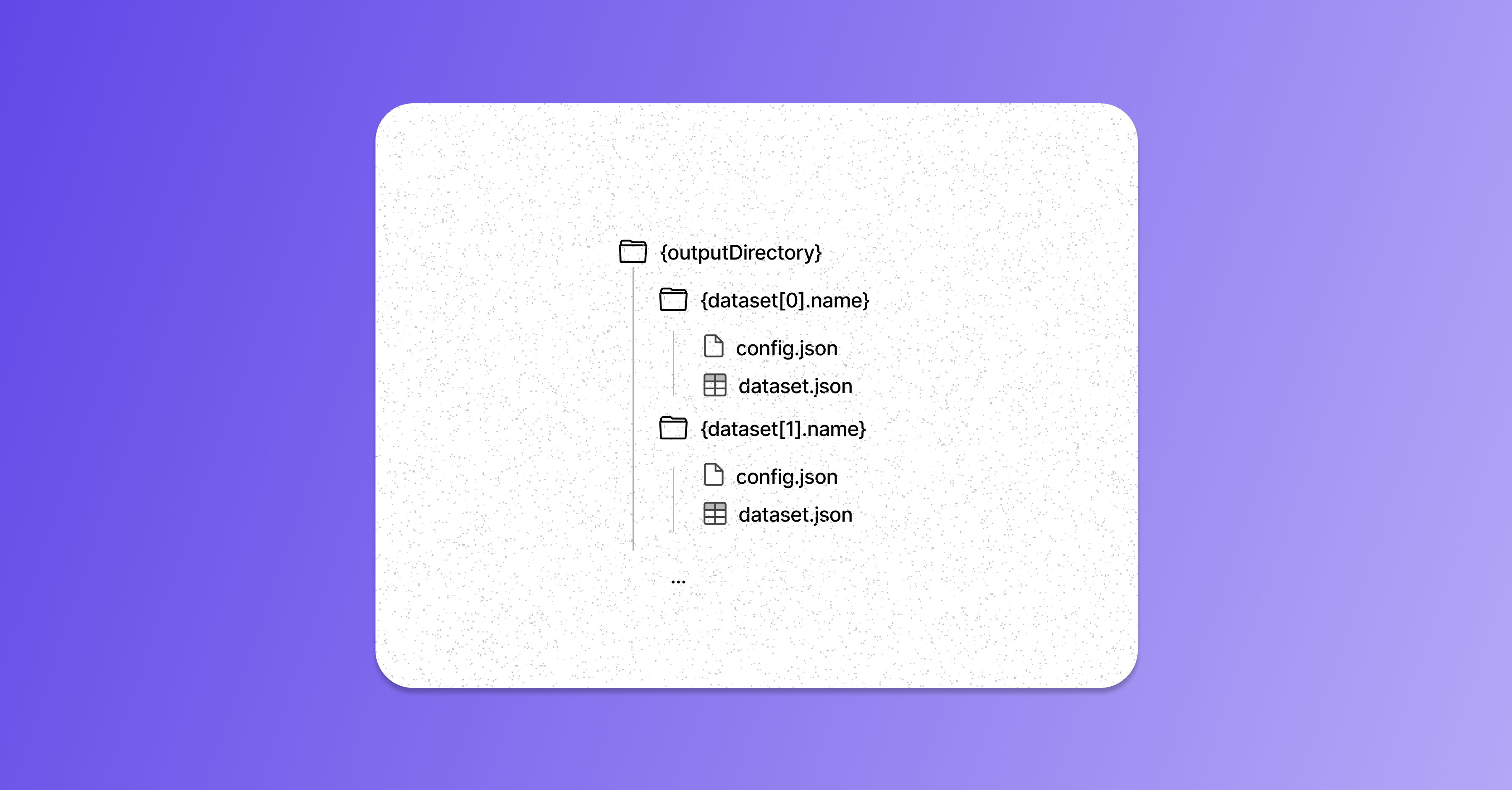 where `{dataset[i].name}` is the name of the i-th dataset specified in the `datasets` array in the `openlayer.json`,
`dataset.json` is the corresponding dataset with an extra column with the model outputs, and `config.json`
is a config file for the dataset.
If you are leveraging one of [Openlayer's SDKs](/api-reference/sdk/overview), you don't need to worry about the output directory structure or the
configs.
You can **browse a template from our [Template gallery](/examples/templates)**
that feels closest to your use case and see what the `openlayer.json` and the
run script look like using [Openlayer's SDKs](/api-reference/sdk/overview).
With Openlayer's SDKs, your `batchCommand` should call a script you wrote and append it with
```
--dataset-path {{ path }} --output-dir {{ outputDirectory }}/{{ name }}
```
Our SDKs abstract away the code that:
1. parses command line arguments `--dataset-path` and `--output-dir` so it knows
which dataset to generate batch outputs on, and where to write the generated outputs.
2. loads the dataset specified in `--dataset-path` into memory and calls your code that
generates outputs for a single row.
3. writes the generated outputs along with additional fields and the input data
to a `dataset.json` (or CSV) file to a directory that adheres to the output directory structure presented above.
This allows you to just focus on writing a method that can generate outputs for a single row.
## How Openlayer checks if it should compute outputs
Regardless of the [method you choose](/development/overview), right after you push artifacts to
the Openlayer platform, it checks if the directory
specified as the `outputDirectory` in the `model` section of your [openlayer.json](/development/openlayer-json)
exists **and** if it contains the output files Openlayer expects.
If both conditions are satisfied, Openlayer interprets this as signaling that you already
ran your model on your datasets before pushing. Therefore, Openlayer will not try to compute
the model predictions again.
However, if one of the conditions above is not satisfied, Openlayer will try to compute your model
outputs for your datasets.
where `{dataset[i].name}` is the name of the i-th dataset specified in the `datasets` array in the `openlayer.json`,
`dataset.json` is the corresponding dataset with an extra column with the model outputs, and `config.json`
is a config file for the dataset.
If you are leveraging one of [Openlayer's SDKs](/api-reference/sdk/overview), you don't need to worry about the output directory structure or the
configs.
You can **browse a template from our [Template gallery](/examples/templates)**
that feels closest to your use case and see what the `openlayer.json` and the
run script look like using [Openlayer's SDKs](/api-reference/sdk/overview).
With Openlayer's SDKs, your `batchCommand` should call a script you wrote and append it with
```
--dataset-path {{ path }} --output-dir {{ outputDirectory }}/{{ name }}
```
Our SDKs abstract away the code that:
1. parses command line arguments `--dataset-path` and `--output-dir` so it knows
which dataset to generate batch outputs on, and where to write the generated outputs.
2. loads the dataset specified in `--dataset-path` into memory and calls your code that
generates outputs for a single row.
3. writes the generated outputs along with additional fields and the input data
to a `dataset.json` (or CSV) file to a directory that adheres to the output directory structure presented above.
This allows you to just focus on writing a method that can generate outputs for a single row.
## How Openlayer checks if it should compute outputs
Regardless of the [method you choose](/development/overview), right after you push artifacts to
the Openlayer platform, it checks if the directory
specified as the `outputDirectory` in the `model` section of your [openlayer.json](/development/openlayer-json)
exists **and** if it contains the output files Openlayer expects.
If both conditions are satisfied, Openlayer interprets this as signaling that you already
ran your model on your datasets before pushing. Therefore, Openlayer will not try to compute
the model predictions again.
However, if one of the conditions above is not satisfied, Openlayer will try to compute your model
outputs for your datasets.