> ## Documentation Index
> Fetch the complete documentation index at: https://docs.openlayer.com/llms.txt
> Use this file to discover all available pages before exploring further.
# Build a custom framework
> Learn how to create a custom governance framework from scratch
Most organizations have internal AI standards and policies that every initiative must
follow — responsible AI guidelines, model review processes, documentation requirements, and similar practices that don't map to a single external standard.
Custom frameworks let you codify these into a set of enforceable rules that your projects track alongside any regulatory frameworks you've activated.
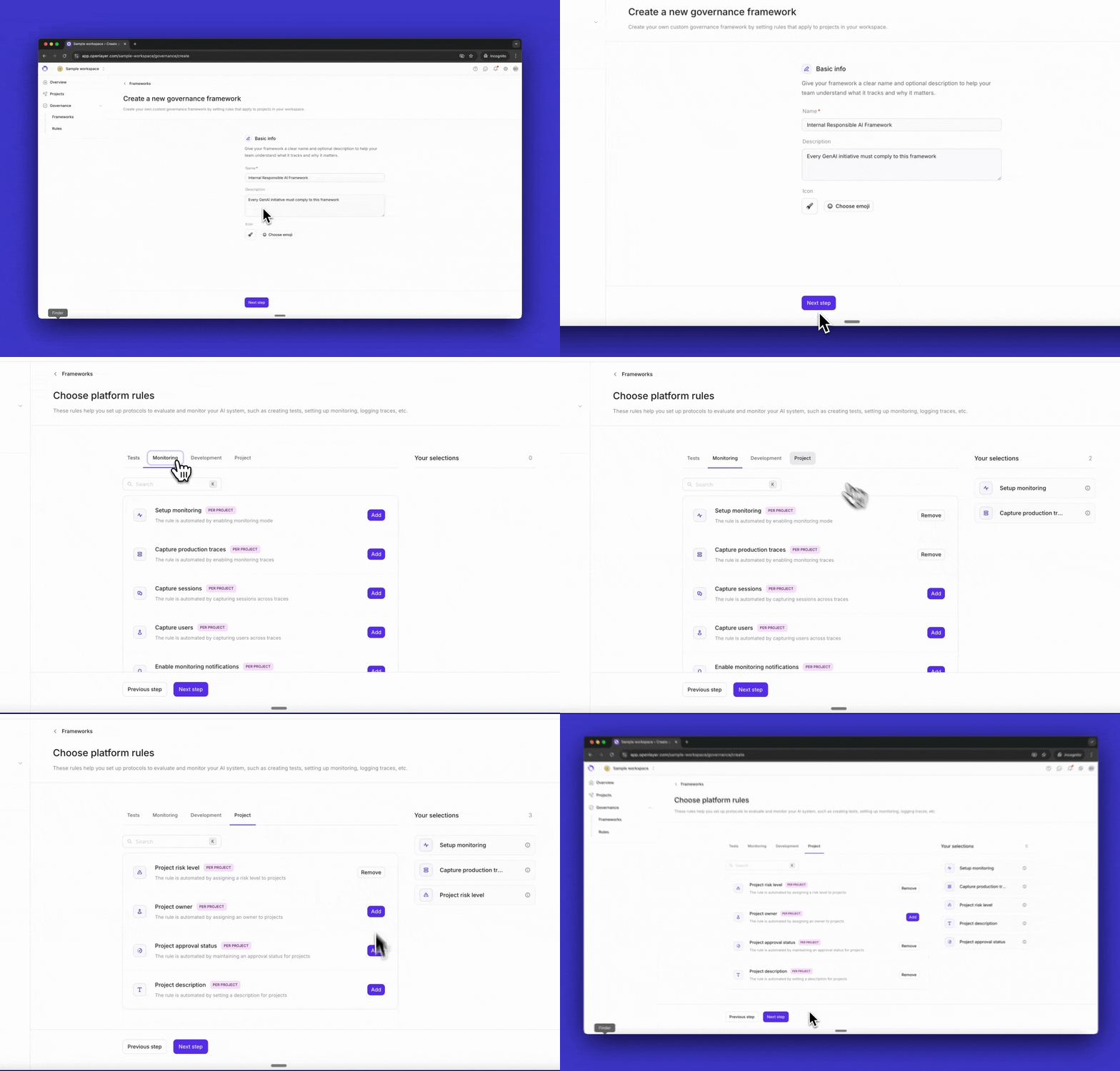 Navigate to **Governance > Frameworks** and click **Create framework**.
Provide a name (e.g., "Internal Responsible AI Policy"), an optional description, and an icon to identify the framework at a glance.
Select the platform rules your framework should enforce. Platform rules require teams to take specific actions within Openlayer — such as enabling [monitoring mode](/monitoring/overview), capturing production traces, or running [tests in CI/CD](/development/overview).
Your selections appear in the sidebar as you go. See [Platform rules](/governance/platform-rules) for the full list of available rules.
Select the evidence-based rules your framework should enforce. These require teams to upload documents or provide links as proof of compliance — security policies, model cards, risk assessments, and similar artifacts.
Openlayer provides a library of common rules, including AI use case declarations, security guidelines, technical documentation, and responsible disclosure policies.
To create a custom rule, click **New rule** and define:
* A name and description
* **Scope** — workspace-wide (completed once for the whole org) or per-project (each project must satisfy it individually)
* **Renewal cadence** — for policies that need periodic review, such as annual security audits
See [Evidence-based rules](/governance/evidence-based-rules) for details on scope and renewal.
Review the summary of your framework: its name, description, and all selected rules grouped by type. Click **Create framework** when ready.
Your framework is ready. The next step is activating it and scoping it to projects — the process is the same as for built-in frameworks. See [Activate a built-in framework](/governance/activate-framework).
Navigate to **Governance > Frameworks** and click **Create framework**.
Provide a name (e.g., "Internal Responsible AI Policy"), an optional description, and an icon to identify the framework at a glance.
Select the platform rules your framework should enforce. Platform rules require teams to take specific actions within Openlayer — such as enabling [monitoring mode](/monitoring/overview), capturing production traces, or running [tests in CI/CD](/development/overview).
Your selections appear in the sidebar as you go. See [Platform rules](/governance/platform-rules) for the full list of available rules.
Select the evidence-based rules your framework should enforce. These require teams to upload documents or provide links as proof of compliance — security policies, model cards, risk assessments, and similar artifacts.
Openlayer provides a library of common rules, including AI use case declarations, security guidelines, technical documentation, and responsible disclosure policies.
To create a custom rule, click **New rule** and define:
* A name and description
* **Scope** — workspace-wide (completed once for the whole org) or per-project (each project must satisfy it individually)
* **Renewal cadence** — for policies that need periodic review, such as annual security audits
See [Evidence-based rules](/governance/evidence-based-rules) for details on scope and renewal.
Review the summary of your framework: its name, description, and all selected rules grouped by type. Click **Create framework** when ready.
Your framework is ready. The next step is activating it and scoping it to projects — the process is the same as for built-in frameworks. See [Activate a built-in framework](/governance/activate-framework).