> ## Documentation Index
> Fetch the complete documentation index at: https://docs.openlayer.com/llms.txt
> Use this file to discover all available pages before exploring further.
# Claude Code
> Send Claude Code traces to Openlayer over OpenTelemetry, configured for your whole organization through Claude managed settings
 [Claude Code](https://code.claude.com/docs/en/overview) is Anthropic's agentic coding tool. It
can export [OpenTelemetry](/integrations/opentelemetry) traces for every prompt a developer sends:
the model requests it makes, the tools it runs, and how long each step takes. Point that export at
Openlayer and every Claude Code session in your organization lands in an inference pipeline, with
no SDK to install and no LLM gateway in the request path.
This page configures the export once, in Claude **managed settings**, so it applies to every
developer and individual users can't redirect or turn it off.
This guide covers **client-side trace export from Claude Code**, which works
on Claude for Teams and Claude for Enterprise. To ingest claude.ai chats and
Cowork sessions, use the [Claude Compliance](/integrations/claude-compliance)
integration instead. It reads transcripts from Anthropic's Compliance API and
requires Claude Enterprise. See [Which Claude surfaces are
covered](#which-claude-surfaces-are-covered).
## Prerequisites
* An Openlayer [API key](/workspace-and-projects/find-your-api-key) and the ID of the inference
pipeline that should receive the traces.
* A way to deliver Claude Code managed settings to your developers. Either:
* **Server-managed settings**, from the claude.ai admin console. Requires Claude for Teams or
Claude for Enterprise and the **Owner** or **Primary Owner** role.
* **Endpoint-managed settings**, deployed to each device through MDM, an OS policy, or a
`managed-settings.json` file.
* Claude Code v2.1.251 or later on developer machines. Earlier versions don't fully lock the
export destination described in [What developers can and can't
change](#what-developers-can-and-cant-change).
## How Claude Code tracing works
Claude Code tracing is a beta feature and is off by default. Three settings turn it on:
| Variable | Value | Purpose |
| - | - | - |
| `CLAUDE_CODE_ENABLE_TELEMETRY` | `1` | Enables OpenTelemetry in Claude Code. Required for any export |
| `CLAUDE_CODE_ENHANCED_TELEMETRY_BETA` | `1` | Enables span tracing |
| `OTEL_TRACES_EXPORTER` | `otlp` | Sends the spans to an OTLP endpoint |
Each prompt a developer sends starts a `claude_code.interaction` root span. Model calls and tool
calls are recorded as its children, and each tool call has its own children for time spent
waiting on a permission decision and for execution. When Claude spawns a subagent, the
subagent's spans nest under the tool call that started it.
```text theme={null}
claude_code.interaction
├── claude_code.llm_request
└── claude_code.tool
├── claude_code.tool.blocked_on_user
└── claude_code.tool.execution
```
Spans carry the model, token counts, latencies, tool names, and success or failure. Prompt text,
tool inputs, and tool output are **redacted by default**. See [Privacy and data
handling](#privacy-and-data-handling) to change that. Claude's replies are only exported with
[detailed tracing](#capture-claudes-replies-with-detailed-tracing).
## 1. Write the managed settings
Put the following `env` block in your managed settings, replacing the two placeholders:
```json theme={null}
{
"env": {
"CLAUDE_CODE_ENABLE_TELEMETRY": "1",
"CLAUDE_CODE_ENHANCED_TELEMETRY_BETA": "1",
"OTEL_TRACES_EXPORTER": "otlp",
"OTEL_EXPORTER_OTLP_TRACES_PROTOCOL": "http/protobuf",
"OTEL_EXPORTER_OTLP_TRACES_ENDPOINT": "https://api.openlayer.com/v1/otel/v1/traces",
"OTEL_EXPORTER_OTLP_TRACES_HEADERS": "Authorization=Bearer YOUR_OPENLAYER_API_KEY,x-bt-parent=pipeline_id:YOUR_OPENLAYER_PIPELINE_ID",
"OTEL_LOG_USER_PROMPTS": "0",
"OTEL_LOG_TOOL_DETAILS": "0",
"OTEL_LOG_TOOL_CONTENT": "0"
}
}
```
* `OTEL_EXPORTER_OTLP_TRACES_*` scopes the endpoint, protocol, and credentials to traces. If your
organization already exports Claude Code metrics or logs to another collector, that export keeps
working, and your Openlayer API key is never sent to it.
* The endpoint is the full traces path, because a traces-specific variable doesn't have
`/v1/traces` appended to it.
* The `x-bt-parent` header chooses the inference pipeline that receives the traces.
* The three `OTEL_LOG_*` values keep content redacted and stop individual developers from turning
content capture on in their own settings. Remove them only if you deliberately [opt
in](#privacy-and-data-handling).
Managed settings reach developers' machines in plain text, so anyone who can
run Claude Code there can read the API key. Create a dedicated Openlayer API
key for this export so you can rotate or revoke it on its own. To mint
short-lived credentials instead, see [Rotate the API
key](#rotate-the-api-key-with-a-headers-helper).
## 2. Deliver the managed settings
Deliver the block through whichever mechanism you already use to manage Claude Code. By default,
Claude Code reads its policy from **one** managed source, the highest-ranked one present on the
machine. If you already deliver a policy, add the block to that source.
Server-managed settings reach every Claude Code user who signs in to your organization,
with nothing to install on their devices.
1. In claude.ai, open [**Admin Settings > Claude Code > Managed
settings**](https://claude.ai/admin-settings/claude-code).
2. Add the `env` block to the JSON and save.
Claude Code fetches the settings at startup and checks for changes every hour. Because the
block sets an export endpoint, each developer sees an approval dialog that lists the
variables before Claude Code applies them.
Server-managed settings don't reach every session. Claude Code skips the fetch when a
developer's shell exports a `CLAUDE_CODE_USE_*` provider variable, such as
`CLAUDE_CODE_USE_BEDROCK`, or a custom `ANTHROPIC_BASE_URL`. Cowork sessions never fetch
them either. Use endpoint-managed settings for those machines.
Deliver the same keys through your device management tool, such as Jamf, Intune, or Group
Policy:
* **macOS**: a configuration profile for the `com.anthropic.claudecode` preference domain,
with `env` as a dictionary.
* **Windows**: the JSON document as a `REG_SZ` value named `Settings` under
`HKLM\SOFTWARE\Policies\ClaudeCode`.
Claude Code reads the policy at startup and checks for changes every 30 minutes. Anthropic
publishes starter templates in its [MDM examples
repository](https://github.com/anthropics/claude-code/tree/main/examples/mdm).
Save the JSON as `managed-settings.json` in the system directory for each operating system:
| Operating system | Path |
| - | - |
| macOS | `/Library/Application Support/ClaudeCode/managed-settings.json` |
| Linux and WSL | `/etc/claude-code/managed-settings.json` |
| Windows | `C:\Program Files\ClaudeCode\managed-settings.json` |
If other teams own parts of your policy, save the block as its own drop-in file, such as
`managed-settings.d/10-openlayer.json`, next to `managed-settings.json`. Claude Code merges
every `*.json` file in that directory in alphabetical order.
Inside WSL, `/etc/claude-code` is writable by the user. To have WSL follow the Windows policy
instead, set
[`wslInheritsWindowsSettings`](https://code.claude.com/docs/en/settings-reference#wslinheritswindowssettings)
in the Windows `HKLM` policy or managed settings file.
For how Claude Code ranks and combines these sources, see Anthropic's [managed settings
deployment guide](https://code.claude.com/docs/en/managed-settings).
## 3. Verify the export
1. On a developer's machine, start Claude Code and run `/status`. The `Setting sources` line should
list `Enterprise managed settings` with the source you used: `(remote)` for the admin console,
`(plist)` or `(HKLM)` for MDM, and `(file)` or `(drop-ins)` for a managed settings file.
2. If you used the admin console, run `claude doctor` and check the `Managed settings (remote)`
line. It says whether the settings loaded, the fetch failed, or Claude Code skipped it and why.
3. Send a prompt in Claude Code. Within a few seconds, a trace appears in your Openlayer inference
pipeline, with the `claude_code.interaction` span at its root.
If no trace arrives, start Claude Code with a debug log, send a prompt, and search the log:
```bash theme={null}
claude --debug-file /tmp/claude-otel.log
grep "3P telemetry" /tmp/claude-otel.log
```
Claude Code logs the result of the first export as a `[3P telemetry] First traces export` line,
followed by the reason when it fails, such as `FAILED (Unauthorized)`. Lines prefixed
`[Anthropic telemetry]` describe Anthropic's own operational telemetry and don't indicate a problem
with this setup.
## What developers can and can't change
Managed settings sit at the top of Claude Code's settings precedence, so no user, project, or
command-line setting overrides them. With the block above in place:
* **The destination is locked.** Because managed settings set the traces endpoint and
credentials, Claude Code removes any traces endpoint a developer sets in their shell or user
settings at startup, including `BETA_TRACING_ENDPOINT`, and logs a warning in the debug log.
* **Tracing can't be turned off.** The enable flags and `OTEL_TRACES_EXPORTER` are managed, so a
developer can't set the exporter to `none` or `console`, or disable telemetry.
* **Repositories can't change it.** Claude Code ignores OpenTelemetry variables in a repository's
`.claude/settings.json` and `.claude/settings.local.json`.
* **Content stays redacted.** A developer can't set the `OTEL_LOG_*` values to `1` for their own
sessions.
Endpoint-managed settings are only as strong as the device's protection. A developer with local
administrator rights can edit a managed settings file, so prefer MDM delivery, which can redeploy
the policy on a schedule.
## Privacy and data handling
With the configuration above, traces carry metadata only: model, token counts, latencies, tool
names, success or failure, and the length of each prompt. Claude Code replaces prompt text with
`` and leaves out tool inputs and tool output.
To send content to Openlayer, set these variables to `1` in managed settings:
| Variable | Adds to traces |
| - | - |
| `OTEL_LOG_USER_PROMPTS` | The text of each prompt the developer sends |
| `OTEL_LOG_TOOL_DETAILS` | Tool inputs: Bash commands, file paths, MCP server and tool names, skill names, and subagent types |
| `OTEL_LOG_TOOL_CONTENT` | Tool output, such as the contents of files Claude reads and the output of commands it runs |
Tool details and tool content routinely include source code, file paths,
command output, and any secrets that appear in them. Turning them on sends
that data to Openlayer for every developer the policy reaches. Confirm that it
matches your data-handling policies before you opt in, and consider [data
retention](/workspace-and-projects/data-retention) for the pipeline that
receives it.
Claude Code truncates each content attribute at 60 KB by default. These flags don't add Claude's
replies. For those, turn on detailed tracing.
## Capture Claude's replies with detailed tracing
Claude Code's detailed beta tracing adds the text of Claude's replies, and the messages and tool
results sent in each model request. Openlayer uses them to show the prompt as each trace's input
and Claude's final reply as its output.
Add these variables to the `env` block from [step 1](#1-write-the-managed-settings), replacing the
`OTEL_LOG_USER_PROMPTS` value there:
```json theme={null}
{
"env": {
"ENABLE_BETA_TRACING_DETAILED": "1",
"BETA_TRACING_ENDPOINT": "https://api.openlayer.com/v1/otel",
"OTEL_LOG_USER_PROMPTS": "1"
}
}
```
* `BETA_TRACING_ENDPOINT` is a base URL. Claude Code appends `/v1/traces` to it and sends traces
there instead of to `OTEL_EXPORTER_OTLP_TRACES_ENDPOINT`. It still sends the
`OTEL_EXPORTER_OTLP_TRACES_HEADERS` credentials.
* `OTEL_LOG_USER_PROMPTS` gates the prompt and reply text. Without it, detailed traces still arrive,
but each trace's input and output are empty.
* Detailed tracing doesn't use [`otelHeadersHelper`](#rotate-the-api-key-with-a-headers-helper).
Set the credentials in `OTEL_EXPORTER_OTLP_TRACES_HEADERS`.
* Claude Code also sends logs to `/v1/logs` under the same base URL. Openlayer doesn't ingest logs,
so those requests fail and the debug log shows an `OTEL diag error` for each. Traces are
unaffected.
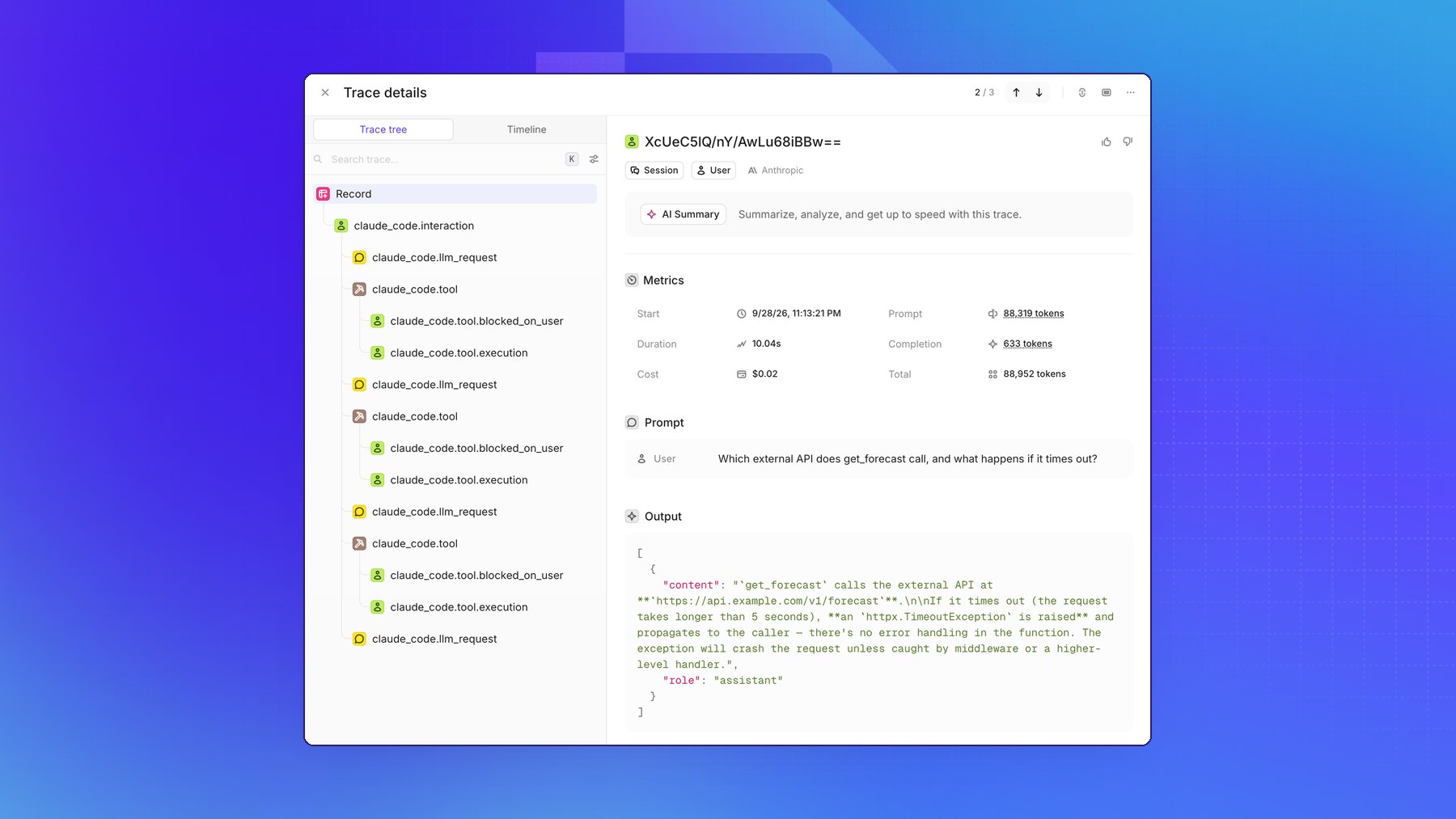
Each prompt then appears in Openlayer with Claude's reply, the token count and cost, and every
model request and tool call as a step:
[Claude Code](https://code.claude.com/docs/en/overview) is Anthropic's agentic coding tool. It
can export [OpenTelemetry](/integrations/opentelemetry) traces for every prompt a developer sends:
the model requests it makes, the tools it runs, and how long each step takes. Point that export at
Openlayer and every Claude Code session in your organization lands in an inference pipeline, with
no SDK to install and no LLM gateway in the request path.
This page configures the export once, in Claude **managed settings**, so it applies to every
developer and individual users can't redirect or turn it off.
This guide covers **client-side trace export from Claude Code**, which works
on Claude for Teams and Claude for Enterprise. To ingest claude.ai chats and
Cowork sessions, use the [Claude Compliance](/integrations/claude-compliance)
integration instead. It reads transcripts from Anthropic's Compliance API and
requires Claude Enterprise. See [Which Claude surfaces are
covered](#which-claude-surfaces-are-covered).
## Prerequisites
* An Openlayer [API key](/workspace-and-projects/find-your-api-key) and the ID of the inference
pipeline that should receive the traces.
* A way to deliver Claude Code managed settings to your developers. Either:
* **Server-managed settings**, from the claude.ai admin console. Requires Claude for Teams or
Claude for Enterprise and the **Owner** or **Primary Owner** role.
* **Endpoint-managed settings**, deployed to each device through MDM, an OS policy, or a
`managed-settings.json` file.
* Claude Code v2.1.251 or later on developer machines. Earlier versions don't fully lock the
export destination described in [What developers can and can't
change](#what-developers-can-and-cant-change).
## How Claude Code tracing works
Claude Code tracing is a beta feature and is off by default. Three settings turn it on:
| Variable | Value | Purpose |
| - | - | - |
| `CLAUDE_CODE_ENABLE_TELEMETRY` | `1` | Enables OpenTelemetry in Claude Code. Required for any export |
| `CLAUDE_CODE_ENHANCED_TELEMETRY_BETA` | `1` | Enables span tracing |
| `OTEL_TRACES_EXPORTER` | `otlp` | Sends the spans to an OTLP endpoint |
Each prompt a developer sends starts a `claude_code.interaction` root span. Model calls and tool
calls are recorded as its children, and each tool call has its own children for time spent
waiting on a permission decision and for execution. When Claude spawns a subagent, the
subagent's spans nest under the tool call that started it.
```text theme={null}
claude_code.interaction
├── claude_code.llm_request
└── claude_code.tool
├── claude_code.tool.blocked_on_user
└── claude_code.tool.execution
```
Spans carry the model, token counts, latencies, tool names, and success or failure. Prompt text,
tool inputs, and tool output are **redacted by default**. See [Privacy and data
handling](#privacy-and-data-handling) to change that. Claude's replies are only exported with
[detailed tracing](#capture-claudes-replies-with-detailed-tracing).
## 1. Write the managed settings
Put the following `env` block in your managed settings, replacing the two placeholders:
```json theme={null}
{
"env": {
"CLAUDE_CODE_ENABLE_TELEMETRY": "1",
"CLAUDE_CODE_ENHANCED_TELEMETRY_BETA": "1",
"OTEL_TRACES_EXPORTER": "otlp",
"OTEL_EXPORTER_OTLP_TRACES_PROTOCOL": "http/protobuf",
"OTEL_EXPORTER_OTLP_TRACES_ENDPOINT": "https://api.openlayer.com/v1/otel/v1/traces",
"OTEL_EXPORTER_OTLP_TRACES_HEADERS": "Authorization=Bearer YOUR_OPENLAYER_API_KEY,x-bt-parent=pipeline_id:YOUR_OPENLAYER_PIPELINE_ID",
"OTEL_LOG_USER_PROMPTS": "0",
"OTEL_LOG_TOOL_DETAILS": "0",
"OTEL_LOG_TOOL_CONTENT": "0"
}
}
```
* `OTEL_EXPORTER_OTLP_TRACES_*` scopes the endpoint, protocol, and credentials to traces. If your
organization already exports Claude Code metrics or logs to another collector, that export keeps
working, and your Openlayer API key is never sent to it.
* The endpoint is the full traces path, because a traces-specific variable doesn't have
`/v1/traces` appended to it.
* The `x-bt-parent` header chooses the inference pipeline that receives the traces.
* The three `OTEL_LOG_*` values keep content redacted and stop individual developers from turning
content capture on in their own settings. Remove them only if you deliberately [opt
in](#privacy-and-data-handling).
Managed settings reach developers' machines in plain text, so anyone who can
run Claude Code there can read the API key. Create a dedicated Openlayer API
key for this export so you can rotate or revoke it on its own. To mint
short-lived credentials instead, see [Rotate the API
key](#rotate-the-api-key-with-a-headers-helper).
## 2. Deliver the managed settings
Deliver the block through whichever mechanism you already use to manage Claude Code. By default,
Claude Code reads its policy from **one** managed source, the highest-ranked one present on the
machine. If you already deliver a policy, add the block to that source.
Server-managed settings reach every Claude Code user who signs in to your organization,
with nothing to install on their devices.
1. In claude.ai, open [**Admin Settings > Claude Code > Managed
settings**](https://claude.ai/admin-settings/claude-code).
2. Add the `env` block to the JSON and save.
Claude Code fetches the settings at startup and checks for changes every hour. Because the
block sets an export endpoint, each developer sees an approval dialog that lists the
variables before Claude Code applies them.
Server-managed settings don't reach every session. Claude Code skips the fetch when a
developer's shell exports a `CLAUDE_CODE_USE_*` provider variable, such as
`CLAUDE_CODE_USE_BEDROCK`, or a custom `ANTHROPIC_BASE_URL`. Cowork sessions never fetch
them either. Use endpoint-managed settings for those machines.
Deliver the same keys through your device management tool, such as Jamf, Intune, or Group
Policy:
* **macOS**: a configuration profile for the `com.anthropic.claudecode` preference domain,
with `env` as a dictionary.
* **Windows**: the JSON document as a `REG_SZ` value named `Settings` under
`HKLM\SOFTWARE\Policies\ClaudeCode`.
Claude Code reads the policy at startup and checks for changes every 30 minutes. Anthropic
publishes starter templates in its [MDM examples
repository](https://github.com/anthropics/claude-code/tree/main/examples/mdm).
Save the JSON as `managed-settings.json` in the system directory for each operating system:
| Operating system | Path |
| - | - |
| macOS | `/Library/Application Support/ClaudeCode/managed-settings.json` |
| Linux and WSL | `/etc/claude-code/managed-settings.json` |
| Windows | `C:\Program Files\ClaudeCode\managed-settings.json` |
If other teams own parts of your policy, save the block as its own drop-in file, such as
`managed-settings.d/10-openlayer.json`, next to `managed-settings.json`. Claude Code merges
every `*.json` file in that directory in alphabetical order.
Inside WSL, `/etc/claude-code` is writable by the user. To have WSL follow the Windows policy
instead, set
[`wslInheritsWindowsSettings`](https://code.claude.com/docs/en/settings-reference#wslinheritswindowssettings)
in the Windows `HKLM` policy or managed settings file.
For how Claude Code ranks and combines these sources, see Anthropic's [managed settings
deployment guide](https://code.claude.com/docs/en/managed-settings).
## 3. Verify the export
1. On a developer's machine, start Claude Code and run `/status`. The `Setting sources` line should
list `Enterprise managed settings` with the source you used: `(remote)` for the admin console,
`(plist)` or `(HKLM)` for MDM, and `(file)` or `(drop-ins)` for a managed settings file.
2. If you used the admin console, run `claude doctor` and check the `Managed settings (remote)`
line. It says whether the settings loaded, the fetch failed, or Claude Code skipped it and why.
3. Send a prompt in Claude Code. Within a few seconds, a trace appears in your Openlayer inference
pipeline, with the `claude_code.interaction` span at its root.
If no trace arrives, start Claude Code with a debug log, send a prompt, and search the log:
```bash theme={null}
claude --debug-file /tmp/claude-otel.log
grep "3P telemetry" /tmp/claude-otel.log
```
Claude Code logs the result of the first export as a `[3P telemetry] First traces export` line,
followed by the reason when it fails, such as `FAILED (Unauthorized)`. Lines prefixed
`[Anthropic telemetry]` describe Anthropic's own operational telemetry and don't indicate a problem
with this setup.
## What developers can and can't change
Managed settings sit at the top of Claude Code's settings precedence, so no user, project, or
command-line setting overrides them. With the block above in place:
* **The destination is locked.** Because managed settings set the traces endpoint and
credentials, Claude Code removes any traces endpoint a developer sets in their shell or user
settings at startup, including `BETA_TRACING_ENDPOINT`, and logs a warning in the debug log.
* **Tracing can't be turned off.** The enable flags and `OTEL_TRACES_EXPORTER` are managed, so a
developer can't set the exporter to `none` or `console`, or disable telemetry.
* **Repositories can't change it.** Claude Code ignores OpenTelemetry variables in a repository's
`.claude/settings.json` and `.claude/settings.local.json`.
* **Content stays redacted.** A developer can't set the `OTEL_LOG_*` values to `1` for their own
sessions.
Endpoint-managed settings are only as strong as the device's protection. A developer with local
administrator rights can edit a managed settings file, so prefer MDM delivery, which can redeploy
the policy on a schedule.
## Privacy and data handling
With the configuration above, traces carry metadata only: model, token counts, latencies, tool
names, success or failure, and the length of each prompt. Claude Code replaces prompt text with
`` and leaves out tool inputs and tool output.
To send content to Openlayer, set these variables to `1` in managed settings:
| Variable | Adds to traces |
| - | - |
| `OTEL_LOG_USER_PROMPTS` | The text of each prompt the developer sends |
| `OTEL_LOG_TOOL_DETAILS` | Tool inputs: Bash commands, file paths, MCP server and tool names, skill names, and subagent types |
| `OTEL_LOG_TOOL_CONTENT` | Tool output, such as the contents of files Claude reads and the output of commands it runs |
Tool details and tool content routinely include source code, file paths,
command output, and any secrets that appear in them. Turning them on sends
that data to Openlayer for every developer the policy reaches. Confirm that it
matches your data-handling policies before you opt in, and consider [data
retention](/workspace-and-projects/data-retention) for the pipeline that
receives it.
Claude Code truncates each content attribute at 60 KB by default. These flags don't add Claude's
replies. For those, turn on detailed tracing.
## Capture Claude's replies with detailed tracing
Claude Code's detailed beta tracing adds the text of Claude's replies, and the messages and tool
results sent in each model request. Openlayer uses them to show the prompt as each trace's input
and Claude's final reply as its output.
Add these variables to the `env` block from [step 1](#1-write-the-managed-settings), replacing the
`OTEL_LOG_USER_PROMPTS` value there:
```json theme={null}
{
"env": {
"ENABLE_BETA_TRACING_DETAILED": "1",
"BETA_TRACING_ENDPOINT": "https://api.openlayer.com/v1/otel",
"OTEL_LOG_USER_PROMPTS": "1"
}
}
```
* `BETA_TRACING_ENDPOINT` is a base URL. Claude Code appends `/v1/traces` to it and sends traces
there instead of to `OTEL_EXPORTER_OTLP_TRACES_ENDPOINT`. It still sends the
`OTEL_EXPORTER_OTLP_TRACES_HEADERS` credentials.
* `OTEL_LOG_USER_PROMPTS` gates the prompt and reply text. Without it, detailed traces still arrive,
but each trace's input and output are empty.
* Detailed tracing doesn't use [`otelHeadersHelper`](#rotate-the-api-key-with-a-headers-helper).
Set the credentials in `OTEL_EXPORTER_OTLP_TRACES_HEADERS`.
* Claude Code also sends logs to `/v1/logs` under the same base URL. Openlayer doesn't ingest logs,
so those requests fail and the debug log shows an `OTEL diag error` for each. Traces are
unaffected.
Each prompt then appears in Openlayer with Claude's reply, the token count and cost, and every
model request and tool call as a step:
 With detailed tracing on, `OTEL_LOG_USER_PROMPTS` also sends the tool results
in each model request, such as the contents of files Claude reads and the
output of commands it runs. It does so even when `OTEL_LOG_TOOL_CONTENT` is
`0`. Review the [privacy guidance](#privacy-and-data-handling) above before
you turn it on.
Detailed tracing is a beta feature. In interactive sessions, it also requires Anthropic to
allowlist your organization. Non-interactive `claude -p` sessions and the Agent SDK don't need
the allowlist. For every attribute it adds, see [Traces
(beta)](https://code.claude.com/docs/en/monitoring-usage#traces-beta) in Anthropic's monitoring
guide.
## Which Claude surfaces are covered
The OTLP configuration on this page applies wherever Claude Code reads managed settings:
| Surface | Covered by this guide | Notes |
| - | - | - |
| Claude Code in the terminal | Yes | |
| Claude Code in VS Code and JetBrains | Yes | |
| Claude Desktop, **Code** tab | Yes | Reads the same managed settings as the terminal |
| Claude Code on the web and in cloud sessions | No | Anthropic-hosted sessions don't read device policy |
| Claude Desktop and claude.ai chat | No | Chat doesn't run on Claude Code. Use [Claude Compliance](/integrations/claude-compliance) |
| Cowork | No | Cowork never fetches server-managed settings. Use [Claude Compliance](/integrations/claude-compliance) |
The two integrations differ in plan, direction, and data:
* **Claude Code OTLP export** (this page) works on Claude for Teams and Claude for Enterprise.
Claude Code pushes traces to Openlayer as each developer works.
* **[Claude Compliance](/integrations/claude-compliance)** requires Claude for Enterprise.
Openlayer pulls transcripts of claude.ai chats, Cowork sessions, and Claude Code sessions from
Anthropic's Compliance API on a schedule.
## Rotate the API key with a headers helper
To avoid distributing a long-lived API key, point Claude Code at a script that prints the headers
instead. Deploy the script to each machine, then replace `OTEL_EXPORTER_OTLP_TRACES_HEADERS` in
your managed settings with the top-level `otelHeadersHelper` key:
```json theme={null}
{
"otelHeadersHelper": "/usr/local/bin/openlayer-otel-headers.sh",
"env": {
"CLAUDE_CODE_ENABLE_TELEMETRY": "1",
"CLAUDE_CODE_ENHANCED_TELEMETRY_BETA": "1",
"OTEL_TRACES_EXPORTER": "otlp",
"OTEL_EXPORTER_OTLP_TRACES_PROTOCOL": "http/protobuf",
"OTEL_EXPORTER_OTLP_TRACES_ENDPOINT": "https://api.openlayer.com/v1/otel/v1/traces"
}
}
```
The script prints a JSON object of headers. Fetch the key from your secrets manager inside it:
```bash theme={null}
#!/bin/bash
echo "{\"Authorization\": \"Bearer $(get-openlayer-key)\", \"x-bt-parent\": \"pipeline_id:YOUR_OPENLAYER_PIPELINE_ID\"}"
```
Claude Code runs the script at startup and every 29 minutes after. If the script fails, Claude
Code exports nothing and reports `otelHeadersHelper failed` in the session and in `/status`.
The helper doesn't apply to [detailed tracing](#capture-claudes-replies-with-detailed-tracing),
which only sends the credentials in `OTEL_EXPORTER_OTLP_TRACES_HEADERS`.
## Troubleshooting
| Symptom | Cause and fix |
| - | - |
| `/status` has no `Enterprise managed settings` line | Claude Code found no managed policy. Check the file path for the operating system, or run `claude doctor` for the admin console fetch outcome |
| `/status` lists a different source than the one you deployed | A higher-ranked managed source is present, and Claude Code ignored yours. `Skipped sources` names it. Add the block to the source that's in effect |
| `claude doctor` says the remote fetch was skipped | The developer's shell exports `CLAUDE_CODE_USE_*` or a custom `ANTHROPIC_BASE_URL`. Deliver the settings through MDM or a managed settings file instead |
| Settings are delivered, but no traces arrive | The developer hasn't accepted the approval dialog for the server-managed settings. Restart Claude Code and accept it |
| The debug log shows `First traces export: FAILED (Unauthorized)` | The API key is wrong or revoked. Check the `Authorization` header |
| Traces arrive in the wrong project | The `x-bt-parent` header names a different pipeline. Check the pipeline ID |
| Prompts appear as `` | This is the default. See [Privacy and data handling](#privacy-and-data-handling) |
| Traces have no output | Claude's replies are only exported with [detailed tracing](#capture-claudes-replies-with-detailed-tracing) and `OTEL_LOG_USER_PROMPTS=1` |
| Detailed tracing works with `claude -p` but not interactively | Interactive sessions need Anthropic to allowlist your organization for detailed tracing |
| The debug log shows an `OTEL diag error` for log exports | With detailed tracing, Claude Code also sends logs to `/v1/logs`, which Openlayer doesn't ingest. Traces are unaffected |
For every Claude Code telemetry setting, see Anthropic's [monitoring
guide](https://code.claude.com/docs/en/monitoring-usage).
With detailed tracing on, `OTEL_LOG_USER_PROMPTS` also sends the tool results
in each model request, such as the contents of files Claude reads and the
output of commands it runs. It does so even when `OTEL_LOG_TOOL_CONTENT` is
`0`. Review the [privacy guidance](#privacy-and-data-handling) above before
you turn it on.
Detailed tracing is a beta feature. In interactive sessions, it also requires Anthropic to
allowlist your organization. Non-interactive `claude -p` sessions and the Agent SDK don't need
the allowlist. For every attribute it adds, see [Traces
(beta)](https://code.claude.com/docs/en/monitoring-usage#traces-beta) in Anthropic's monitoring
guide.
## Which Claude surfaces are covered
The OTLP configuration on this page applies wherever Claude Code reads managed settings:
| Surface | Covered by this guide | Notes |
| - | - | - |
| Claude Code in the terminal | Yes | |
| Claude Code in VS Code and JetBrains | Yes | |
| Claude Desktop, **Code** tab | Yes | Reads the same managed settings as the terminal |
| Claude Code on the web and in cloud sessions | No | Anthropic-hosted sessions don't read device policy |
| Claude Desktop and claude.ai chat | No | Chat doesn't run on Claude Code. Use [Claude Compliance](/integrations/claude-compliance) |
| Cowork | No | Cowork never fetches server-managed settings. Use [Claude Compliance](/integrations/claude-compliance) |
The two integrations differ in plan, direction, and data:
* **Claude Code OTLP export** (this page) works on Claude for Teams and Claude for Enterprise.
Claude Code pushes traces to Openlayer as each developer works.
* **[Claude Compliance](/integrations/claude-compliance)** requires Claude for Enterprise.
Openlayer pulls transcripts of claude.ai chats, Cowork sessions, and Claude Code sessions from
Anthropic's Compliance API on a schedule.
## Rotate the API key with a headers helper
To avoid distributing a long-lived API key, point Claude Code at a script that prints the headers
instead. Deploy the script to each machine, then replace `OTEL_EXPORTER_OTLP_TRACES_HEADERS` in
your managed settings with the top-level `otelHeadersHelper` key:
```json theme={null}
{
"otelHeadersHelper": "/usr/local/bin/openlayer-otel-headers.sh",
"env": {
"CLAUDE_CODE_ENABLE_TELEMETRY": "1",
"CLAUDE_CODE_ENHANCED_TELEMETRY_BETA": "1",
"OTEL_TRACES_EXPORTER": "otlp",
"OTEL_EXPORTER_OTLP_TRACES_PROTOCOL": "http/protobuf",
"OTEL_EXPORTER_OTLP_TRACES_ENDPOINT": "https://api.openlayer.com/v1/otel/v1/traces"
}
}
```
The script prints a JSON object of headers. Fetch the key from your secrets manager inside it:
```bash theme={null}
#!/bin/bash
echo "{\"Authorization\": \"Bearer $(get-openlayer-key)\", \"x-bt-parent\": \"pipeline_id:YOUR_OPENLAYER_PIPELINE_ID\"}"
```
Claude Code runs the script at startup and every 29 minutes after. If the script fails, Claude
Code exports nothing and reports `otelHeadersHelper failed` in the session and in `/status`.
The helper doesn't apply to [detailed tracing](#capture-claudes-replies-with-detailed-tracing),
which only sends the credentials in `OTEL_EXPORTER_OTLP_TRACES_HEADERS`.
## Troubleshooting
| Symptom | Cause and fix |
| - | - |
| `/status` has no `Enterprise managed settings` line | Claude Code found no managed policy. Check the file path for the operating system, or run `claude doctor` for the admin console fetch outcome |
| `/status` lists a different source than the one you deployed | A higher-ranked managed source is present, and Claude Code ignored yours. `Skipped sources` names it. Add the block to the source that's in effect |
| `claude doctor` says the remote fetch was skipped | The developer's shell exports `CLAUDE_CODE_USE_*` or a custom `ANTHROPIC_BASE_URL`. Deliver the settings through MDM or a managed settings file instead |
| Settings are delivered, but no traces arrive | The developer hasn't accepted the approval dialog for the server-managed settings. Restart Claude Code and accept it |
| The debug log shows `First traces export: FAILED (Unauthorized)` | The API key is wrong or revoked. Check the `Authorization` header |
| Traces arrive in the wrong project | The `x-bt-parent` header names a different pipeline. Check the pipeline ID |
| Prompts appear as `` | This is the default. See [Privacy and data handling](#privacy-and-data-handling) |
| Traces have no output | Claude's replies are only exported with [detailed tracing](#capture-claudes-replies-with-detailed-tracing) and `OTEL_LOG_USER_PROMPTS=1` |
| Detailed tracing works with `claude -p` but not interactively | Interactive sessions need Anthropic to allowlist your organization for detailed tracing |
| The debug log shows an `OTEL diag error` for log exports | With detailed tracing, Claude Code also sends logs to `/v1/logs`, which Openlayer doesn't ingest. Traces are unaffected |
For every Claude Code telemetry setting, see Anthropic's [monitoring
guide](https://code.claude.com/docs/en/monitoring-usage).