> ## Documentation Index
> Fetch the complete documentation index at: https://docs.openlayer.com/llms.txt
> Use this file to discover all available pages before exploring further.
# CrowdStrike Falcon AIDR
> Import AI coding agent prompts, tool calls, and model usage from CrowdStrike Falcon AIDR into Openlayer, with one project per agent product
 Openlayer connects to CrowdStrike Falcon AIDR and pulls the prompts, tool calls, and model usage of
AI coding agents — Claude Code, Cursor, Codex, and others — running on machines with the Falcon
sensor. Each agent product lands in its own Openlayer project, where you can run tests and review
real usage. Nothing is installed on developer machines beyond the Falcon sensor you already run.
This is the right integration when you govern AI coding agents across your endpoints and already use
Falcon AIDR. It covers every agent product Falcon reports, whatever vendor plan each developer is on.
Other integrations capture some of the same activity from a different angle:
* [Claude Code](/integrations/claude-code) exports OpenTelemetry traces from Claude Code itself,
configured through Claude managed settings. Use it when you need Claude Code's model requests and
tool runs step by step, not only prompts.
* [Claude Compliance](/integrations/claude-compliance) and
[OpenAI Compliance](/integrations/openai-compliance) read transcripts, including assistant replies,
from the vendor's compliance API. They require that vendor's enterprise plan.
All access is **read-only**. The Falcon API client needs only the AIDR read
scope, and Openlayer never changes anything in your Falcon tenant.
## How it works
Once connected, Openlayer reads AIDR events from the Falcon API and turns them into inference data.
1. **Discovers agent products.** Falcon tags every prompt and agent session with the product that
produced it, such as Claude Code or Codex. Each product Falcon reports appears under
**Products**.
2. **Gives each product its own project.** By default, a newly discovered product is enabled into a
new `CrowdStrike · ` project, so each agent can be governed separately. Products that
are not enabled do not sync.
3. **Pulls on a schedule.** Openlayer syncs every 10 minutes by default.
4. **Writes prompts first, activity later.** Each prompt becomes a row as soon as Openlayer sees it.
Tool calls and model usage follow in an **Agent activity** row once the session goes idle.
***
## Prerequisites
* A CrowdStrike Falcon tenant with the **Falcon AIDR** module, and the Falcon sensor on the machines
where developers run AI agents.
* **AIDR API access** turned on for the tenant. When it is off, Falcon rejects every AIDR request
with **403**, even for an API client with the right scope.
* A Falcon API client with the AIDR read scope, created below.
* An Openlayer workspace where you are an **admin**. Connecting, changing settings, enabling,
disabling, or moving products, and disconnecting are admin-only. Members can view products and
their projects.
### Create the Falcon API client
In the Falcon console, go to **Support and resources → API clients and keys** and create an API
client with only the **Aidr Events: Read** scope. Copy the client ID and the secret. Falcon shows
the secret only once.
Also note your tenant's **region**: the Falcon cloud your console runs on. For example,
`falcon.crowdstrike.com` is **US-1** and `falcon.eu-1.crowdstrike.com` is **EU-1**. Openlayer
supports US-1, US-2, US-3, EU-1, US-GOV-1, and US-GOV-2.
The [CrowdStrike Developer Center](https://developer.crowdstrike.com/) covers API clients in
general, and [FalconPy](https://github.com/CrowdStrike/falconpy) is a quick way to check a client's
credentials and region outside Openlayer.
***
## Setup guide
### Step 1: Connect
In Openlayer, go to **Settings → Integrations** and open **CrowdStrike Falcon AIDR** in the **AI
Usage & Security** section.
Enter the **Client ID**, **Client secret**, and **Region** (US-1 by default). Click **Test
connection** to check the credentials without saving them, then click **Connect**.
Openlayer connects to CrowdStrike Falcon AIDR and pulls the prompts, tool calls, and model usage of
AI coding agents — Claude Code, Cursor, Codex, and others — running on machines with the Falcon
sensor. Each agent product lands in its own Openlayer project, where you can run tests and review
real usage. Nothing is installed on developer machines beyond the Falcon sensor you already run.
This is the right integration when you govern AI coding agents across your endpoints and already use
Falcon AIDR. It covers every agent product Falcon reports, whatever vendor plan each developer is on.
Other integrations capture some of the same activity from a different angle:
* [Claude Code](/integrations/claude-code) exports OpenTelemetry traces from Claude Code itself,
configured through Claude managed settings. Use it when you need Claude Code's model requests and
tool runs step by step, not only prompts.
* [Claude Compliance](/integrations/claude-compliance) and
[OpenAI Compliance](/integrations/openai-compliance) read transcripts, including assistant replies,
from the vendor's compliance API. They require that vendor's enterprise plan.
All access is **read-only**. The Falcon API client needs only the AIDR read
scope, and Openlayer never changes anything in your Falcon tenant.
## How it works
Once connected, Openlayer reads AIDR events from the Falcon API and turns them into inference data.
1. **Discovers agent products.** Falcon tags every prompt and agent session with the product that
produced it, such as Claude Code or Codex. Each product Falcon reports appears under
**Products**.
2. **Gives each product its own project.** By default, a newly discovered product is enabled into a
new `CrowdStrike · ` project, so each agent can be governed separately. Products that
are not enabled do not sync.
3. **Pulls on a schedule.** Openlayer syncs every 10 minutes by default.
4. **Writes prompts first, activity later.** Each prompt becomes a row as soon as Openlayer sees it.
Tool calls and model usage follow in an **Agent activity** row once the session goes idle.
***
## Prerequisites
* A CrowdStrike Falcon tenant with the **Falcon AIDR** module, and the Falcon sensor on the machines
where developers run AI agents.
* **AIDR API access** turned on for the tenant. When it is off, Falcon rejects every AIDR request
with **403**, even for an API client with the right scope.
* A Falcon API client with the AIDR read scope, created below.
* An Openlayer workspace where you are an **admin**. Connecting, changing settings, enabling,
disabling, or moving products, and disconnecting are admin-only. Members can view products and
their projects.
### Create the Falcon API client
In the Falcon console, go to **Support and resources → API clients and keys** and create an API
client with only the **Aidr Events: Read** scope. Copy the client ID and the secret. Falcon shows
the secret only once.
Also note your tenant's **region**: the Falcon cloud your console runs on. For example,
`falcon.crowdstrike.com` is **US-1** and `falcon.eu-1.crowdstrike.com` is **EU-1**. Openlayer
supports US-1, US-2, US-3, EU-1, US-GOV-1, and US-GOV-2.
The [CrowdStrike Developer Center](https://developer.crowdstrike.com/) covers API clients in
general, and [FalconPy](https://github.com/CrowdStrike/falconpy) is a quick way to check a client's
credentials and region outside Openlayer.
***
## Setup guide
### Step 1: Connect
In Openlayer, go to **Settings → Integrations** and open **CrowdStrike Falcon AIDR** in the **AI
Usage & Security** section.
Enter the **Client ID**, **Client secret**, and **Region** (US-1 by default). Click **Test
connection** to check the credentials without saving them, then click **Connect**.
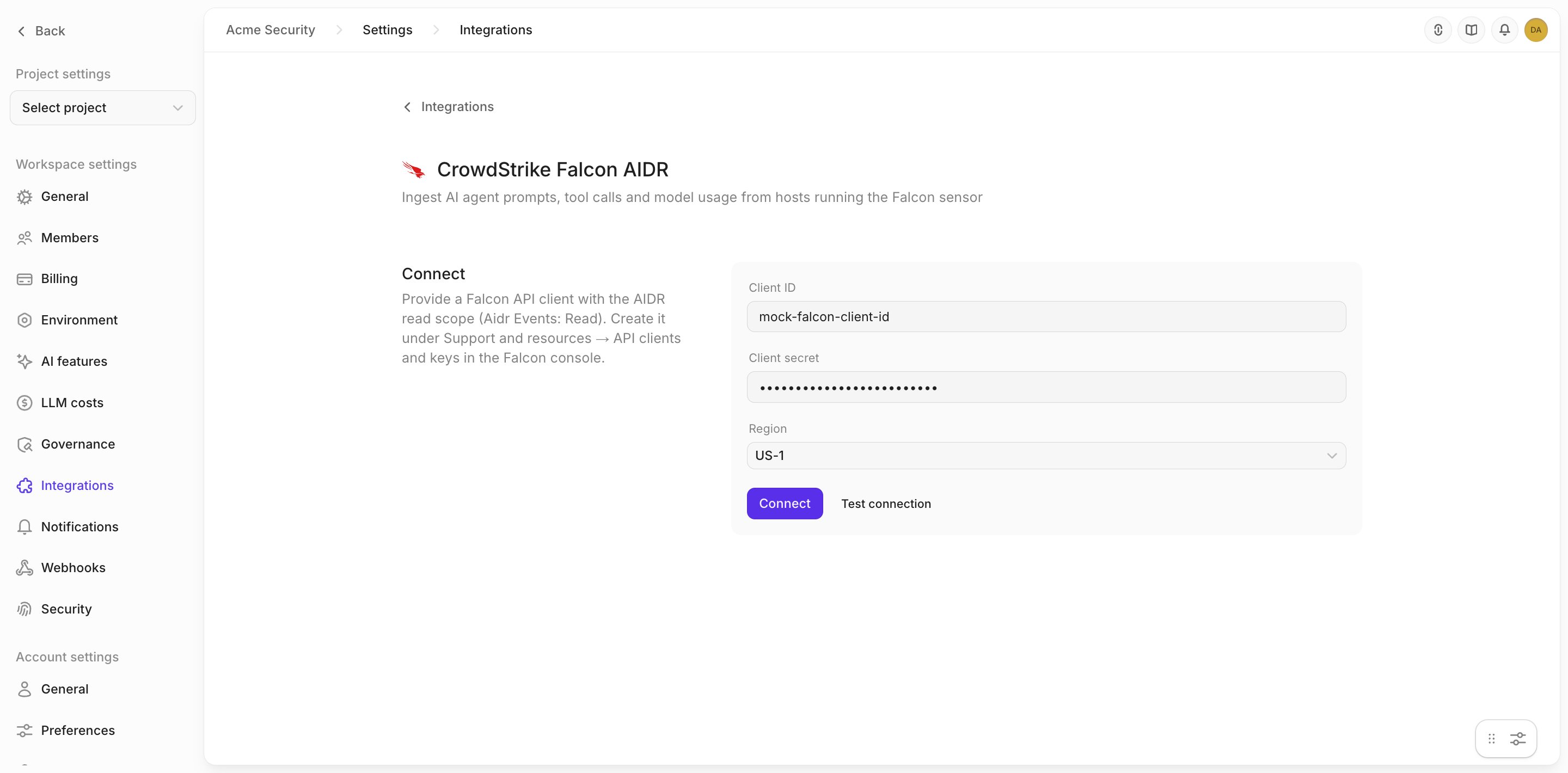 Openlayer checks the credentials against Falcon before storing them, and encrypts the secret at
rest. The stored secret is never returned by later requests. If Falcon rejects the credentials, the
form shows Falcon's reason and nothing is saved.
On success, the first sync starts and products appear shortly.
### Step 2: Review the sync settings
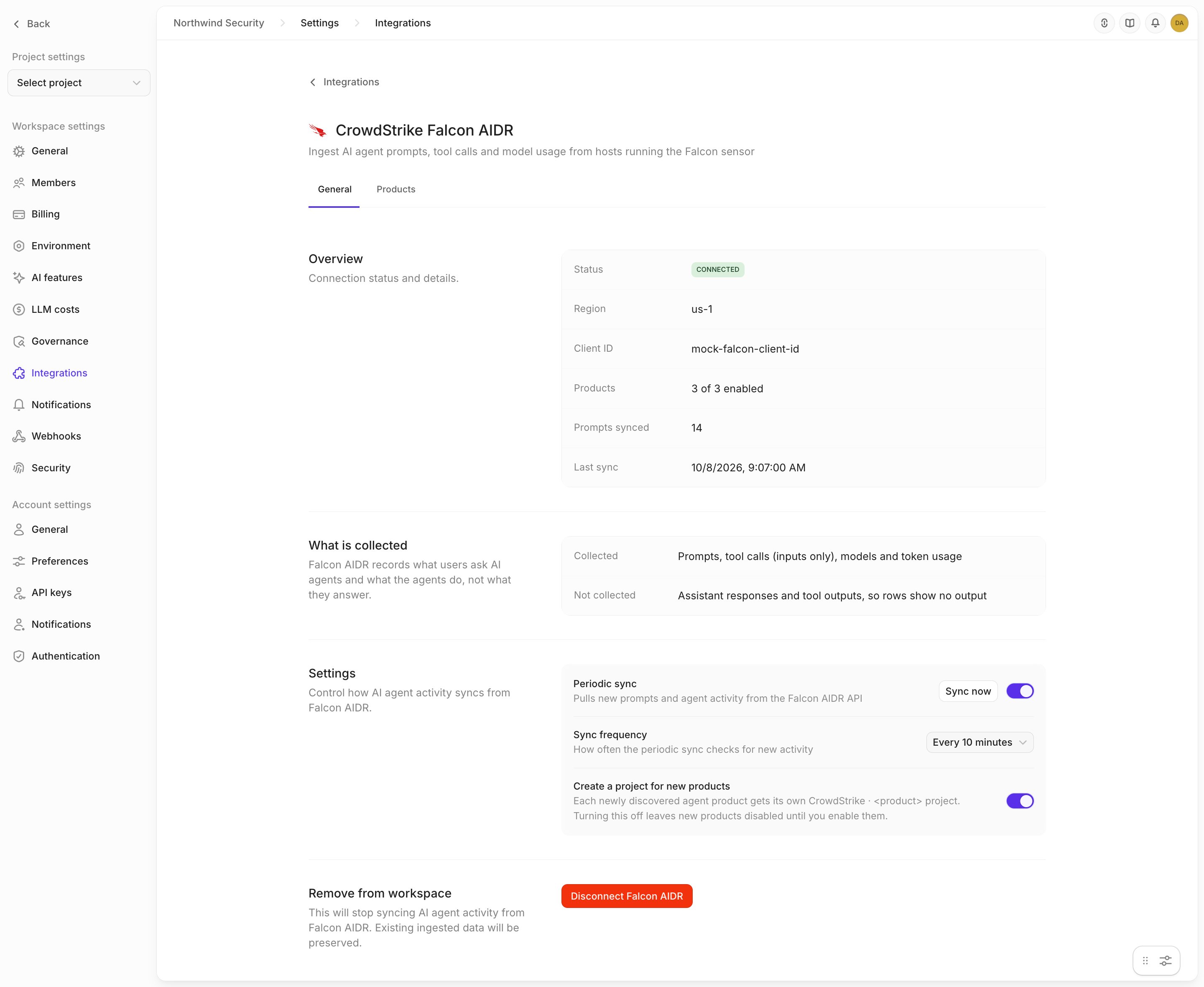
Open the **General** tab. Under **Settings**:
* **Periodic sync** pulls new prompts and agent activity. Turn it off to pause syncing without
disconnecting, or click **Sync now** to queue a sync immediately.
* **Sync frequency** is **Every 10 minutes**, **Every 30 minutes**, or **Every hour**.
* **Create a project for new products** is on by default. See
[Products and projects](#products-and-projects).
The **Overview** on the same tab reports the connection's status, how many products are enabled,
prompts synced, last sync, and the last error. A status of **no products enabled** means nothing
syncs: no product is enabled and new products are not enabled automatically.
Openlayer checks the credentials against Falcon before storing them, and encrypts the secret at
rest. The stored secret is never returned by later requests. If Falcon rejects the credentials, the
form shows Falcon's reason and nothing is saved.
On success, the first sync starts and products appear shortly.
### Step 2: Review the sync settings
Open the **General** tab. Under **Settings**:
* **Periodic sync** pulls new prompts and agent activity. Turn it off to pause syncing without
disconnecting, or click **Sync now** to queue a sync immediately.
* **Sync frequency** is **Every 10 minutes**, **Every 30 minutes**, or **Every hour**.
* **Create a project for new products** is on by default. See
[Products and projects](#products-and-projects).
The **Overview** on the same tab reports the connection's status, how many products are enabled,
prompts synced, last sync, and the last error. A status of **no products enabled** means nothing
syncs: no product is enabled and new products are not enabled automatically.
 ***
## Products and projects
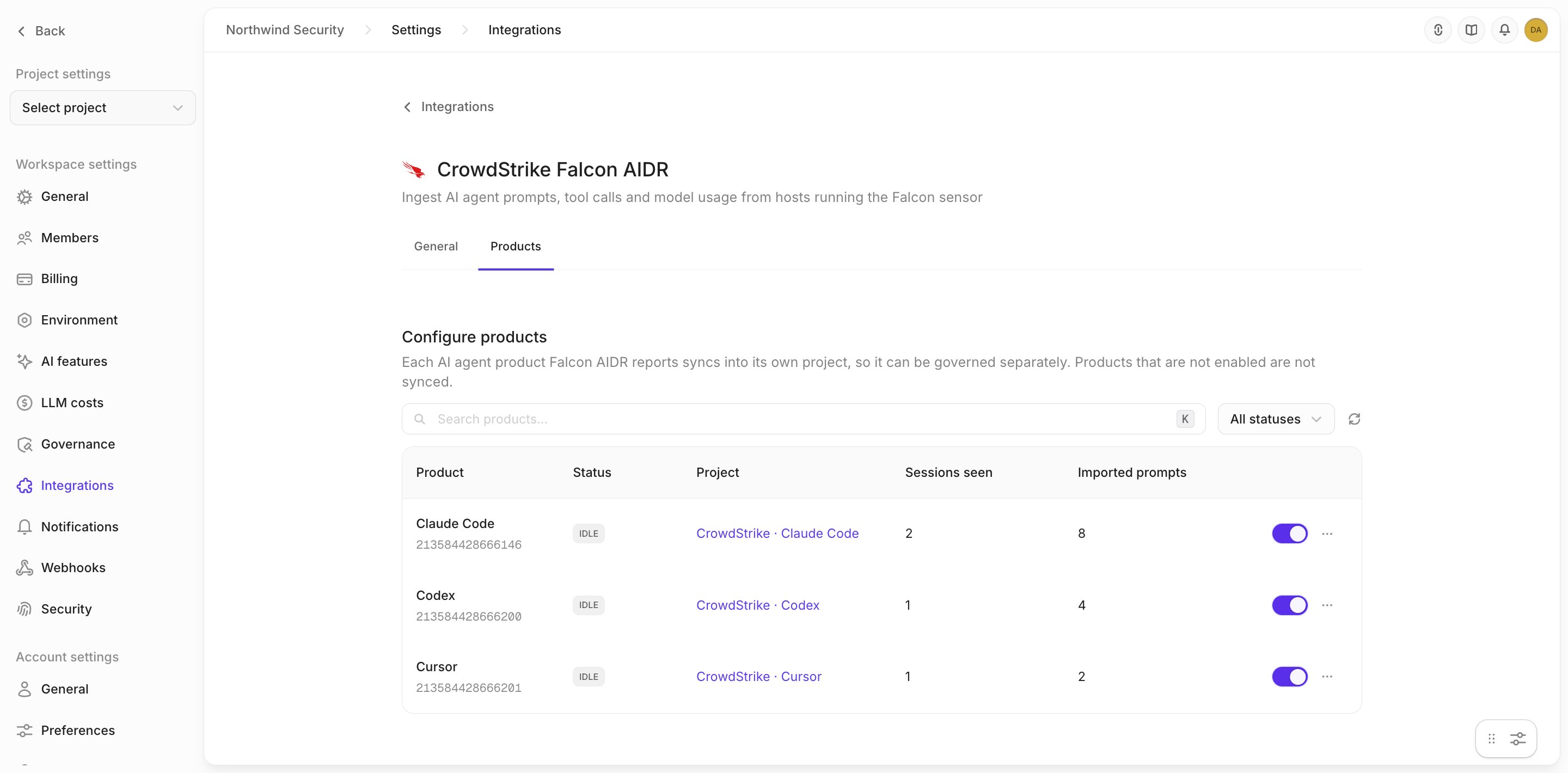
The **Products** tab lists every AI agent product Falcon AIDR has reported, with its name and Falcon's
numeric product tag (for example, Claude Code and `213584428666146`), status, project, sessions
seen, and imported prompts. A product
appears after a sync once Falcon reports activity for it.
***
## Products and projects
The **Products** tab lists every AI agent product Falcon AIDR has reported, with its name and Falcon's
numeric product tag (for example, Claude Code and `213584428666146`), status, project, sessions
seen, and imported prompts. A product
appears after a sync once Falcon reports activity for it.
 **Create a project for new products** decides what happens to a product the first time Openlayer
sees it:
* **On** (the default) — Openlayer enables the product into a new `CrowdStrike · ` project
and pipeline. If a plan limit or a missing permission blocks the project, the product stays
disabled and shows the reason.
* **Off** — the product stays **disabled** until an admin enables it.
To enable a product by hand, turn on its switch and choose **Create new project** or **Map to
existing project**. An existing pipeline must use Openlayer's default storage. Pipelines on a
BigQuery or Snowflake backend cannot receive these rows.
An enabled product's menu has **View project**, **Change project**, and **Disable**:
* **Change project** sends the product's new rows to another project and pipeline. Rows already
written stay in the previous project; they are not moved or copied.
* **Disable** stops syncing the product. Its project, pipeline, and existing data are kept.
* **Re-enabling** a disabled product opens on the project it already had, so it does not create a
second project. The product shows **backfilling** while Openlayer reads its sessions from the last
7 days, then returns to **idle** and syncs new activity.
Falcon AIDR keeps 7 days of activity, so that is as far back as any backfill
reaches. Activity from a product's disabled period that is older than 7 days
when you re-enable it is never imported.
***
## What lands in Openlayer
Falcon AIDR records what people ask AI agents and what the agents do, not what the agents answer.
It returns prompts, tool-call inputs, models, and token counts. It does not return assistant
responses or tool output, so every row's output is empty.
Openlayer writes two kinds of rows into the product's pipeline:
| Row | When it is written | Input | Trace |
| - | - | - | - |
| Prompt | As soon as Openlayer sees the prompt | The prompt text | None |
| Agent activity | Once the session has been idle for 30 minutes and its tool calls stop changing | `Agent activity: N tool calls, M agent runs` | One model-usage step per agent run, with the model and prompt and completion tokens, and one tool step per tool call, with its inputs (command, path, URL, query) |
**Create a project for new products** decides what happens to a product the first time Openlayer
sees it:
* **On** (the default) — Openlayer enables the product into a new `CrowdStrike · ` project
and pipeline. If a plan limit or a missing permission blocks the project, the product stays
disabled and shows the reason.
* **Off** — the product stays **disabled** until an admin enables it.
To enable a product by hand, turn on its switch and choose **Create new project** or **Map to
existing project**. An existing pipeline must use Openlayer's default storage. Pipelines on a
BigQuery or Snowflake backend cannot receive these rows.
An enabled product's menu has **View project**, **Change project**, and **Disable**:
* **Change project** sends the product's new rows to another project and pipeline. Rows already
written stay in the previous project; they are not moved or copied.
* **Disable** stops syncing the product. Its project, pipeline, and existing data are kept.
* **Re-enabling** a disabled product opens on the project it already had, so it does not create a
second project. The product shows **backfilling** while Openlayer reads its sessions from the last
7 days, then returns to **idle** and syncs new activity.
Falcon AIDR keeps 7 days of activity, so that is as far back as any backfill
reaches. Activity from a product's disabled period that is older than 7 days
when you re-enable it is never imported.
***
## What lands in Openlayer
Falcon AIDR records what people ask AI agents and what the agents do, not what the agents answer.
It returns prompts, tool-call inputs, models, and token counts. It does not return assistant
responses or tool output, so every row's output is empty.
Openlayer writes two kinds of rows into the product's pipeline:
| Row | When it is written | Input | Trace |
| - | - | - | - |
| Prompt | As soon as Openlayer sees the prompt | The prompt text | None |
| Agent activity | Once the session has been idle for 30 minutes and its tool calls stop changing | `Agent activity: N tool calls, M agent runs` | One model-usage step per agent run, with the model and prompt and completion tokens, and one tool step per tool call, with its inputs (command, path, URL, query) |
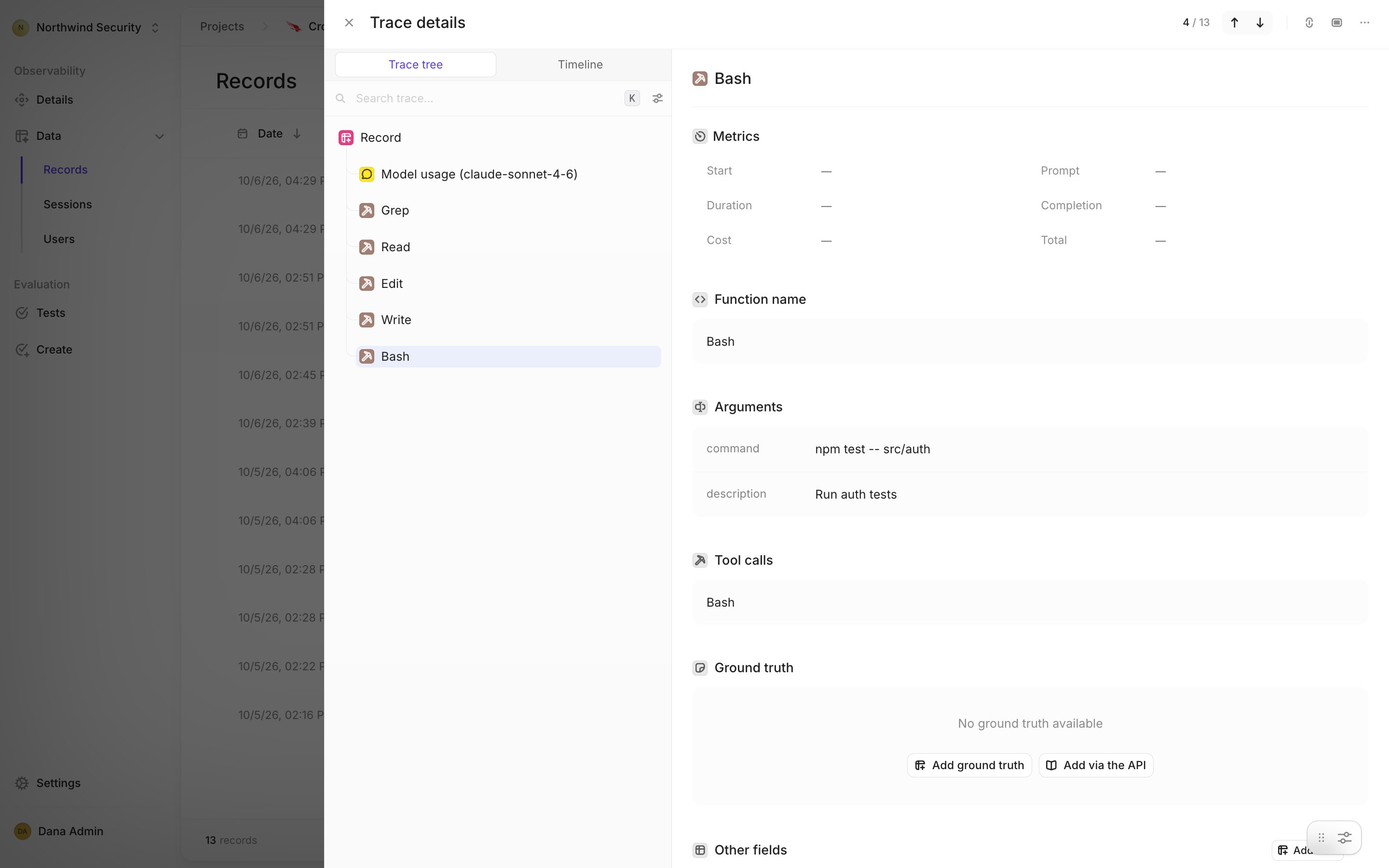
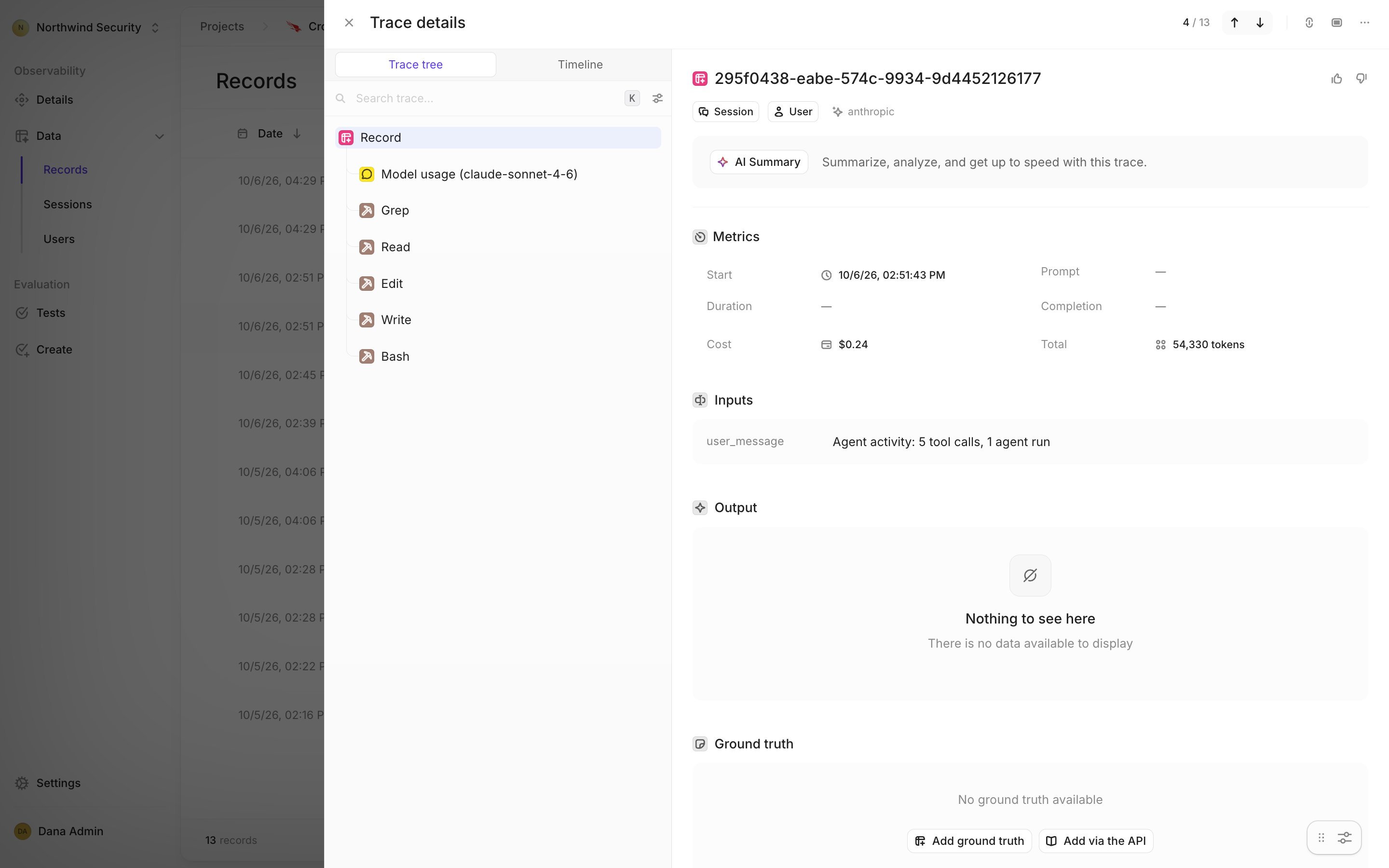 Selecting a tool step shows the inputs Falcon captured. Here, the Bash command and the agent's stated purpose:
 A few behaviors are not obvious from the trace:
* **Tool calls are not attached to prompts.** Falcon gives tool calls no timestamp, so Openlayer
cannot tell which prompt caused them. They are grouped into the session's activity row instead.
* **Resumed sessions get a follow-up row.** If a session picks up again after its activity row is
written, the new calls land in another **Agent activity** row. Rows are never rewritten.
* **Sessions are preserved.** Each AIDR agent session becomes one Openlayer session.
* **Users are attributed only when unambiguous.** The user ID is the OS user who ran the agent, and
only when exactly one OS user ran agents on that host. Otherwise the user is **anonymous**.
* **Cost is estimated.** Openlayer estimates cost on the model-usage step from the model and token
counts.
* **Long values are cut.** A prompt or tool input longer than 50,000 characters ends with
`… [truncated]`.
Each row also carries these columns:
| Column | Value |
| - | - |
| `aidr_product` | Falcon's product name, such as `CLAUDE_CODE` |
| `aidr_host_id` | The Falcon host the agent ran on |
| `aidr_record_type` | `prompt` or `activity` |
| `aidr_content` | What the row holds: `prompt_only`, or `tool_inputs_and_usage` for activity rows |
***
## Evaluating the ingested data
Once rows are flowing, evaluate AI agent usage the same way you evaluate application traffic:
* [Create tests](/tests/overview) on prompts and token usage. Tests that score a response have
nothing to score, because outputs are empty.
* Detect [PII](/tests/catalog/contains-p-i-i) in the prompts people send to coding agents
* Use [governance frameworks](/governance/overview) to evidence AI-usage controls with real traffic
***
## Disconnecting
On the **General** tab, click **Disconnect Falcon AIDR** and confirm **Remove Falcon AIDR**.
Disconnecting stops syncing and deletes the stored API client. Projects, pipelines, and data already
ingested are kept. Delete the API client in the Falcon console afterwards if nothing else uses it.
***
## Troubleshooting
| Symptom | Likely cause | Fix |
| - | - | - |
| **Test connection** or **Connect** fails with **401** | The client ID or secret is wrong, or the API client was deleted | Re-enter both values, or create an API client and use its credentials. A failed test saves nothing |
| **Test connection** or **Connect** fails with **403** | The API client lacks **Aidr Events: Read**, or AIDR API access is off for the tenant | Add the scope to the API client, and make sure AIDR API access is turned on for the tenant |
| Connect fails although the credentials are right | The region does not match your tenant | Choose the region your Falcon console runs on |
| Every row's output is empty | Falcon AIDR does not return assistant responses or tool output | Expected. Prompts, tool inputs, models, and tokens are what AIDR provides |
| The user is **anonymous** | More than one OS user ran agents on that host, or Falcon did not report one | Expected. Openlayer attributes a user only when exactly one OS user ran agents on the host |
| A prompt appears but its tool calls and tokens do not | The session has not been idle for 30 minutes yet | Expected. The **Agent activity** row follows once the session settles |
| A product does not sync | The product is disabled, or **Periodic sync** is off | Turn on the product's switch, or turn periodic sync back on. Disabled products are skipped |
| A new product stays disabled | **Create a project for new products** is off, or a plan limit or permission blocked the project | Enable the product by hand into a new or existing project |
| A re-enabled product is missing older activity | That activity is older than AIDR's 7-day window | Expected. Backfill reaches back 7 days at most |
| A member cannot enable, disable, or move a product, or sync now | These actions are admin-only | Ask a workspace admin |
This documentation is built and hosted on [Mintlify](https://mintlify.com), a developer documentation platform.
A few behaviors are not obvious from the trace:
* **Tool calls are not attached to prompts.** Falcon gives tool calls no timestamp, so Openlayer
cannot tell which prompt caused them. They are grouped into the session's activity row instead.
* **Resumed sessions get a follow-up row.** If a session picks up again after its activity row is
written, the new calls land in another **Agent activity** row. Rows are never rewritten.
* **Sessions are preserved.** Each AIDR agent session becomes one Openlayer session.
* **Users are attributed only when unambiguous.** The user ID is the OS user who ran the agent, and
only when exactly one OS user ran agents on that host. Otherwise the user is **anonymous**.
* **Cost is estimated.** Openlayer estimates cost on the model-usage step from the model and token
counts.
* **Long values are cut.** A prompt or tool input longer than 50,000 characters ends with
`… [truncated]`.
Each row also carries these columns:
| Column | Value |
| - | - |
| `aidr_product` | Falcon's product name, such as `CLAUDE_CODE` |
| `aidr_host_id` | The Falcon host the agent ran on |
| `aidr_record_type` | `prompt` or `activity` |
| `aidr_content` | What the row holds: `prompt_only`, or `tool_inputs_and_usage` for activity rows |
***
## Evaluating the ingested data
Once rows are flowing, evaluate AI agent usage the same way you evaluate application traffic:
* [Create tests](/tests/overview) on prompts and token usage. Tests that score a response have
nothing to score, because outputs are empty.
* Detect [PII](/tests/catalog/contains-p-i-i) in the prompts people send to coding agents
* Use [governance frameworks](/governance/overview) to evidence AI-usage controls with real traffic
***
## Disconnecting
On the **General** tab, click **Disconnect Falcon AIDR** and confirm **Remove Falcon AIDR**.
Disconnecting stops syncing and deletes the stored API client. Projects, pipelines, and data already
ingested are kept. Delete the API client in the Falcon console afterwards if nothing else uses it.
***
## Troubleshooting
| Symptom | Likely cause | Fix |
| - | - | - |
| **Test connection** or **Connect** fails with **401** | The client ID or secret is wrong, or the API client was deleted | Re-enter both values, or create an API client and use its credentials. A failed test saves nothing |
| **Test connection** or **Connect** fails with **403** | The API client lacks **Aidr Events: Read**, or AIDR API access is off for the tenant | Add the scope to the API client, and make sure AIDR API access is turned on for the tenant |
| Connect fails although the credentials are right | The region does not match your tenant | Choose the region your Falcon console runs on |
| Every row's output is empty | Falcon AIDR does not return assistant responses or tool output | Expected. Prompts, tool inputs, models, and tokens are what AIDR provides |
| The user is **anonymous** | More than one OS user ran agents on that host, or Falcon did not report one | Expected. Openlayer attributes a user only when exactly one OS user ran agents on the host |
| A prompt appears but its tool calls and tokens do not | The session has not been idle for 30 minutes yet | Expected. The **Agent activity** row follows once the session settles |
| A product does not sync | The product is disabled, or **Periodic sync** is off | Turn on the product's switch, or turn periodic sync back on. Disabled products are skipped |
| A new product stays disabled | **Create a project for new products** is off, or a plan limit or permission blocked the project | Enable the product by hand into a new or existing project |
| A re-enabled product is missing older activity | That activity is older than AIDR's 7-day window | Expected. Backfill reaches back 7 days at most |
| A member cannot enable, disable, or move a product, or sync now | These actions are admin-only | Ask a workspace admin |
This documentation is built and hosted on [Mintlify](https://mintlify.com), a developer documentation platform.