> ## Documentation Index
> Fetch the complete documentation index at: https://docs.openlayer.com/llms.txt
> Use this file to discover all available pages before exploring further.
# ElevenLabs Agents
> Monitor and evaluate your ElevenAgents voice agents in Openlayer
 Openlayer integrates with [ElevenLabs Agents](https://elevenlabs.io/agents)
(ElevenAgents) to help you monitor, evaluate, and improve your voice agents.
The integration connects to the ElevenLabs API with an API key you provide,
automatically discovers your agents, and periodically syncs every completed
conversation — including the **call recording**, ElevenLabs' own **call
analysis**, the full **transcript**, per-turn **LLM usage and cost**, and tool
calls — so your voice agents get the same tests, metrics, and tracing as any
other pipeline in Openlayer.
## How it works
Openlayer connects to your ElevenLabs account and automatically:
1. **Discovers your agents**: finds every ElevenAgents agent visible to your
API key, on connect and on each sync.
2. **Creates projects and data sources**: each enabled agent gets its own
Openlayer project and inference pipeline, with no manual setup required.
3. **Syncs conversations**: periodically pulls new conversations. Each agent
turn becomes a row (so per-response tests work out of the box), and the
turns of one call are grouped into a **session**.
4. **Attaches the recording**: the whole-call audio and ElevenLabs' call
analysis are attached to the session, powering the session page's
[Audio view](#the-audio-view).
The integration is **pull-based**: Openlayer reaches out to the ElevenLabs
API, so it never requires inbound access or webhooks. Only **completed**
conversations are ingested — calls still in progress are picked up on a later
sync once they finish, no matter how long they run. Re-syncing the same
conversation is idempotent, so overlapping syncs and backfills never create
duplicates.
All access is **read-only**. Openlayer lists conversations, reads their
transcripts and analysis, and downloads recordings. It never modifies your
ElevenLabs agents or data.
## Prerequisites
One thing: an **ElevenLabs API key**.
1. In ElevenLabs, go to your profile → **API keys**.
2. Create a key. If you restrict its permissions, it needs read access to
**Conversational AI** (conversations and audio).
3. Copy the key — you'll paste it into Openlayer below.
Openlayer stores the key encrypted and uses it only for the syncs described
above.
## Setup guide
### Step 1: Navigate to the integration
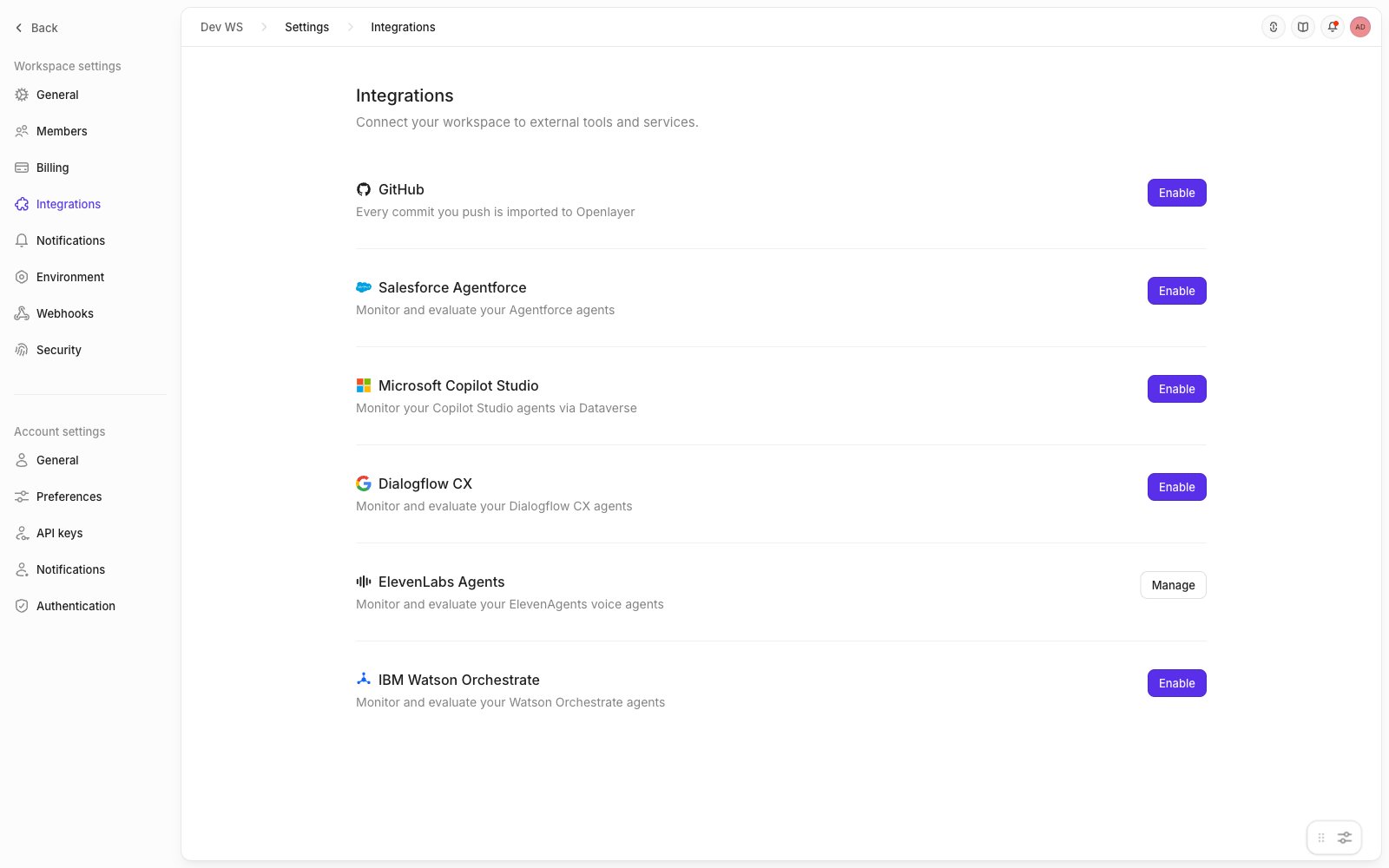
In your Openlayer workspace, go to **Settings** → **Integrations** and find
the **ElevenLabs Agents** card. Click **Enable**.
Openlayer integrates with [ElevenLabs Agents](https://elevenlabs.io/agents)
(ElevenAgents) to help you monitor, evaluate, and improve your voice agents.
The integration connects to the ElevenLabs API with an API key you provide,
automatically discovers your agents, and periodically syncs every completed
conversation — including the **call recording**, ElevenLabs' own **call
analysis**, the full **transcript**, per-turn **LLM usage and cost**, and tool
calls — so your voice agents get the same tests, metrics, and tracing as any
other pipeline in Openlayer.
## How it works
Openlayer connects to your ElevenLabs account and automatically:
1. **Discovers your agents**: finds every ElevenAgents agent visible to your
API key, on connect and on each sync.
2. **Creates projects and data sources**: each enabled agent gets its own
Openlayer project and inference pipeline, with no manual setup required.
3. **Syncs conversations**: periodically pulls new conversations. Each agent
turn becomes a row (so per-response tests work out of the box), and the
turns of one call are grouped into a **session**.
4. **Attaches the recording**: the whole-call audio and ElevenLabs' call
analysis are attached to the session, powering the session page's
[Audio view](#the-audio-view).
The integration is **pull-based**: Openlayer reaches out to the ElevenLabs
API, so it never requires inbound access or webhooks. Only **completed**
conversations are ingested — calls still in progress are picked up on a later
sync once they finish, no matter how long they run. Re-syncing the same
conversation is idempotent, so overlapping syncs and backfills never create
duplicates.
All access is **read-only**. Openlayer lists conversations, reads their
transcripts and analysis, and downloads recordings. It never modifies your
ElevenLabs agents or data.
## Prerequisites
One thing: an **ElevenLabs API key**.
1. In ElevenLabs, go to your profile → **API keys**.
2. Create a key. If you restrict its permissions, it needs read access to
**Conversational AI** (conversations and audio).
3. Copy the key — you'll paste it into Openlayer below.
Openlayer stores the key encrypted and uses it only for the syncs described
above.
## Setup guide
### Step 1: Navigate to the integration
In your Openlayer workspace, go to **Settings** → **Integrations** and find
the **ElevenLabs Agents** card. Click **Enable**.
 ### Step 2: Connect your account
Paste your ElevenLabs API key into the connect form. Click **Test
connection** to verify the key before saving, then **Connect**.
On connect, Openlayer immediately discovers every agent visible to the key
and lists them in the **Agents** section.
### Step 3: Configure sync settings
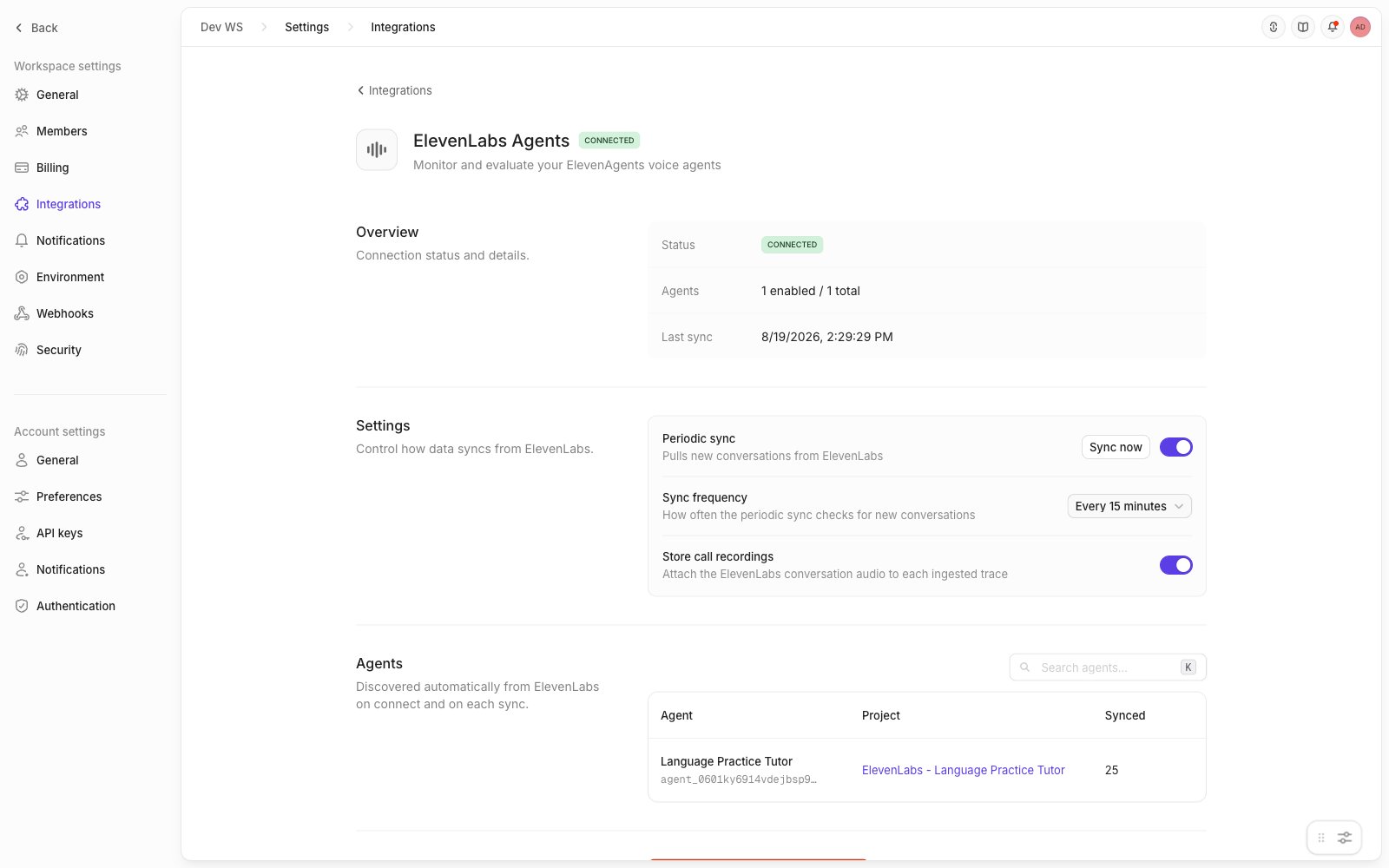
Once connected, control how data flows:
* **Periodic sync**: toggle automatic syncing on or off. You can also click
**Sync now** at any time.
* **Sync frequency**: every 15 minutes, every 30 minutes, or hourly.
* **Store call recordings**: when on (the default), the conversation audio is
attached to each session. Turn it off for transcript-only ingestion — see
[Audio storage and privacy](#audio-storage-and-privacy).
### Step 2: Connect your account
Paste your ElevenLabs API key into the connect form. Click **Test
connection** to verify the key before saving, then **Connect**.
On connect, Openlayer immediately discovers every agent visible to the key
and lists them in the **Agents** section.
### Step 3: Configure sync settings
Once connected, control how data flows:
* **Periodic sync**: toggle automatic syncing on or off. You can also click
**Sync now** at any time.
* **Sync frequency**: every 15 minutes, every 30 minutes, or hourly.
* **Store call recordings**: when on (the default), the conversation audio is
attached to each session. Turn it off for transcript-only ingestion — see
[Audio storage and privacy](#audio-storage-and-privacy).
 ### Step 4: Enable agents
Under **Agents**, click **Enable** on each agent you want to monitor. The
Enable dialog lets you choose between:
* **Create new project** (default): Openlayer creates a project named
`ElevenLabs - ` with a default inference pipeline linked to the
agent.
* **Map to existing project**: route the agent's conversations into a project
you already have.
Enabling queues an immediate sync, so data starts flowing right away. The
agents table shows each agent's linked project and how many conversations
have been synced.
## Monitoring in Openlayer
Every synced conversation appears in the agent's project as a **session**
whose rows are the agent's turns. Each turn carries the user's utterance, the
agent's reply, latency, token usage, per-turn LLM cost, and any tool calls or
knowledge-base retrievals as trace steps.
### The Audio view
Sessions with a recording open in the **Audio view**:
### Step 4: Enable agents
Under **Agents**, click **Enable** on each agent you want to monitor. The
Enable dialog lets you choose between:
* **Create new project** (default): Openlayer creates a project named
`ElevenLabs - ` with a default inference pipeline linked to the
agent.
* **Map to existing project**: route the agent's conversations into a project
you already have.
Enabling queues an immediate sync, so data starts flowing right away. The
agents table shows each agent's linked project and how many conversations
have been synced.
## Monitoring in Openlayer
Every synced conversation appears in the agent's project as a **session**
whose rows are the agent's turns. Each turn carries the user's utterance, the
agent's reply, latency, token usage, per-turn LLM cost, and any tool calls or
knowledge-base retrievals as trace steps.
### The Audio view
Sessions with a recording open in the **Audio view**:
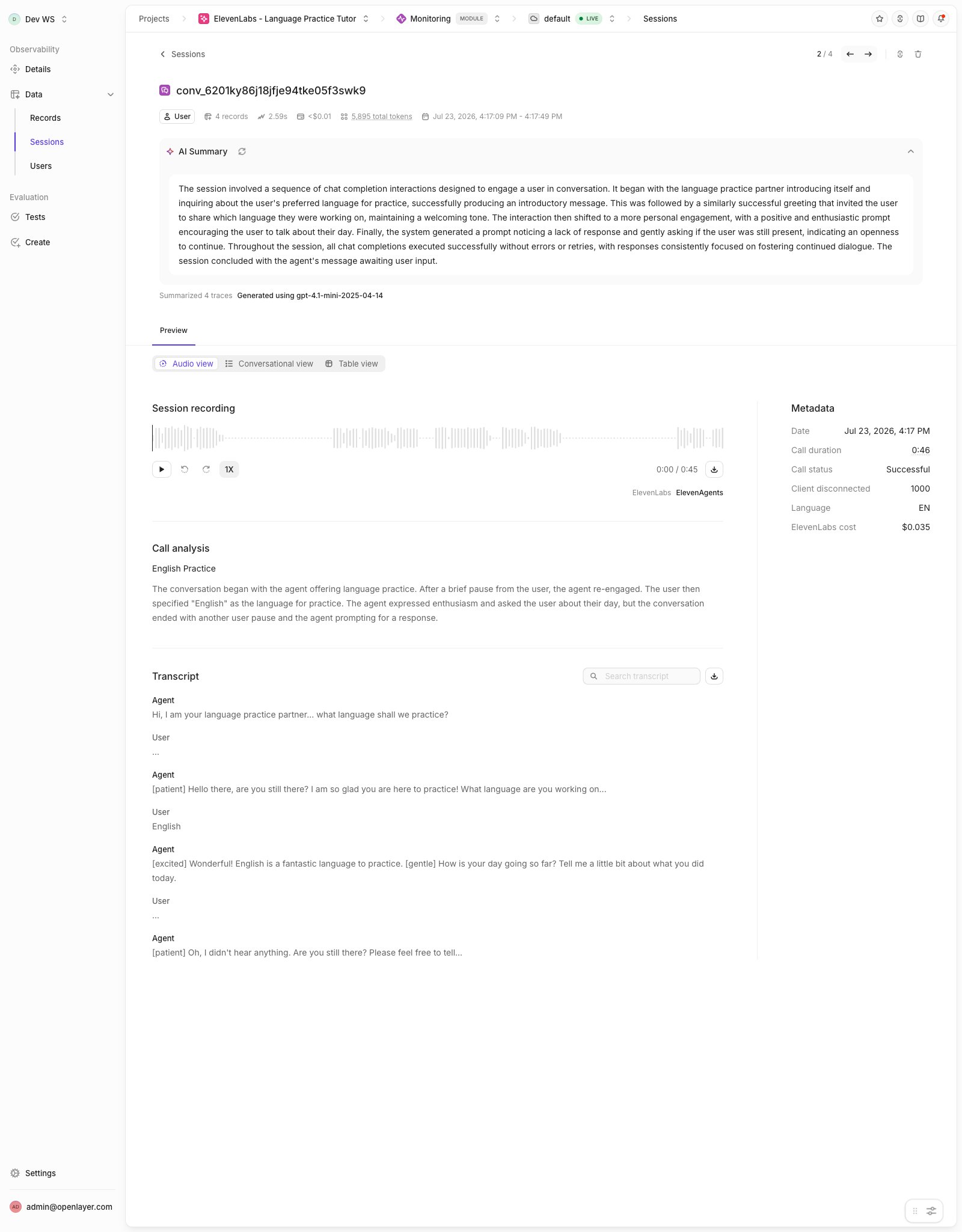 * **Session recording**: play the whole call on a waveform player with
seeking, ±10s skip, playback speeds, and download.
* **Call analysis**: ElevenLabs' own summary and evaluation of the call.
* **Transcript**: the full conversation with per-speaker timestamps, search,
and plain-text download.
* **Metadata**: the call's facts — date, duration, status, termination
reason, language, and ElevenLabs cost.
The **Conversational** and **Table** views show the same session as
turn-by-turn traces, and every Openlayer feature — tests, metrics, AI
summaries — works on voice sessions like any other data.
You'll see two costs. The **ElevenLabs cost** in the Metadata panel is
ElevenLabs' billed price for the whole call (speech recognition, voice
synthesis, platform, and LLM). The cost in the session header is Openlayer's
standard **LLM-only** cost computed from token usage — the same metric used
for every other pipeline, so it stays comparable across integrations. The
call's duration and its recording's length can also differ slightly: a call
stays open after the last audio.
### Backfill historical data
To import conversations that occurred before the integration was connected
(or before an agent was enabled), open the agent's options menu and click
**Backfill**. Choose:
* **All available history**: re-sync every conversation ElevenLabs still
retains for the agent.
* **Custom start date**: sync conversations from a specific date forward.
Duplicates are skipped automatically, so backfills are safe to run at any
time.
### Run evaluations
With conversations flowing in, you can:
* [Create tests](/tests/overview) to score response quality per turn or per
session
* Track safety and compliance metrics on transcripts
* Monitor latency, token-usage, and cost trends
* Compare agent behavior across versions
## Audio storage and privacy
Transcripts pass through your workspace's standard PII redaction before they
are stored, including ElevenLabs' free-text call analysis. **Audio cannot be
redacted**: recordings are stored exactly as ElevenLabs provides them.
If storing raw call audio doesn't fit your data policies, turn **Store call
recordings** off in the integration settings — conversations then ingest with
transcripts and analysis only, and the Audio view simply omits the player.
Data imported into Openlayer is retained until you delete it in Openlayer;
deleting a conversation on the ElevenLabs side does not remove the copy
already ingested.
## Disconnecting
To disconnect the ElevenLabs integration:
1. Go to **Settings** → **Integrations** → **ElevenLabs Agents**
2. Click **Remove ElevenLabs from workspace**
This stops all syncs and deletes the connection and discovered-agent records.
Existing data already imported into Openlayer (projects, pipelines, sessions,
recordings) is preserved.
## Troubleshooting
| Symptom | Likely cause | Fix |
| ------------------------------------------------------ | ---------------------------------------------------------------------------------------------------------------- | --------------------------------------------------------------------------------------------------------------------------- |
| Test connection fails | Key is invalid, revoked, or lacks Conversational AI access | Create a new key with Conversational AI read access and reconnect |
| Connection shows an authentication error after working | The API key was rotated or revoked in ElevenLabs | Update the key in the integration settings; syncing resumes on the next run |
| **0 agents discovered** | The key belongs to a workspace with no ElevenAgents agents | Verify the agent exists under the same ElevenLabs account, then click **Refresh agents** |
| A call doesn't appear after finishing | ElevenLabs is still processing it — only **completed** conversations ingest | Wait for the next periodic sync, or click **Sync now** |
| Recording missing on a session | The call produced no audio, audio was deleted in ElevenLabs, or **Store call recordings** was off when it synced | Check the conversation in ElevenLabs; re-sync via **Backfill** after enabling recordings |
| Per-turn cost is \$0 for some turns | The agent uses a custom or unrecognized LLM | Expected for unknown models. ElevenLabs' own billed price is always available as **ElevenLabs cost** on the session |
| A conversation has fewer turns than in ElevenLabs | Turns where the agent produced no spoken output are skipped | Expected. Aborted or unspoken generations don't become rows; their cost is still reflected in the session's ElevenLabs cost |
* **Session recording**: play the whole call on a waveform player with
seeking, ±10s skip, playback speeds, and download.
* **Call analysis**: ElevenLabs' own summary and evaluation of the call.
* **Transcript**: the full conversation with per-speaker timestamps, search,
and plain-text download.
* **Metadata**: the call's facts — date, duration, status, termination
reason, language, and ElevenLabs cost.
The **Conversational** and **Table** views show the same session as
turn-by-turn traces, and every Openlayer feature — tests, metrics, AI
summaries — works on voice sessions like any other data.
You'll see two costs. The **ElevenLabs cost** in the Metadata panel is
ElevenLabs' billed price for the whole call (speech recognition, voice
synthesis, platform, and LLM). The cost in the session header is Openlayer's
standard **LLM-only** cost computed from token usage — the same metric used
for every other pipeline, so it stays comparable across integrations. The
call's duration and its recording's length can also differ slightly: a call
stays open after the last audio.
### Backfill historical data
To import conversations that occurred before the integration was connected
(or before an agent was enabled), open the agent's options menu and click
**Backfill**. Choose:
* **All available history**: re-sync every conversation ElevenLabs still
retains for the agent.
* **Custom start date**: sync conversations from a specific date forward.
Duplicates are skipped automatically, so backfills are safe to run at any
time.
### Run evaluations
With conversations flowing in, you can:
* [Create tests](/tests/overview) to score response quality per turn or per
session
* Track safety and compliance metrics on transcripts
* Monitor latency, token-usage, and cost trends
* Compare agent behavior across versions
## Audio storage and privacy
Transcripts pass through your workspace's standard PII redaction before they
are stored, including ElevenLabs' free-text call analysis. **Audio cannot be
redacted**: recordings are stored exactly as ElevenLabs provides them.
If storing raw call audio doesn't fit your data policies, turn **Store call
recordings** off in the integration settings — conversations then ingest with
transcripts and analysis only, and the Audio view simply omits the player.
Data imported into Openlayer is retained until you delete it in Openlayer;
deleting a conversation on the ElevenLabs side does not remove the copy
already ingested.
## Disconnecting
To disconnect the ElevenLabs integration:
1. Go to **Settings** → **Integrations** → **ElevenLabs Agents**
2. Click **Remove ElevenLabs from workspace**
This stops all syncs and deletes the connection and discovered-agent records.
Existing data already imported into Openlayer (projects, pipelines, sessions,
recordings) is preserved.
## Troubleshooting
| Symptom | Likely cause | Fix |
| ------------------------------------------------------ | ---------------------------------------------------------------------------------------------------------------- | --------------------------------------------------------------------------------------------------------------------------- |
| Test connection fails | Key is invalid, revoked, or lacks Conversational AI access | Create a new key with Conversational AI read access and reconnect |
| Connection shows an authentication error after working | The API key was rotated or revoked in ElevenLabs | Update the key in the integration settings; syncing resumes on the next run |
| **0 agents discovered** | The key belongs to a workspace with no ElevenAgents agents | Verify the agent exists under the same ElevenLabs account, then click **Refresh agents** |
| A call doesn't appear after finishing | ElevenLabs is still processing it — only **completed** conversations ingest | Wait for the next periodic sync, or click **Sync now** |
| Recording missing on a session | The call produced no audio, audio was deleted in ElevenLabs, or **Store call recordings** was off when it synced | Check the conversation in ElevenLabs; re-sync via **Backfill** after enabling recordings |
| Per-turn cost is \$0 for some turns | The agent uses a custom or unrecognized LLM | Expected for unknown models. ElevenLabs' own billed price is always available as **ElevenLabs cost** on the session |
| A conversation has fewer turns than in ElevenLabs | Turns where the agent produced no spoken output are skipped | Expected. Aborted or unspoken generations don't become rows; their cost is still reflected in the session's ElevenLabs cost |