> ## Documentation Index
> Fetch the complete documentation index at: https://docs.openlayer.com/llms.txt
> Use this file to discover all available pages before exploring further.
# LangChain
> Learn how to evaluate LangChain applications with Openlayer
 Openlayer integrates with Langchain using [Langchain Callbacks](https://python.langchain.com/v0.1/docs/modules/callbacks/). Therfore,
Openlayer automatically traces every run of your
Langchain applications.
This allows you to set up tests, log, and analyze your LangChain
application with minimal integration efforts.
Want to integrate with **LangGraph**? Check out the [LangGraph
integration](/integrations/langgraph) page.
## Evaluating LangChain applications
You can set up Openlayer tests to evaluate your LangChain applications
in [monitoring](/monitoring/overview) and [development](/development/overview).
### Monitoring
To use the [monitoring mode](/monitoring/overview), you must instrument your code to publish
the requests your AI system receives to the Openlayer platform.
To set it up, you must follow the steps in the code snippet below:
```python Python theme={null}
# 1. Set the environment variables
import os
os.environ["OPENAI_API_KEY"] = "YOUR_OPENAI_API_KEY_HERE"
os.environ["OPENLAYER_API_KEY"] = "YOUR_OPENLAYER_API_KEY_HERE"
os.environ["OPENLAYER_INFERENCE_PIPELINE_ID"] = "YOUR_OPENLAYER_INFERENCE_PIPELINE_ID_HERE"
# 2. Instantiate the `OpenlayerHandler`
from openlayer.lib.integrations import langchain_callback
openlayer_handler = langchain_callback.OpenlayerHandler()
# 3. Pass the handler to your LLM/chain invocations
from langchain_openai import ChatOpenAI
chat = ChatOpenAI(max_tokens=25, callbacks=[openlayer_handler])
chat.invoke("What's the meaning of life?")
```
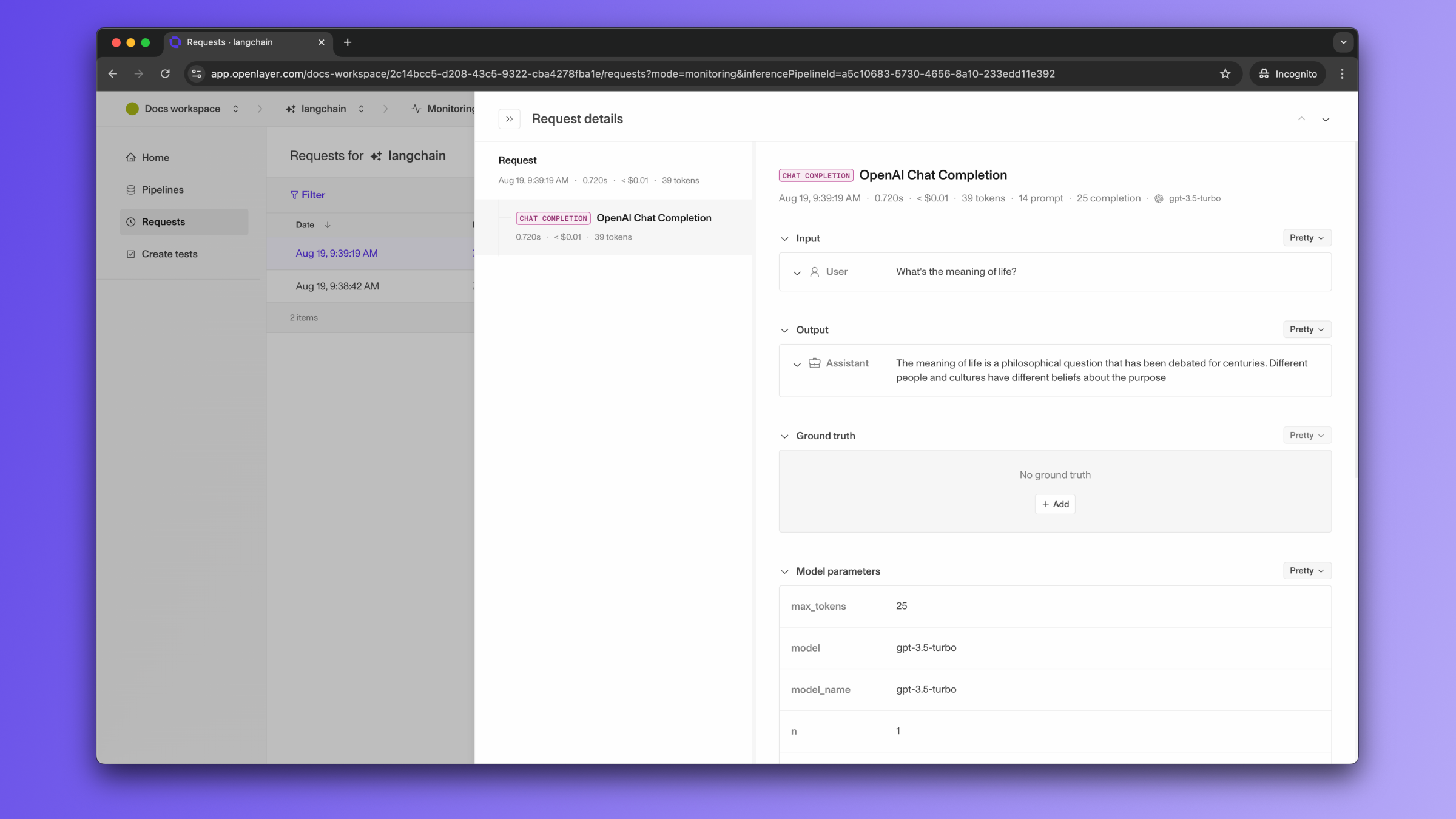
Once the code is instrumented, all your LangChain LLM/chain invocations are automatically published to Openlayer,
along with metadata, such as latency, number of tokens, cost estimate, and more.
If you navigate to the "Data" page of your Openlayer data source, you can see
the traces for each request.
Openlayer integrates with Langchain using [Langchain Callbacks](https://python.langchain.com/v0.1/docs/modules/callbacks/). Therfore,
Openlayer automatically traces every run of your
Langchain applications.
This allows you to set up tests, log, and analyze your LangChain
application with minimal integration efforts.
Want to integrate with **LangGraph**? Check out the [LangGraph
integration](/integrations/langgraph) page.
## Evaluating LangChain applications
You can set up Openlayer tests to evaluate your LangChain applications
in [monitoring](/monitoring/overview) and [development](/development/overview).
### Monitoring
To use the [monitoring mode](/monitoring/overview), you must instrument your code to publish
the requests your AI system receives to the Openlayer platform.
To set it up, you must follow the steps in the code snippet below:
```python Python theme={null}
# 1. Set the environment variables
import os
os.environ["OPENAI_API_KEY"] = "YOUR_OPENAI_API_KEY_HERE"
os.environ["OPENLAYER_API_KEY"] = "YOUR_OPENLAYER_API_KEY_HERE"
os.environ["OPENLAYER_INFERENCE_PIPELINE_ID"] = "YOUR_OPENLAYER_INFERENCE_PIPELINE_ID_HERE"
# 2. Instantiate the `OpenlayerHandler`
from openlayer.lib.integrations import langchain_callback
openlayer_handler = langchain_callback.OpenlayerHandler()
# 3. Pass the handler to your LLM/chain invocations
from langchain_openai import ChatOpenAI
chat = ChatOpenAI(max_tokens=25, callbacks=[openlayer_handler])
chat.invoke("What's the meaning of life?")
```
Once the code is instrumented, all your LangChain LLM/chain invocations are automatically published to Openlayer,
along with metadata, such as latency, number of tokens, cost estimate, and more.
If you navigate to the "Data" page of your Openlayer data source, you can see
the traces for each request.
 If the LangChain LLM/chain invocations are just one of the steps of your AI
system, you can use the code snippets above together with
[tracing](/monitoring/tracing). In this case, your LangChain LLM/chain
invocations get added as a step of a larger trace. Refer to the [Tracing
guide](/monitoring/tracing) for details.
After your AI system requests are continuously published and logged by Openlayer, you can
[create tests](/tests/overview) that run at a regular cadence on top of them.
Refer to the [Monitoring overview](/monitoring/overview), for details on Openlayer's
monitoring mode, to the [Publishing data guide](/monitoring/publishing-data), for more
information on setting it up, or to the [Tracing guide](/monitoring/tracing), to
understand how to trace more complex systems.
### Development
You can use the [LangChain
template](https://github.com/openlayer-ai/templates/tree/main/python/llms/langchain)
to check out how a sample app fully set up with Openlayer looks like.
In [development mode](/development/overview), Openlayer becomes a step in
your CI/CD pipeline, and your tests get automatically evaluated after being triggered
by some events.
Openlayer tests often rely on your AI system's outputs on a validation
dataset. As discussed in the
[Configuring output generation guide](/development/configuring-output-generation),
you have two options:
1. either provide a way for Openlayer to run your AI system on your datasets, or
2. before pushing, generate the model outputs yourself and push them alongside your
artifacts.
For LangChain applications, if you are **not** computing
your system's outputs yourself, you must provide the required **API credentials**.
For example, if you application uses LangChain's [ChatOpenAI](https://python.langchain.com/v0.2/docs/integrations/chat/openai/),
you provide an `OPENAI_API_KEY`, if it uses [ChatMistralAI](https://python.langchain.com/v0.2/docs/integrations/chat/mistralai/),
you must provide a `MISTRAL_API_KEY`,
and so on.
To provide the required API credentials, navigate to "**Workspace settings**" -> "**Environment variables**,"
and add the credentials as variables.
If fail to add the required credentials, you'll likely encounter a "Missing API key"
error when Openlayer tries to run your AI system to get its outputs.
### Advanced callback handler features
The Openlayer LangChain callback handler supports several advanced features for enhanced
observability, including support for:
* [Asynchronous usage](#asynchronous-usage)
* [Streaming responses](#streaming-responses)
* [Metadata transformation](#metadata-transformation)
* [Context logging for RAG systems](#context-logging-for-rag-systems)
#### Asynchronous usage
When using asynchronous usage, make sure you use the `AsyncOpenlayerHandler` instead of the `OpenlayerHandler`.
```python Python theme={null}
from openlayer.lib.integrations import langchain_callback
openlayer_handler = langchain_callback.AsyncOpenlayerHandler()
```
#### Streaming responses
When using streaming, make sure you set `stream_usage=True` when calling the streaming method.
This way, the Openlayer callback handler is able to capture usage information from the streaming responses.
```python Python theme={null}
from langchain_openai import ChatOpenAI
chat = ChatOpenAI(callbacks=[openlayer_handler])
# Streaming with usage tracking
for chunk in chat.stream("Explain quantum computing", stream_usage=True):
print(chunk.content, end="")
# Usage information is automatically logged at the end
```
#### Metadata transformation
You can use a `metadata_transformer` function to filter, modify, or enrich metadata before it's logged to Openlayer:
```python Python theme={null}
from typing import Dict, Any
def custom_metadata_transformer(metadata: Dict[str, Any]) -> Dict[str, Any]:
# Filter out sensitive fields
filtered = {k: v for k, v in metadata.items() if not k.startswith("_private")}
# Add custom context
filtered["environment"] = "production"
filtered["user_session"] = get_current_session_id()
return filtered
openlayer_handler = langchain_callback.OpenlayerHandler(
metadata_transformer=custom_metadata_transformer
)
```
#### Context logging for RAG systems
The handler automatically logs context from retrieval steps and chains containing `source_documents`, enabling context-dependent metrics:
```python Python theme={null}
from langchain.chains import RetrievalQA
from langchain_community.vectorstores import FAISS
from langchain_openai import ChatOpenAI, OpenAIEmbeddings
# Set up a retrieval chain
vectorstore = FAISS.from_texts(texts, OpenAIEmbeddings())
qa_chain = RetrievalQA.from_chain_type(
llm=ChatOpenAI(callbacks=[openlayer_handler]),
chain_type="stuff",
retriever=vectorstore.as_retriever()
)
# Context from retrieved documents is automatically logged
response = qa_chain.run("What is machine learning?")
```
If the LangChain LLM/chain invocations are just one of the steps of your AI
system, you can use the code snippets above together with
[tracing](/monitoring/tracing). In this case, your LangChain LLM/chain
invocations get added as a step of a larger trace. Refer to the [Tracing
guide](/monitoring/tracing) for details.
After your AI system requests are continuously published and logged by Openlayer, you can
[create tests](/tests/overview) that run at a regular cadence on top of them.
Refer to the [Monitoring overview](/monitoring/overview), for details on Openlayer's
monitoring mode, to the [Publishing data guide](/monitoring/publishing-data), for more
information on setting it up, or to the [Tracing guide](/monitoring/tracing), to
understand how to trace more complex systems.
### Development
You can use the [LangChain
template](https://github.com/openlayer-ai/templates/tree/main/python/llms/langchain)
to check out how a sample app fully set up with Openlayer looks like.
In [development mode](/development/overview), Openlayer becomes a step in
your CI/CD pipeline, and your tests get automatically evaluated after being triggered
by some events.
Openlayer tests often rely on your AI system's outputs on a validation
dataset. As discussed in the
[Configuring output generation guide](/development/configuring-output-generation),
you have two options:
1. either provide a way for Openlayer to run your AI system on your datasets, or
2. before pushing, generate the model outputs yourself and push them alongside your
artifacts.
For LangChain applications, if you are **not** computing
your system's outputs yourself, you must provide the required **API credentials**.
For example, if you application uses LangChain's [ChatOpenAI](https://python.langchain.com/v0.2/docs/integrations/chat/openai/),
you provide an `OPENAI_API_KEY`, if it uses [ChatMistralAI](https://python.langchain.com/v0.2/docs/integrations/chat/mistralai/),
you must provide a `MISTRAL_API_KEY`,
and so on.
To provide the required API credentials, navigate to "**Workspace settings**" -> "**Environment variables**,"
and add the credentials as variables.
If fail to add the required credentials, you'll likely encounter a "Missing API key"
error when Openlayer tries to run your AI system to get its outputs.
### Advanced callback handler features
The Openlayer LangChain callback handler supports several advanced features for enhanced
observability, including support for:
* [Asynchronous usage](#asynchronous-usage)
* [Streaming responses](#streaming-responses)
* [Metadata transformation](#metadata-transformation)
* [Context logging for RAG systems](#context-logging-for-rag-systems)
#### Asynchronous usage
When using asynchronous usage, make sure you use the `AsyncOpenlayerHandler` instead of the `OpenlayerHandler`.
```python Python theme={null}
from openlayer.lib.integrations import langchain_callback
openlayer_handler = langchain_callback.AsyncOpenlayerHandler()
```
#### Streaming responses
When using streaming, make sure you set `stream_usage=True` when calling the streaming method.
This way, the Openlayer callback handler is able to capture usage information from the streaming responses.
```python Python theme={null}
from langchain_openai import ChatOpenAI
chat = ChatOpenAI(callbacks=[openlayer_handler])
# Streaming with usage tracking
for chunk in chat.stream("Explain quantum computing", stream_usage=True):
print(chunk.content, end="")
# Usage information is automatically logged at the end
```
#### Metadata transformation
You can use a `metadata_transformer` function to filter, modify, or enrich metadata before it's logged to Openlayer:
```python Python theme={null}
from typing import Dict, Any
def custom_metadata_transformer(metadata: Dict[str, Any]) -> Dict[str, Any]:
# Filter out sensitive fields
filtered = {k: v for k, v in metadata.items() if not k.startswith("_private")}
# Add custom context
filtered["environment"] = "production"
filtered["user_session"] = get_current_session_id()
return filtered
openlayer_handler = langchain_callback.OpenlayerHandler(
metadata_transformer=custom_metadata_transformer
)
```
#### Context logging for RAG systems
The handler automatically logs context from retrieval steps and chains containing `source_documents`, enabling context-dependent metrics:
```python Python theme={null}
from langchain.chains import RetrievalQA
from langchain_community.vectorstores import FAISS
from langchain_openai import ChatOpenAI, OpenAIEmbeddings
# Set up a retrieval chain
vectorstore = FAISS.from_texts(texts, OpenAIEmbeddings())
qa_chain = RetrievalQA.from_chain_type(
llm=ChatOpenAI(callbacks=[openlayer_handler]),
chain_type="stuff",
retriever=vectorstore.as_retriever()
)
# Context from retrieved documents is automatically logged
response = qa_chain.run("What is machine learning?")
```