> ## Documentation Index
> Fetch the complete documentation index at: https://docs.openlayer.com/llms.txt
> Use this file to discover all available pages before exploring further.
# Microsoft Agent Framework
> Learn how to export Microsoft Agent Framework traces to Openlayer
 [Microsoft Agent Framework](https://learn.microsoft.com/en-us/agent-framework/) (MAF) is an
open-source SDK from Microsoft for building AI agents and multi-agent workflows. It succeeds
[Semantic Kernel](/integrations/semantic-kernel) and AutoGen, both now in maintenance mode, and
ships with built-in OpenTelemetry instrumentation.
Not to be confused with the [Microsoft 365 Agents
SDK](https://learn.microsoft.com/en-us/microsoft-365/agents-sdk/): Agent
Framework (`microsoft/agent-framework`) is the orchestration layer, the M365
Agents SDK (`microsoft/Agents`) is the channel and hosting layer for Teams and
Copilot. They compose. Agent Framework's .NET package is
`Microsoft.Agents.AI`, which despite the name is not part of the M365 Agents
SDK.
## Configuration
The integration works by sending trace data to Openlayer's [OpenTelemetry endpoint](/integrations/opentelemetry).
The steps below use the Python SDK; the .NET and Go SDKs emit the same spans, but the setup
calls differ.
Agent Framework depends on the OpenTelemetry **API** only and ships no exporter, so install one:
```bash theme={null}
pip install agent-framework opentelemetry-sdk opentelemetry-exporter-otlp-proto-http
```
```bash theme={null}
OTEL_EXPORTER_OTLP_TRACES_ENDPOINT="https://api.openlayer.com/v1/otel/v1/traces"
OTEL_EXPORTER_OTLP_TRACES_HEADERS="Authorization=Bearer YOUR_OPENLAYER_API_KEY_HERE, x-bt-parent=pipeline_id:YOUR_PIPELINE_ID_HERE"
OTEL_EXPORTER_OTLP_PROTOCOL="http/protobuf"
```
Two details are specific to Agent Framework:
* **Set the protocol explicitly.** It defaults to OTLP over gRPC, and Openlayer's endpoint
speaks OTLP over HTTP — without this variable, no traces arrive.
* **Use the traces-specific variables.** They create only a trace exporter. The generic
`OTEL_EXPORTER_OTLP_ENDPOINT` also builds metric and log exporters, pointed at endpoints
Openlayer does not serve.
Call this before creating your agents:
```python theme={null}
from agent_framework.observability import configure_otel_providers
configure_otel_providers()
```
If you already configure OpenTelemetry yourself — Azure Monitor distro, an OTel Collector,
your own `TracerProvider` — skip that call. Agent Framework's instrumentation is **on by
default** and emits into whatever providers are globally registered; you only need to opt in
to message content:
```python theme={null}
from agent_framework.observability import enable_sensitive_telemetry
enable_sensitive_telemetry()
```
Trace data is captured and exported automatically. The example below is a travel concierge
with several function tools, a retrieval tool that embeds its query, and a specialist
sub-agent exposed as a tool:
```python theme={null}
from typing import Annotated
from pydantic import Field
from agent_framework import Agent, tool
from agent_framework.openai import OpenAIChatClient, OpenAIEmbeddingClient
chat_client = OpenAIChatClient(model="gpt-4o-mini")
embedding_client = OpenAIEmbeddingClient(model="text-embedding-3-small")
@tool(approval_mode="never_require")
async def search_travel_policy(
query: Annotated[str, Field(description="What to look up.")],
) -> str:
"""Search the company travel policy."""
# Embedding inside the tool keeps the `embeddings` span in this trace,
# nested under `execute_tool`, the way a real retrieval tool would.
await embedding_client.get_embeddings([query])
return "Economy is required under 6 hours. Hotels capped at 220 USD/night."
@tool(approval_mode="never_require")
def search_flights(
origin: Annotated[str, Field(description="Departure city.")],
destination: Annotated[str, Field(description="Arrival city.")],
) -> str:
"""Find flights between two cities."""
return f"IB6250 {origin}->{destination} 09:15-11:40, 412 EUR economy."
@tool(approval_mode="never_require")
def get_weather_forecast(city: Annotated[str, Field(description="City.")]) -> str:
"""Get the forecast for a city."""
return f"{city}: 18-24C, light rain Tuesday, clear the rest of the week."
@tool(approval_mode="never_require")
def convert_currency(
amount: Annotated[float, Field(description="Amount.")],
from_currency: Annotated[str, Field(description="Source currency.")],
to_currency: Annotated[str, Field(description="Target currency.")],
) -> str:
"""Convert between currencies."""
return f"{amount} {from_currency} = {round(amount * 1.09, 2)} {to_currency}"
@tool(approval_mode="never_require")
def lookup_visa_rules(
nationality: Annotated[str, Field(description="Traveller nationality.")],
destination: Annotated[str, Field(description="Destination country.")],
) -> str:
"""Look up entry requirements."""
return f"{nationality} passports entering {destination}: visa-free for 90 days."
# Exposing a sub-agent with `as_tool()` nests its own `invoke_agent` span
# under the caller's `execute_tool` span.
visa_specialist = Agent(
client=chat_client,
name="VisaSpecialist",
instructions="Answer visa questions. Always use the lookup tool.",
tools=lookup_visa_rules,
)
concierge = Agent(
client=chat_client,
name="TravelConcierge",
instructions=(
"You are a corporate travel concierge. Check the travel policy first, then look up "
"flights, weather and visa rules, and convert fares to the traveller's currency."
),
tools=[
search_travel_policy,
search_flights,
get_weather_forecast,
convert_currency,
visa_specialist.as_tool(
name="visa_specialist",
description="Ask about entry requirements.",
),
],
)
result = await concierge.run(
"I'm a Brazilian passport holder flying Madrid to Lisbon next Tuesday for 3 nights. "
"What are my options, do I need a visa, and what's the fare in USD?"
)
```
## Capturing prompts and responses
Agent Framework captures **no message content by default**. Without opting in, prompts,
completions and tool arguments/results are all omitted, and traces arrive looking healthy but
carry nothing to evaluate. Opt in with `ENABLE_SENSITIVE_DATA=true`, or programmatically:
```python theme={null}
from agent_framework.observability import enable_sensitive_telemetry
enable_sensitive_telemetry()
```
`ENABLE_SENSITIVE_DATA` gates the agent, chat and tool code paths only. It
does not apply to workflow spans, which carry structural metadata either way —
see [Workflow tracing](#workflow-tracing).
## Resulting traces
Your Agent Framework interactions are published to Openlayer as:
* **Agent invocations** — `invoke_agent` spans, with agent names and instructions. Sub-agents
invoked through `as_tool()` nest inside the caller's `execute_tool` span.
* **LLM calls** — `chat` spans, with messages, model parameters, token usage, and cost.
* **Tool calls** — `execute_tool` spans, with function names, arguments, and results.
* **Embedding calls** — `embeddings` spans, with model and token usage. Calling
`get_embeddings()` inside a tool keeps the span in the same trace.
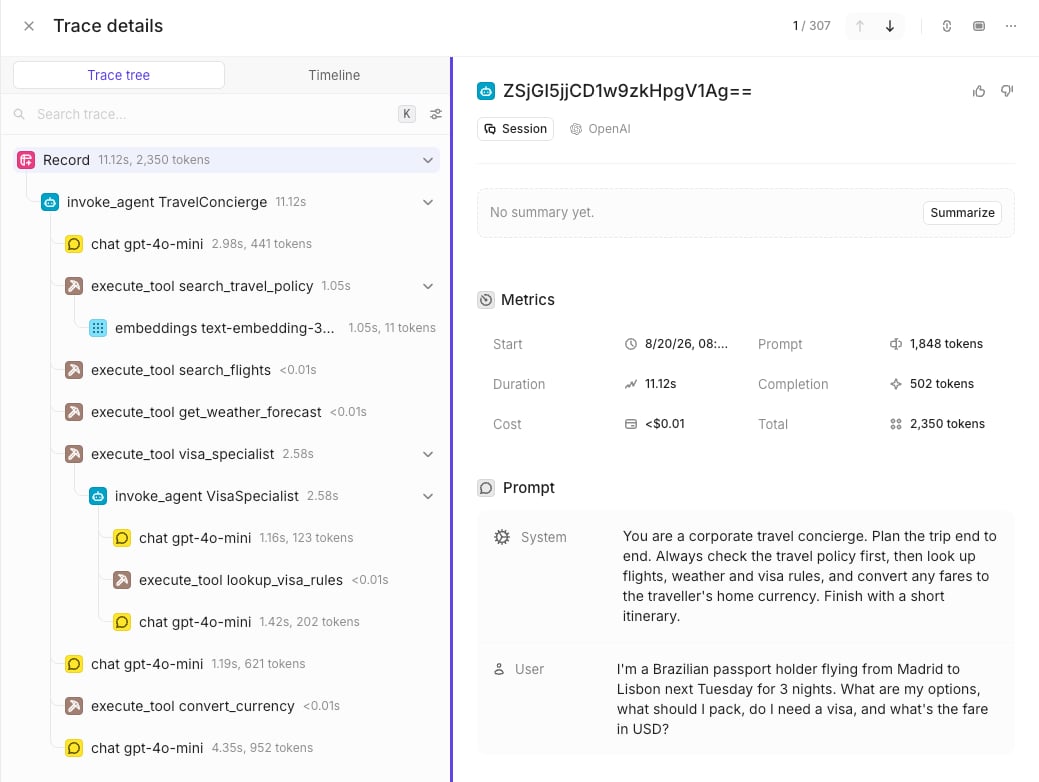
The agent above produces all four step types:
```
invoke_agent TravelConcierge
├─ chat gpt-4o-mini
├─ execute_tool search_travel_policy
│ └─ embeddings text-embedding-3-small
├─ execute_tool search_flights
├─ execute_tool get_weather_forecast
├─ execute_tool visa_specialist
│ └─ invoke_agent VisaSpecialist
│ ├─ chat gpt-4o-mini
│ ├─ execute_tool lookup_visa_rules
│ └─ chat gpt-4o-mini
├─ chat gpt-4o-mini
├─ execute_tool convert_currency
└─ chat gpt-4o-mini
```
The "Data" page of your data source shows the full trace, with per-span latency and tokens:
[Microsoft Agent Framework](https://learn.microsoft.com/en-us/agent-framework/) (MAF) is an
open-source SDK from Microsoft for building AI agents and multi-agent workflows. It succeeds
[Semantic Kernel](/integrations/semantic-kernel) and AutoGen, both now in maintenance mode, and
ships with built-in OpenTelemetry instrumentation.
Not to be confused with the [Microsoft 365 Agents
SDK](https://learn.microsoft.com/en-us/microsoft-365/agents-sdk/): Agent
Framework (`microsoft/agent-framework`) is the orchestration layer, the M365
Agents SDK (`microsoft/Agents`) is the channel and hosting layer for Teams and
Copilot. They compose. Agent Framework's .NET package is
`Microsoft.Agents.AI`, which despite the name is not part of the M365 Agents
SDK.
## Configuration
The integration works by sending trace data to Openlayer's [OpenTelemetry endpoint](/integrations/opentelemetry).
The steps below use the Python SDK; the .NET and Go SDKs emit the same spans, but the setup
calls differ.
Agent Framework depends on the OpenTelemetry **API** only and ships no exporter, so install one:
```bash theme={null}
pip install agent-framework opentelemetry-sdk opentelemetry-exporter-otlp-proto-http
```
```bash theme={null}
OTEL_EXPORTER_OTLP_TRACES_ENDPOINT="https://api.openlayer.com/v1/otel/v1/traces"
OTEL_EXPORTER_OTLP_TRACES_HEADERS="Authorization=Bearer YOUR_OPENLAYER_API_KEY_HERE, x-bt-parent=pipeline_id:YOUR_PIPELINE_ID_HERE"
OTEL_EXPORTER_OTLP_PROTOCOL="http/protobuf"
```
Two details are specific to Agent Framework:
* **Set the protocol explicitly.** It defaults to OTLP over gRPC, and Openlayer's endpoint
speaks OTLP over HTTP — without this variable, no traces arrive.
* **Use the traces-specific variables.** They create only a trace exporter. The generic
`OTEL_EXPORTER_OTLP_ENDPOINT` also builds metric and log exporters, pointed at endpoints
Openlayer does not serve.
Call this before creating your agents:
```python theme={null}
from agent_framework.observability import configure_otel_providers
configure_otel_providers()
```
If you already configure OpenTelemetry yourself — Azure Monitor distro, an OTel Collector,
your own `TracerProvider` — skip that call. Agent Framework's instrumentation is **on by
default** and emits into whatever providers are globally registered; you only need to opt in
to message content:
```python theme={null}
from agent_framework.observability import enable_sensitive_telemetry
enable_sensitive_telemetry()
```
Trace data is captured and exported automatically. The example below is a travel concierge
with several function tools, a retrieval tool that embeds its query, and a specialist
sub-agent exposed as a tool:
```python theme={null}
from typing import Annotated
from pydantic import Field
from agent_framework import Agent, tool
from agent_framework.openai import OpenAIChatClient, OpenAIEmbeddingClient
chat_client = OpenAIChatClient(model="gpt-4o-mini")
embedding_client = OpenAIEmbeddingClient(model="text-embedding-3-small")
@tool(approval_mode="never_require")
async def search_travel_policy(
query: Annotated[str, Field(description="What to look up.")],
) -> str:
"""Search the company travel policy."""
# Embedding inside the tool keeps the `embeddings` span in this trace,
# nested under `execute_tool`, the way a real retrieval tool would.
await embedding_client.get_embeddings([query])
return "Economy is required under 6 hours. Hotels capped at 220 USD/night."
@tool(approval_mode="never_require")
def search_flights(
origin: Annotated[str, Field(description="Departure city.")],
destination: Annotated[str, Field(description="Arrival city.")],
) -> str:
"""Find flights between two cities."""
return f"IB6250 {origin}->{destination} 09:15-11:40, 412 EUR economy."
@tool(approval_mode="never_require")
def get_weather_forecast(city: Annotated[str, Field(description="City.")]) -> str:
"""Get the forecast for a city."""
return f"{city}: 18-24C, light rain Tuesday, clear the rest of the week."
@tool(approval_mode="never_require")
def convert_currency(
amount: Annotated[float, Field(description="Amount.")],
from_currency: Annotated[str, Field(description="Source currency.")],
to_currency: Annotated[str, Field(description="Target currency.")],
) -> str:
"""Convert between currencies."""
return f"{amount} {from_currency} = {round(amount * 1.09, 2)} {to_currency}"
@tool(approval_mode="never_require")
def lookup_visa_rules(
nationality: Annotated[str, Field(description="Traveller nationality.")],
destination: Annotated[str, Field(description="Destination country.")],
) -> str:
"""Look up entry requirements."""
return f"{nationality} passports entering {destination}: visa-free for 90 days."
# Exposing a sub-agent with `as_tool()` nests its own `invoke_agent` span
# under the caller's `execute_tool` span.
visa_specialist = Agent(
client=chat_client,
name="VisaSpecialist",
instructions="Answer visa questions. Always use the lookup tool.",
tools=lookup_visa_rules,
)
concierge = Agent(
client=chat_client,
name="TravelConcierge",
instructions=(
"You are a corporate travel concierge. Check the travel policy first, then look up "
"flights, weather and visa rules, and convert fares to the traveller's currency."
),
tools=[
search_travel_policy,
search_flights,
get_weather_forecast,
convert_currency,
visa_specialist.as_tool(
name="visa_specialist",
description="Ask about entry requirements.",
),
],
)
result = await concierge.run(
"I'm a Brazilian passport holder flying Madrid to Lisbon next Tuesday for 3 nights. "
"What are my options, do I need a visa, and what's the fare in USD?"
)
```
## Capturing prompts and responses
Agent Framework captures **no message content by default**. Without opting in, prompts,
completions and tool arguments/results are all omitted, and traces arrive looking healthy but
carry nothing to evaluate. Opt in with `ENABLE_SENSITIVE_DATA=true`, or programmatically:
```python theme={null}
from agent_framework.observability import enable_sensitive_telemetry
enable_sensitive_telemetry()
```
`ENABLE_SENSITIVE_DATA` gates the agent, chat and tool code paths only. It
does not apply to workflow spans, which carry structural metadata either way —
see [Workflow tracing](#workflow-tracing).
## Resulting traces
Your Agent Framework interactions are published to Openlayer as:
* **Agent invocations** — `invoke_agent` spans, with agent names and instructions. Sub-agents
invoked through `as_tool()` nest inside the caller's `execute_tool` span.
* **LLM calls** — `chat` spans, with messages, model parameters, token usage, and cost.
* **Tool calls** — `execute_tool` spans, with function names, arguments, and results.
* **Embedding calls** — `embeddings` spans, with model and token usage. Calling
`get_embeddings()` inside a tool keeps the span in the same trace.
The agent above produces all four step types:
```
invoke_agent TravelConcierge
├─ chat gpt-4o-mini
├─ execute_tool search_travel_policy
│ └─ embeddings text-embedding-3-small
├─ execute_tool search_flights
├─ execute_tool get_weather_forecast
├─ execute_tool visa_specialist
│ └─ invoke_agent VisaSpecialist
│ ├─ chat gpt-4o-mini
│ ├─ execute_tool lookup_visa_rules
│ └─ chat gpt-4o-mini
├─ chat gpt-4o-mini
├─ execute_tool convert_currency
└─ chat gpt-4o-mini
```
The "Data" page of your data source shows the full trace, with per-span latency and tokens:
 **Do not wrap your agent run in a root span.** Agent Framework's own samples
open a manual parent span to print a trace ID for Application Insights.
Openlayer builds a record from the root span, and a plain span carries no
output — so the record arrives empty even though the content sits one level
down. Let `invoke_agent` be the root span.
You can then [create tests](/tests/overview) that run at a regular cadence on top of these records.
## Workflow tracing
Agent Framework's graph workflow engine emits its own spans outside the GenAI semantic
conventions: `workflow.build`, `workflow.run`, `executor.process`, `edge_group.process` and
`message.send`. Executor and edge-group spans nest under `workflow.run`, and are stored as
generic steps with their attributes preserved under "Other fields."
Because Agent Framework opens a separate root span per top-level operation and never wraps them
in a shared parent, an agent run followed by a workflow run arrives as **three** records:
| Record | Span | Emitted by |
| -------------------------------------- | ---------------- | ------------------------- |
| the agent run, with content and tokens | `invoke_agent` | `agent.run()` |
| a few milliseconds, no content | `workflow.build` | `WorkflowBuilder.build()` |
| the workflow execution, no content | `workflow.run` | `workflow.run()` |
`workflow.build` fires when the graph is constructed, not when it runs — so a real application
that builds once at startup gets one such record per process, not one per request.
Routing decisions are the useful part: every edge evaluation is recorded, including messages
silently dropped because a condition did not match.
```json theme={null}
{
"delivered": false,
"delivery_status": "dropped condition evaluated to false",
"id": "SingleEdgeGroup/6b5a7d2c-939e-4649-9a83-b829257b3ced",
"type": "SingleEdgeGroup"
}
```
`edge_group.delivery_status` is one of `delivered`, `buffered`, `exception`, `dropped type
mismatch`, `dropped target mismatch`, or `dropped condition evaluated to false`.
Two limitations:
* **Executor inputs and outputs are not on the spans.** Agent Framework exposes them as workflow
events, so no telemetry setting surfaces them. Read the `executor_invoked` and
`executor_completed` events off `workflow.run(..., stream=True)` and record them yourself.
* **Causality between executors uses span links.** A `message.send` span and the
`executor.process` span it feeds are connected by an OpenTelemetry link rather than nesting,
since executors do not nest. The tree still renders correctly — every span is a child of
`workflow.run` — but the link edges are not shown.
## Caveats
* **Duplicate content.** Instrumenting the chat client *and* the agent captures prompts and
responses twice.
* **MCP trace propagation.** Agent Framework injects `traceparent` into `tools/call` for MCP
sessions your process opens (`MCPStreamableHTTPTool`, `MCPStdioTool`, `MCPWebsocketTool`), but
not for hosted connectors like `FoundryChatClient.get_mcp_tool(...)`, where the provider
runtime issues the call. Traces stop at that boundary — use a client-opened transport for
end-to-end tracing.
* **No `.env` auto-loading.** Call `load_dotenv()` before configuring the providers, or pass
`configure_otel_providers(env_file_path=".env")`.
**Do not wrap your agent run in a root span.** Agent Framework's own samples
open a manual parent span to print a trace ID for Application Insights.
Openlayer builds a record from the root span, and a plain span carries no
output — so the record arrives empty even though the content sits one level
down. Let `invoke_agent` be the root span.
You can then [create tests](/tests/overview) that run at a regular cadence on top of these records.
## Workflow tracing
Agent Framework's graph workflow engine emits its own spans outside the GenAI semantic
conventions: `workflow.build`, `workflow.run`, `executor.process`, `edge_group.process` and
`message.send`. Executor and edge-group spans nest under `workflow.run`, and are stored as
generic steps with their attributes preserved under "Other fields."
Because Agent Framework opens a separate root span per top-level operation and never wraps them
in a shared parent, an agent run followed by a workflow run arrives as **three** records:
| Record | Span | Emitted by |
| -------------------------------------- | ---------------- | ------------------------- |
| the agent run, with content and tokens | `invoke_agent` | `agent.run()` |
| a few milliseconds, no content | `workflow.build` | `WorkflowBuilder.build()` |
| the workflow execution, no content | `workflow.run` | `workflow.run()` |
`workflow.build` fires when the graph is constructed, not when it runs — so a real application
that builds once at startup gets one such record per process, not one per request.
Routing decisions are the useful part: every edge evaluation is recorded, including messages
silently dropped because a condition did not match.
```json theme={null}
{
"delivered": false,
"delivery_status": "dropped condition evaluated to false",
"id": "SingleEdgeGroup/6b5a7d2c-939e-4649-9a83-b829257b3ced",
"type": "SingleEdgeGroup"
}
```
`edge_group.delivery_status` is one of `delivered`, `buffered`, `exception`, `dropped type
mismatch`, `dropped target mismatch`, or `dropped condition evaluated to false`.
Two limitations:
* **Executor inputs and outputs are not on the spans.** Agent Framework exposes them as workflow
events, so no telemetry setting surfaces them. Read the `executor_invoked` and
`executor_completed` events off `workflow.run(..., stream=True)` and record them yourself.
* **Causality between executors uses span links.** A `message.send` span and the
`executor.process` span it feeds are connected by an OpenTelemetry link rather than nesting,
since executors do not nest. The tree still renders correctly — every span is a child of
`workflow.run` — but the link edges are not shown.
## Caveats
* **Duplicate content.** Instrumenting the chat client *and* the agent captures prompts and
responses twice.
* **MCP trace propagation.** Agent Framework injects `traceparent` into `tools/call` for MCP
sessions your process opens (`MCPStreamableHTTPTool`, `MCPStdioTool`, `MCPWebsocketTool`), but
not for hosted connectors like `FoundryChatClient.get_mcp_tool(...)`, where the provider
runtime issues the call. Traces stop at that boundary — use a client-opened transport for
end-to-end tracing.
* **No `.env` auto-loading.** Call `load_dotenv()` before configuring the providers, or pass
`configure_otel_providers(env_file_path=".env")`.