> ## Documentation Index
> Fetch the complete documentation index at: https://docs.openlayer.com/llms.txt
> Use this file to discover all available pages before exploring further.
# Snowflake Cortex
> Connect your Snowflake Cortex Agents to Openlayer for automated monitoring and evaluation
 Openlayer integrates with [Snowflake Cortex Agents](https://docs.snowflake.com/en/user-guide/snowflake-cortex/cortex-agents)
to help you monitor, evaluate, and improve the agents running inside your Snowflake account. The
integration authenticates with key-pair auth, automatically discovers your agents, and periodically
pulls their execution traces from
[`SNOWFLAKE.LOCAL.AI_OBSERVABILITY_EVENTS`](https://docs.snowflake.com/en/sql-reference/local/ai_observability_events)
so you can inspect every turn in Openlayer.
## How it works
Once connected, Openlayer:
1. **Discovers your agents** — enumerates Cortex Agents account-wide with `SHOW AGENTS`, then reads each
one's specification for its tools and sample questions
2. **Creates projects and data sources** — each enabled agent gets its own Openlayer project and data
source, with no manual setup required
3. **Syncs traces** — polls the AI observability event table on a schedule, assembling spans into complete
traces before they are written
4. **Enriches traces** — extracts model names, token counts (including cache reads and writes), tool calls,
SQL statements, and the Snowflake user and role behind each request
All access is **read-only** — Openlayer never writes to your Snowflake
account, and never runs your agents.
Because Cortex Agents are a fully managed service, there is no process you control in which to configure an
OpenTelemetry exporter. Openlayer therefore reads the observability event table directly, which is the
approach Snowflake documents for third-party tools.
***
## Prerequisites
Before connecting, you need:
* A Snowflake account with at least one Cortex Agent.
* Permission to create users and roles (`SECURITYADMIN`), and to grant an account-level privilege
(`ACCOUNTADMIN`).
* A running warehouse Openlayer can use.
* An Openlayer workspace where you are an **admin**.
***
## Setup guide
### Step 1: Open the integration
In Openlayer, go to **Settings → Integrations**. This page lists every integration available to your
workspace.
Openlayer integrates with [Snowflake Cortex Agents](https://docs.snowflake.com/en/user-guide/snowflake-cortex/cortex-agents)
to help you monitor, evaluate, and improve the agents running inside your Snowflake account. The
integration authenticates with key-pair auth, automatically discovers your agents, and periodically
pulls their execution traces from
[`SNOWFLAKE.LOCAL.AI_OBSERVABILITY_EVENTS`](https://docs.snowflake.com/en/sql-reference/local/ai_observability_events)
so you can inspect every turn in Openlayer.
## How it works
Once connected, Openlayer:
1. **Discovers your agents** — enumerates Cortex Agents account-wide with `SHOW AGENTS`, then reads each
one's specification for its tools and sample questions
2. **Creates projects and data sources** — each enabled agent gets its own Openlayer project and data
source, with no manual setup required
3. **Syncs traces** — polls the AI observability event table on a schedule, assembling spans into complete
traces before they are written
4. **Enriches traces** — extracts model names, token counts (including cache reads and writes), tool calls,
SQL statements, and the Snowflake user and role behind each request
All access is **read-only** — Openlayer never writes to your Snowflake
account, and never runs your agents.
Because Cortex Agents are a fully managed service, there is no process you control in which to configure an
OpenTelemetry exporter. Openlayer therefore reads the observability event table directly, which is the
approach Snowflake documents for third-party tools.
***
## Prerequisites
Before connecting, you need:
* A Snowflake account with at least one Cortex Agent.
* Permission to create users and roles (`SECURITYADMIN`), and to grant an account-level privilege
(`ACCOUNTADMIN`).
* A running warehouse Openlayer can use.
* An Openlayer workspace where you are an **admin**.
***
## Setup guide
### Step 1: Open the integration
In Openlayer, go to **Settings → Integrations**. This page lists every integration available to your
workspace.
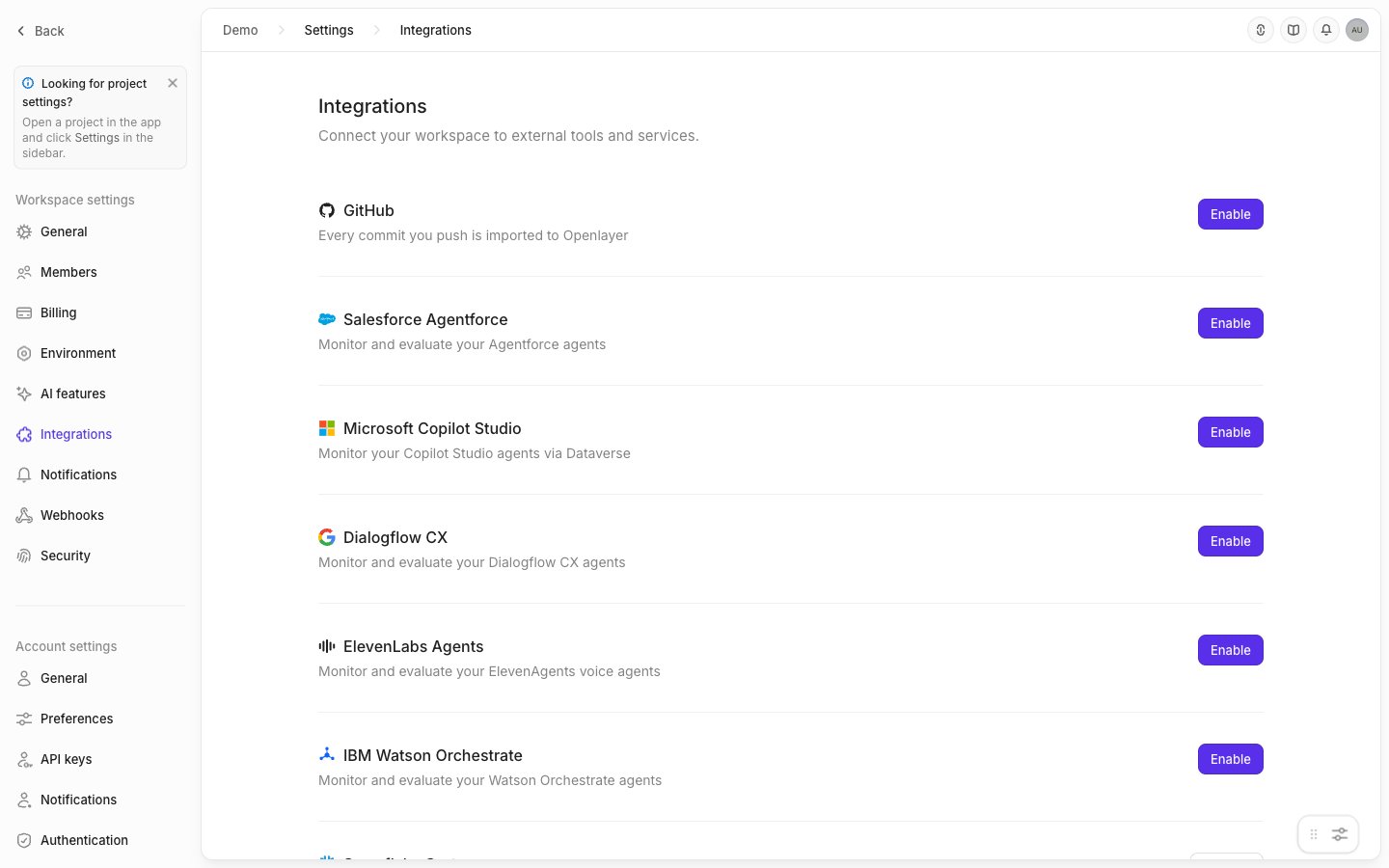 Find **Snowflake Cortex** and click **Enable**.
### Step 2: Copy your workspace's public key
The connect page shows your workspace's RSA public key, along with the four connection fields.
Find **Snowflake Cortex** and click **Enable**.
### Step 2: Copy your workspace's public key
The connect page shows your workspace's RSA public key, along with the four connection fields.
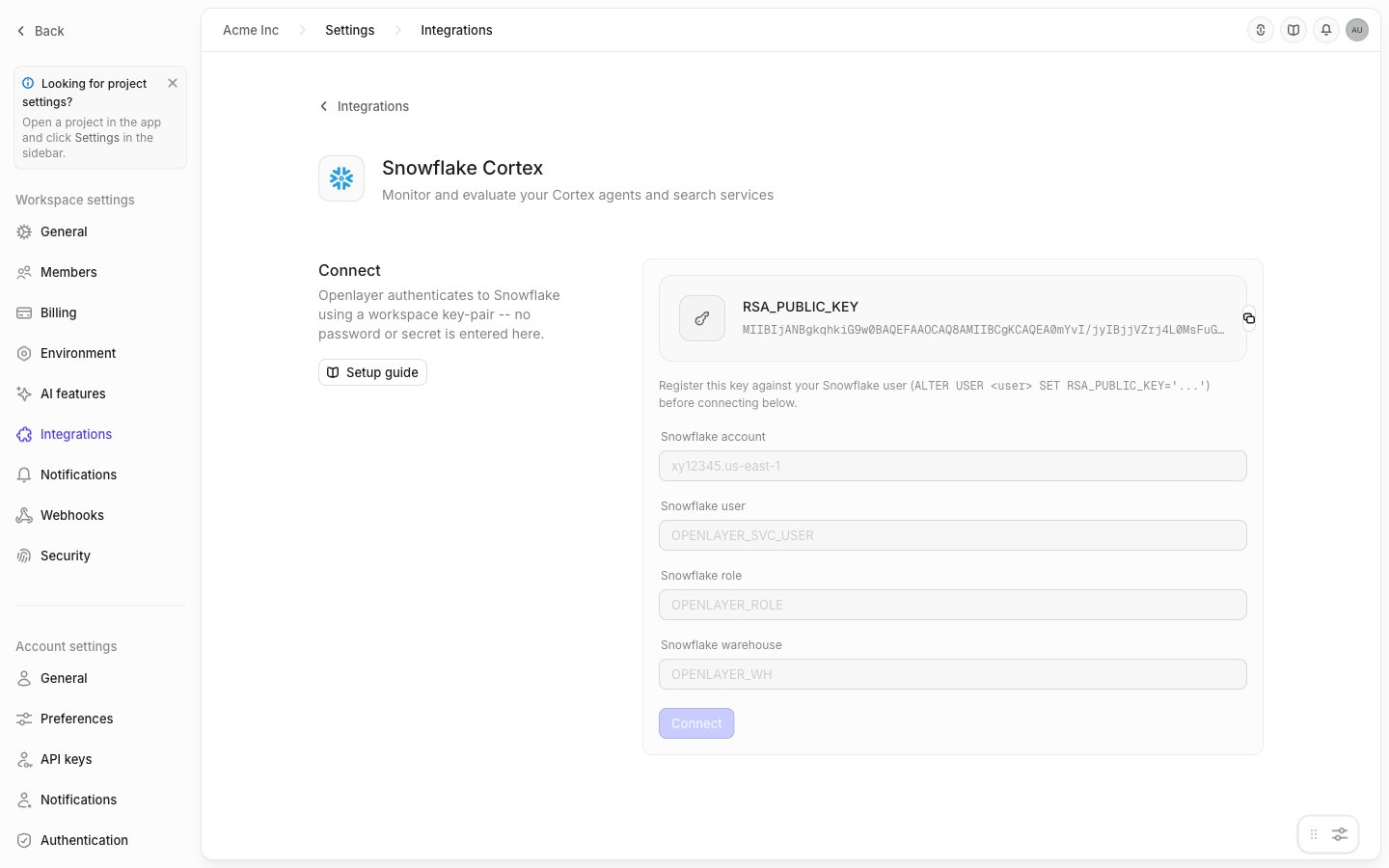 Copy the key — you will paste it into the script in the next step. Openlayer generates and holds the
matching private key, so no password or secret is ever entered into Snowflake or into Openlayer.
### Step 3: Create the role and service user
Run the following in a Snowflake worksheet. Replace the `RSA_PUBLIC_KEY` value with the key you just
copied, and set `agent_database` and `agent_schema` to the database and schema that contain your agents.
```sql theme={null}
-- Variables
set role_name = 'OPENLAYER_CORTEX_ROLE';
set user_name = 'OPENLAYER_CORTEX_INTEGRATION';
set warehouse_name = 'OPENLAYER';
-- The database and schema containing the agents you want to monitor
set agent_database = 'MY_DATABASE';
set agent_schema = 'MY_DATABASE.MY_SCHEMA';
use role securityadmin;
-- Create a role and a dedicated service user for Openlayer
create role if not exists identifier($role_name);
create user if not exists identifier($user_name);
alter user identifier($user_name) set default_role = $role_name;
alter user identifier($user_name) set default_warehouse = $warehouse_name;
alter user identifier($user_name) set type = 'SERVICE';
grant role identifier($role_name) to user identifier($user_name);
-- Key-pair authentication: paste the public key from the Openlayer UI
alter user identifier($user_name) set RSA_PUBLIC_KEY='';
-- The warehouse Openlayer queries through
grant usage on warehouse identifier($warehouse_name) to role identifier($role_name);
-- Required for Cortex access
grant database role SNOWFLAKE.CORTEX_USER to role identifier($role_name);
-- Required to read prompts and completions (see the note below)
use role accountadmin;
grant read unredacted ai observability events table on account
to role identifier($role_name);
-- Usage on the database and schema that contain your agents
grant usage on database identifier($agent_database) to role identifier($role_name);
grant usage on schema identifier($agent_schema) to role identifier($role_name);
-- MONITOR on existing and future agents
grant monitor on all agents in schema identifier($agent_schema)
to role identifier($role_name);
grant monitor on future agents in schema identifier($agent_schema)
to role identifier($role_name);
```
If your agents live in more than one schema, re-run the last four grants for each one, changing
`agent_database` and `agent_schema` each time.
**`READ UNREDACTED AI OBSERVABILITY EVENTS TABLE` is not optional.** Snowflake
redacts observability content by default. Without this account-level
privilege, Openlayer receives only metadata — tool names, token counts,
latency, model name — with no prompts, responses, or tool inputs and outputs.
Most of the evaluation catalog (groundedness, hallucination, answer relevancy,
PII, prompt injection) needs the content to work at all. Openlayer checks this
at setup and reports the result rather than degrading silently.
Granting `MONITOR` on **future** agents means agents created later are picked
up by discovery without another grant. Without it, you must re-run the grant
and re-run discovery each time an agent is added.
### Step 4: Connect from Openlayer
Back on the connect page, fill in:
| Field | Example | Where to find it |
| ----------------------- | ------------------------------ | ---------------------------------- |
| **Snowflake account** | `xy12345.us-east-1` | Your account identifier |
| **Snowflake user** | `OPENLAYER_CORTEX_INTEGRATION` | The service user created above |
| **Snowflake role** | `OPENLAYER_CORTEX_ROLE` | The role created above |
| **Snowflake warehouse** | `OPENLAYER` | The warehouse you granted usage on |
Click **Connect**. Openlayer validates the credentials against Snowflake before saving anything — if the
account, user, role, or warehouse is wrong, the connection fails immediately rather than silently failing
on the first sync.
### Step 5: Discover and enable agents
Click **Discover** to enumerate the agents your role can see. Each discovered agent appears in the
**Objects** table.
Click **Enable** on an agent to start monitoring it. Openlayer creates a project and data source for it,
runs the redaction check, and begins syncing.
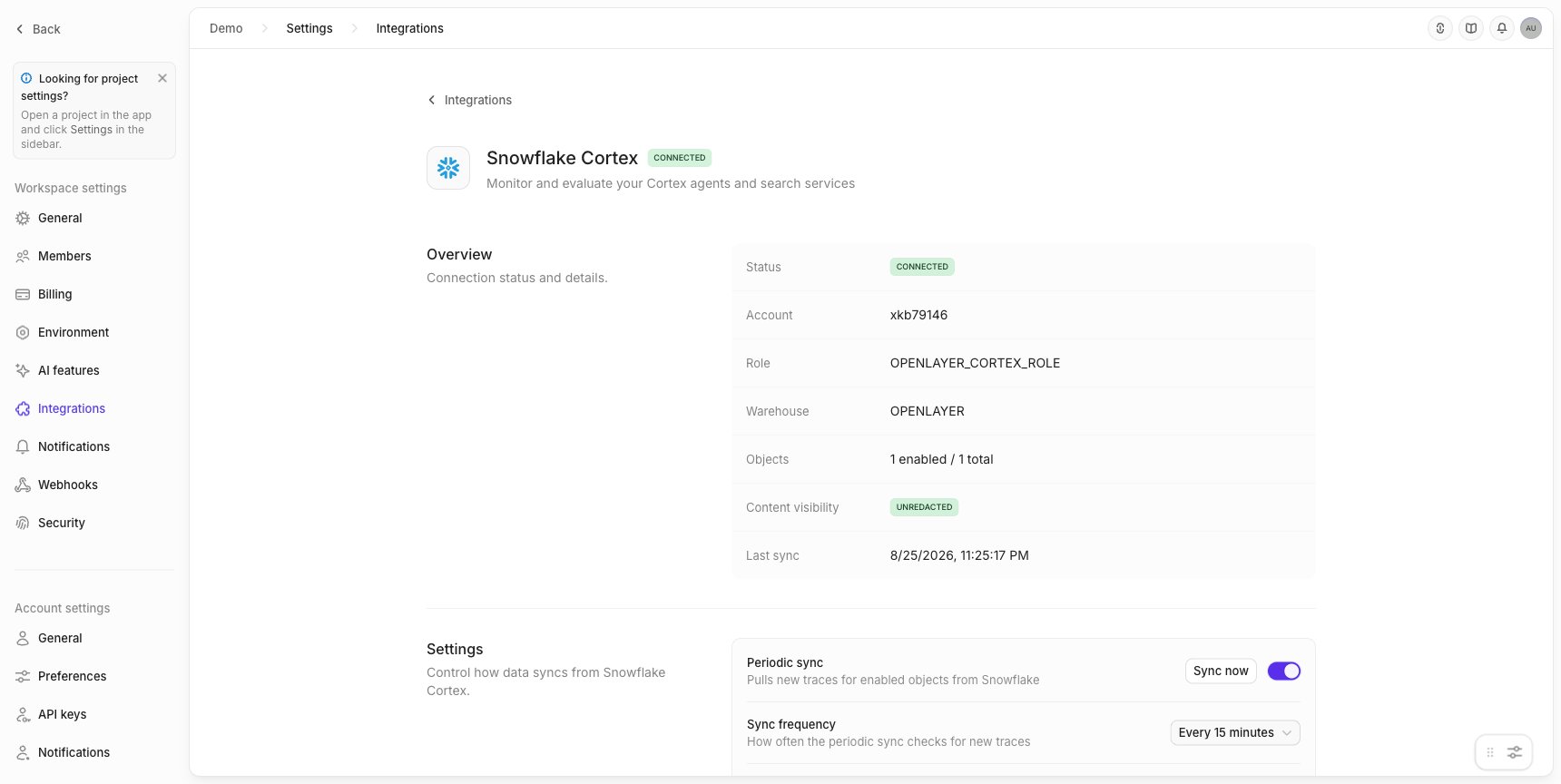
Once connected, the page shows the connection's status, the agents it found, and whether content is
readable:
Copy the key — you will paste it into the script in the next step. Openlayer generates and holds the
matching private key, so no password or secret is ever entered into Snowflake or into Openlayer.
### Step 3: Create the role and service user
Run the following in a Snowflake worksheet. Replace the `RSA_PUBLIC_KEY` value with the key you just
copied, and set `agent_database` and `agent_schema` to the database and schema that contain your agents.
```sql theme={null}
-- Variables
set role_name = 'OPENLAYER_CORTEX_ROLE';
set user_name = 'OPENLAYER_CORTEX_INTEGRATION';
set warehouse_name = 'OPENLAYER';
-- The database and schema containing the agents you want to monitor
set agent_database = 'MY_DATABASE';
set agent_schema = 'MY_DATABASE.MY_SCHEMA';
use role securityadmin;
-- Create a role and a dedicated service user for Openlayer
create role if not exists identifier($role_name);
create user if not exists identifier($user_name);
alter user identifier($user_name) set default_role = $role_name;
alter user identifier($user_name) set default_warehouse = $warehouse_name;
alter user identifier($user_name) set type = 'SERVICE';
grant role identifier($role_name) to user identifier($user_name);
-- Key-pair authentication: paste the public key from the Openlayer UI
alter user identifier($user_name) set RSA_PUBLIC_KEY='';
-- The warehouse Openlayer queries through
grant usage on warehouse identifier($warehouse_name) to role identifier($role_name);
-- Required for Cortex access
grant database role SNOWFLAKE.CORTEX_USER to role identifier($role_name);
-- Required to read prompts and completions (see the note below)
use role accountadmin;
grant read unredacted ai observability events table on account
to role identifier($role_name);
-- Usage on the database and schema that contain your agents
grant usage on database identifier($agent_database) to role identifier($role_name);
grant usage on schema identifier($agent_schema) to role identifier($role_name);
-- MONITOR on existing and future agents
grant monitor on all agents in schema identifier($agent_schema)
to role identifier($role_name);
grant monitor on future agents in schema identifier($agent_schema)
to role identifier($role_name);
```
If your agents live in more than one schema, re-run the last four grants for each one, changing
`agent_database` and `agent_schema` each time.
**`READ UNREDACTED AI OBSERVABILITY EVENTS TABLE` is not optional.** Snowflake
redacts observability content by default. Without this account-level
privilege, Openlayer receives only metadata — tool names, token counts,
latency, model name — with no prompts, responses, or tool inputs and outputs.
Most of the evaluation catalog (groundedness, hallucination, answer relevancy,
PII, prompt injection) needs the content to work at all. Openlayer checks this
at setup and reports the result rather than degrading silently.
Granting `MONITOR` on **future** agents means agents created later are picked
up by discovery without another grant. Without it, you must re-run the grant
and re-run discovery each time an agent is added.
### Step 4: Connect from Openlayer
Back on the connect page, fill in:
| Field | Example | Where to find it |
| ----------------------- | ------------------------------ | ---------------------------------- |
| **Snowflake account** | `xy12345.us-east-1` | Your account identifier |
| **Snowflake user** | `OPENLAYER_CORTEX_INTEGRATION` | The service user created above |
| **Snowflake role** | `OPENLAYER_CORTEX_ROLE` | The role created above |
| **Snowflake warehouse** | `OPENLAYER` | The warehouse you granted usage on |
Click **Connect**. Openlayer validates the credentials against Snowflake before saving anything — if the
account, user, role, or warehouse is wrong, the connection fails immediately rather than silently failing
on the first sync.
### Step 5: Discover and enable agents
Click **Discover** to enumerate the agents your role can see. Each discovered agent appears in the
**Objects** table.
Click **Enable** on an agent to start monitoring it. Openlayer creates a project and data source for it,
runs the redaction check, and begins syncing.
Once connected, the page shows the connection's status, the agents it found, and whether content is
readable:
 `SHOW AGENTS` returns only objects your role holds a privilege on, with no
error when the list is incomplete. If an agent you expect is missing, check
the `MONITOR` grants for its schema. Openlayer surfaces a warning when the
inventory may be partial.
***
## What gets synced
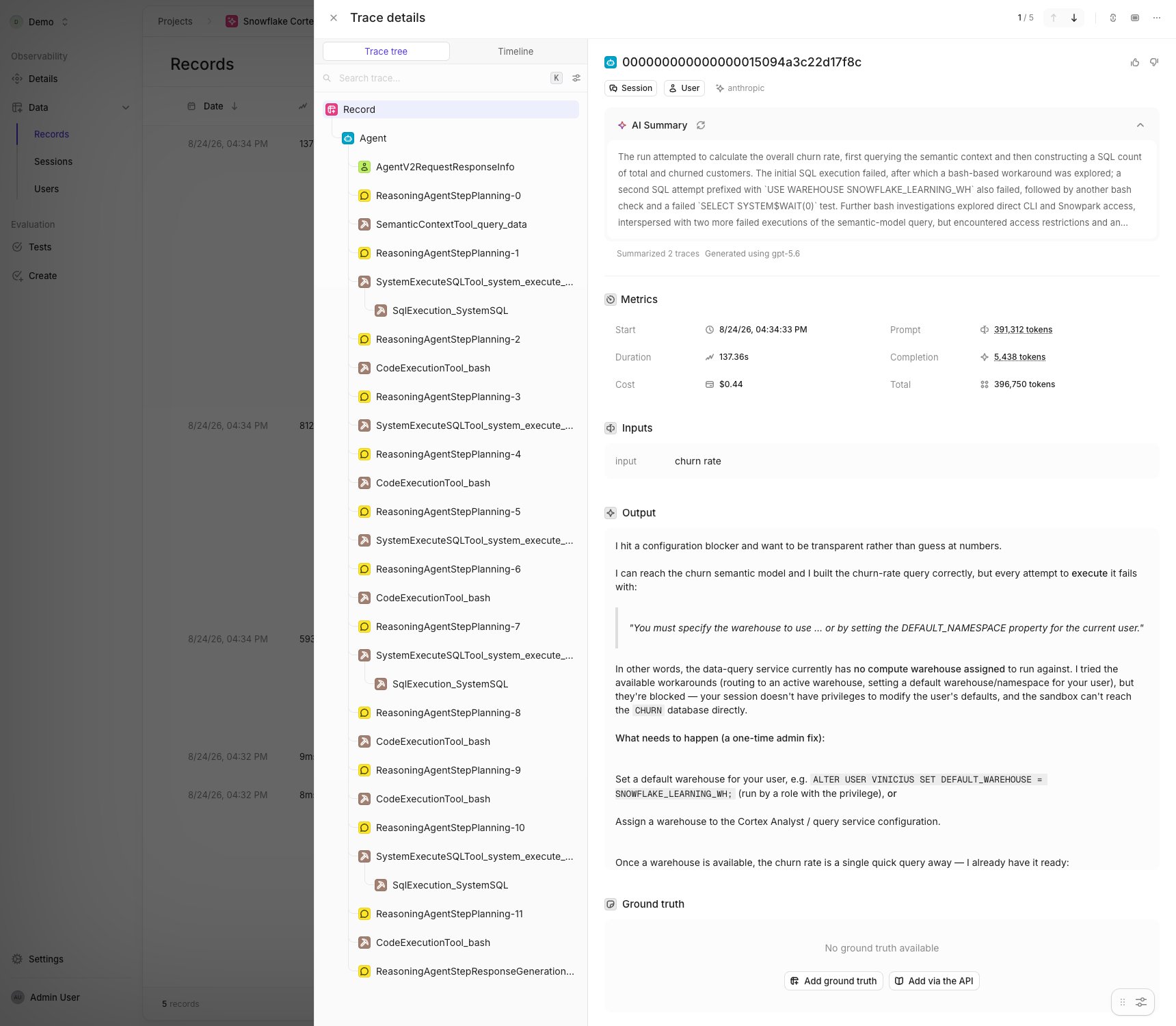
Openlayer maps each Cortex trace onto its own trace format:
| Cortex span | Openlayer step | What it carries |
| ---------------------------------------------- | --------------- | ------------------------------------------------ |
| `Agent` | Trace root | The user's message and the agent's final answer |
| `AgentV2RequestResponseInfo` | Generation | Conversation input and output, thread context |
| `ReasoningAgentStepPlanning-N` | Chat completion | Model, token counts, reasoning or tool selection |
| `ReasoningAgentStepResponseGeneration-N` | Chat completion | Model, token counts, generated response |
| `CortexAnalystTool_*`, `SemanticContextTool_*` | Tool | Semantic model, tables, question |
| `SqlExecution_*`, `SystemExecuteSQLTool_*` | Tool | SQL statement, query ID, row count, status |
| `CodeExecutionTool_*` | Tool | Command, arguments, status |
Each trace also carries the Snowflake **user**, **session**, and **role** that ran it, so you can filter
and group by who invoked the agent and under what privilege.
`SHOW AGENTS` returns only objects your role holds a privilege on, with no
error when the list is incomplete. If an agent you expect is missing, check
the `MONITOR` grants for its schema. Openlayer surfaces a warning when the
inventory may be partial.
***
## What gets synced
Openlayer maps each Cortex trace onto its own trace format:
| Cortex span | Openlayer step | What it carries |
| ---------------------------------------------- | --------------- | ------------------------------------------------ |
| `Agent` | Trace root | The user's message and the agent's final answer |
| `AgentV2RequestResponseInfo` | Generation | Conversation input and output, thread context |
| `ReasoningAgentStepPlanning-N` | Chat completion | Model, token counts, reasoning or tool selection |
| `ReasoningAgentStepResponseGeneration-N` | Chat completion | Model, token counts, generated response |
| `CortexAnalystTool_*`, `SemanticContextTool_*` | Tool | Semantic model, tables, question |
| `SqlExecution_*`, `SystemExecuteSQLTool_*` | Tool | SQL statement, query ID, row count, status |
| `CodeExecutionTool_*` | Tool | Command, arguments, status |
Each trace also carries the Snowflake **user**, **session**, and **role** that ran it, so you can filter
and group by who invoked the agent and under what privilege.
 ### Token accounting
Cortex reports prompt tokens inclusive of cache reads and writes. Openlayer breaks them into a
non-overlapping set — `input_tokens`, `cached_tokens`, `cache_creation_tokens`, `output_tokens` — so cost
estimates do not double-count cached input. Multi-turn agents frequently see high cache-hit rates, so any
figure that ignores this is materially wrong.
***
## Settings
| Setting | Default | What it does |
| --------------------------- | ---------------- | ------------------------------------------------- |
| **Periodic sync** | On | Pulls new traces on a schedule |
| **Sync frequency** | Every 15 minutes | How often to check for new traces |
| **Initial sync range** | Last 7 days | How far back the first sync reaches (max 90 days) |
| **Auto-enable new objects** | Off | Automatically monitor newly discovered agents |
### Backfilling history
To re-read a window that has already been polled — or one older than your initial sync range — open the
**⋯** menu on an agent row and choose **Backfill**.
Backfill runs independently of the ongoing sync: it drains its own window while normal polling continues
forward, so recent traces keep arriving while history fills in behind them. Duplicate records are filtered
automatically, so re-running a backfill is safe.
Backfill drains in windows rather than in one query, so a large range takes
several sync cycles to complete. Progress is shown on the agent's row.
***
## Troubleshooting
**No agents appear after clicking Discover.**
Your role likely lacks `MONITOR` on the schema containing them. `SHOW AGENTS` silently omits objects the
role cannot see. Re-run the `grant monitor on all agents in schema ...` statement for each relevant schema.
**Traces sync but contain no prompts or responses.**
The `READ UNREDACTED AI OBSERVABILITY EVENTS TABLE` privilege is missing. Openlayer shows content
visibility on the integration page — if it reads redacted, grant the privilege as `ACCOUNTADMIN` and
re-sync.
**The connection status shows an error after a sync.**
Openlayer distinguishes credential failures, which stop the whole connection, from per-agent failures,
which skip that agent and continue. The error message on the integration page names the most recent
failure. A dropped or renamed agent in Snowflake is skipped rather than treated as a credential problem;
the next discovery marks it as removed.
**An agent shows zero synced traces.**
Confirm the agent has activity inside your configured sync range. Cortex writes traces only when an agent
actually runs, and the initial range defaults to the last 7 days — use **Backfill** to reach further back.
### Token accounting
Cortex reports prompt tokens inclusive of cache reads and writes. Openlayer breaks them into a
non-overlapping set — `input_tokens`, `cached_tokens`, `cache_creation_tokens`, `output_tokens` — so cost
estimates do not double-count cached input. Multi-turn agents frequently see high cache-hit rates, so any
figure that ignores this is materially wrong.
***
## Settings
| Setting | Default | What it does |
| --------------------------- | ---------------- | ------------------------------------------------- |
| **Periodic sync** | On | Pulls new traces on a schedule |
| **Sync frequency** | Every 15 minutes | How often to check for new traces |
| **Initial sync range** | Last 7 days | How far back the first sync reaches (max 90 days) |
| **Auto-enable new objects** | Off | Automatically monitor newly discovered agents |
### Backfilling history
To re-read a window that has already been polled — or one older than your initial sync range — open the
**⋯** menu on an agent row and choose **Backfill**.
Backfill runs independently of the ongoing sync: it drains its own window while normal polling continues
forward, so recent traces keep arriving while history fills in behind them. Duplicate records are filtered
automatically, so re-running a backfill is safe.
Backfill drains in windows rather than in one query, so a large range takes
several sync cycles to complete. Progress is shown on the agent's row.
***
## Troubleshooting
**No agents appear after clicking Discover.**
Your role likely lacks `MONITOR` on the schema containing them. `SHOW AGENTS` silently omits objects the
role cannot see. Re-run the `grant monitor on all agents in schema ...` statement for each relevant schema.
**Traces sync but contain no prompts or responses.**
The `READ UNREDACTED AI OBSERVABILITY EVENTS TABLE` privilege is missing. Openlayer shows content
visibility on the integration page — if it reads redacted, grant the privilege as `ACCOUNTADMIN` and
re-sync.
**The connection status shows an error after a sync.**
Openlayer distinguishes credential failures, which stop the whole connection, from per-agent failures,
which skip that agent and continue. The error message on the integration page names the most recent
failure. A dropped or renamed agent in Snowflake is skipped rather than treated as a credential problem;
the next discovery marks it as removed.
**An agent shows zero synced traces.**
Confirm the agent has activity inside your configured sync range. Cortex writes traces only when an agent
actually runs, and the initial range defaults to the last 7 days — use **Backfill** to reach further back.