> ## Documentation Index
> Fetch the complete documentation index at: https://docs.openlayer.com/llms.txt
> Use this file to discover all available pages before exploring further.
# Trace multimodal data
> Learn how to attach images, audio, and files to traces sent to Openlayer
Not every AI system runs on text alone. A claims agent reads a photo of a receipt, a
support bot listens to a voice note, a document pipeline parses a PDF.
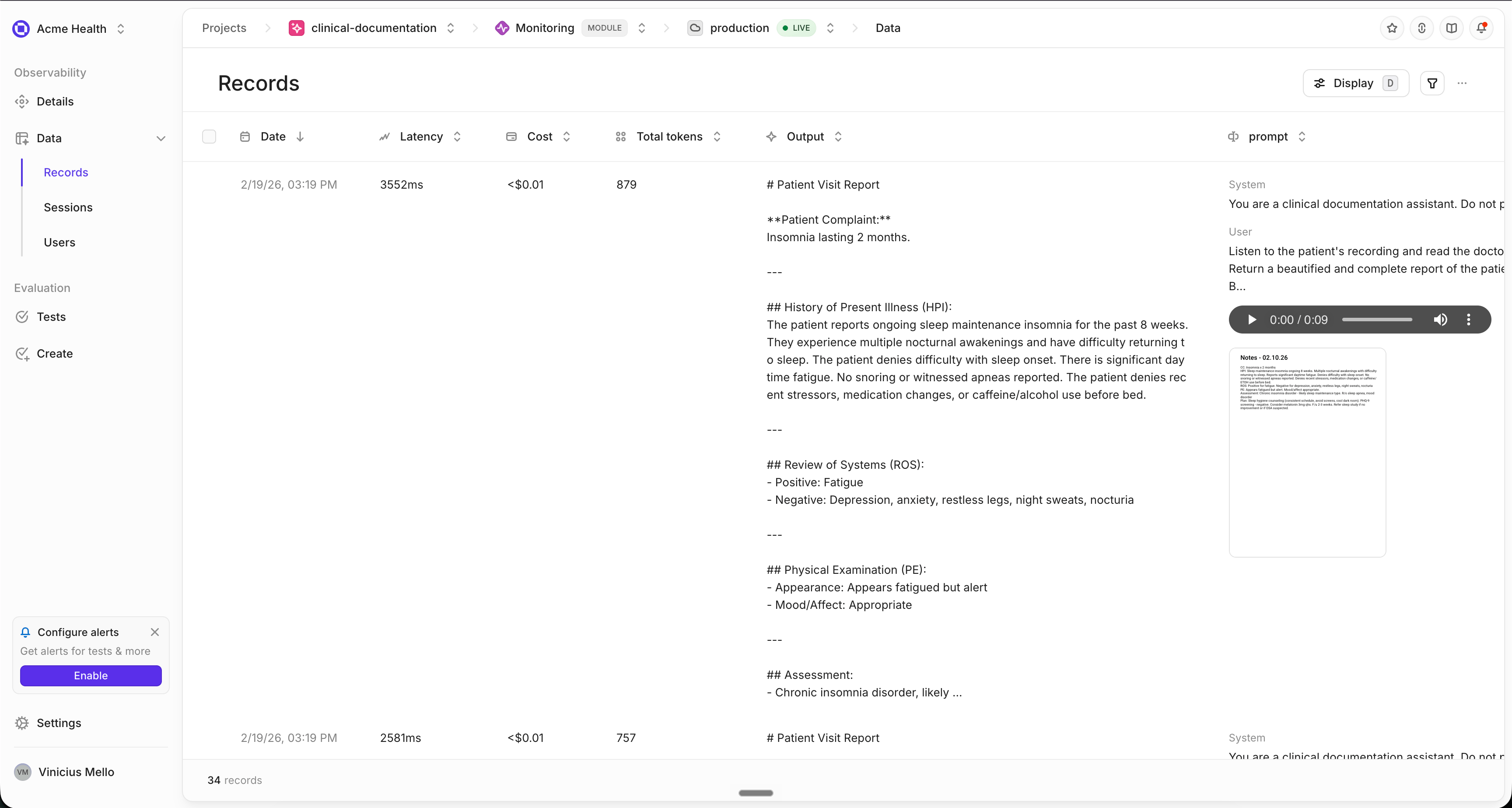
**Attachments** let your traces carry that unstructured data. The media itself is uploaded
to your workspace storage, and the trace keeps a reference to it — so the platform can
show you the actual image, play the actual audio, and page through the actual document
next to the rest of the trace.
 ## Enable attachment uploads
Attachment uploads are **disabled by default**. Until you turn them on,
attachments are recorded in the trace but never uploaded — and anything that
was not uploaded cannot be displayed.
```python theme={null}
from openlayer.lib import init
init(attachment_upload_enabled=True)
```
With uploads enabled, Openlayer uploads each attachment when the trace completes and
stores the resulting reference in the trace data.
If you attach media that already lives at an **external URL**, add `url_upload_enabled` so
Openlayer fetches it and keeps its own copy:
```python theme={null}
init(attachment_upload_enabled=True, url_upload_enabled=True)
```
Without it, an external URL is recorded as-is. That keeps your trace pointing at a
resource Openlayer cannot read — if the URL later expires or sits behind
authentication, the media is gone.
Attachments require `openlayer>=0.17.0`, and `url_upload_enabled` requires
`openlayer>=0.17.9`.
## Attach a file to a step
Call `log_attachment()` inside any traced function to attach media to the step currently
being recorded:
```python theme={null}
from openlayer.lib import init, trace
from openlayer.lib.tracing import log_attachment
init(attachment_upload_enabled=True)
@trace()
def triage_expense_claim(claim_id: str) -> str:
# Attach the artifacts the claim arrived with
log_attachment("receipt.png", metadata={"source": "mobile upload"})
log_attachment("voice_note.wav", metadata={"channel": "voicemail"})
log_attachment("policy.pdf")
return review(claim_id)
```
The multimodal helpers live in `openlayer.lib.tracing`, not in
`openlayer.lib`.
`log_attachment()` accepts a file path, raw bytes, a file-like object, or an `Attachment`
you built yourself:
```python theme={null}
# A path — media type is detected from the extension
log_attachment("invoices/june.pdf")
# Raw bytes — name and media type are required
log_attachment(chart_png, name="chart.png", media_type="image/png")
```
Every attachment can carry a `metadata` dict. Use it for whatever you need to filter or
debug on later: the upload channel, a page count, an audio duration, a document revision.
### Build attachments explicitly
For more control, construct an `Attachment` and pass it to `log_attachment()`:
```python theme={null}
from openlayer.lib.tracing import Attachment, log_attachment
log_attachment(Attachment.from_file("receipt.png", name="Receipt"))
log_attachment(Attachment.from_url("https://example.com/receipt.png"))
log_attachment(
Attachment.from_bytes(png, name="chart.png", media_type="image/png")
)
log_attachment(
Attachment.from_base64(b64, name="clip.wav", media_type="audio/wav")
)
```
| Factory | Use it for | Notes |
| --------------- | ---------------------------- | ------------------------------------------------------------------------ |
| `from_file()` | Media on local disk | Media type is guessed from the extension; size and checksum are computed |
| `from_url()` | Media hosted somewhere else | Only fetched into Openlayer when `url_upload_enabled=True` |
| `from_bytes()` | Media generated in memory | `name` and `media_type` are required |
| `from_base64()` | Media already base64-encoded | Useful for provider payloads that are encoded in transit |
Identical files are uploaded once per trace — attachments are deduplicated by MD5
checksum, so attaching the same image to three steps costs one upload.
## Multimodal inputs and outputs
The attachments above hang off a step as supporting artifacts. To model a **message that
is itself part text and part media** — the shape a vision or audio model actually
receives — use content items instead:
```python theme={null}
from openlayer.lib import init, trace
from openlayer.lib.tracing import Attachment, create_step
from openlayer.lib.tracing.content import (
AudioContent,
FileContent,
ImageContent,
TextContent,
)
from openlayer.lib.tracing.enums import StepType
init(attachment_upload_enabled=True)
@trace()
def answer_claim_question(question: str) -> str:
receipt = Attachment.from_file("receipt.png")
voice_note = Attachment.from_file("voice_note.wav")
policy = Attachment.from_file("policy.pdf")
with create_step(
name="Claim assistant", step_type=StepType.CHAT_COMPLETION
) as step:
answer = call_your_model(question, receipt, voice_note, policy)
step.log(
inputs={
"prompt": [
{
"role": "user",
"content": [
TextContent(text=question),
ImageContent(attachment=receipt),
AudioContent(attachment=voice_note),
FileContent(attachment=policy),
],
}
]
},
output=answer,
)
return answer
```
There are four content items — `TextContent`, `ImageContent`, `AudioContent`, and
`FileContent` — and a single message can mix as many as you need. Openlayer renders the
message in order, so the text and the media it refers to stay together.
## Automatic capture from OpenAI
If you send multimodal messages through a traced OpenAI client, you do not need to write
any of the above. Openlayer reads the content array and converts it to attachments for
you, on both the Chat Completions and Responses APIs:
```python theme={null}
import openai
from openlayer.lib import init
init(attachment_upload_enabled=True)
client = openai.OpenAI() # auto-traced
response = client.chat.completions.create(
model="gpt-4o-mini",
messages=[
{
"role": "user",
"content": [
{"type": "text", "text": "What is the total?"},
{"type": "image_url", "image_url": {"url": data_url}},
],
}
],
)
```
Images (`image_url`, `input_image`), audio (`input_audio`), and files (`file`) are all
recognized, whether they arrive as a URL, a base64 data URL, or an uploaded file ID.
Generated images in Responses API output are captured the same way.
## How attachments appear in Openlayer
Uploaded attachments are rendered wherever the trace is shown — in the row, in the row
detail view, and on the individual step:
| Media | What you get |
| --------------- | --------------------------------------------------------- |
| Images | Rendered inline, click to open full size |
| Audio | A player you can scrub; only one clip plays at a time |
| PDFs | A page-by-page viewer, click to open the full document |
| Everything else | A card with the file name and size, and a download button |
Every attachment can be downloaded, whatever its type. Downloads keep the attachment's
name and extension as part of the filename.
## The attachment format
Attachments are plain JSON inside your trace, so any client that can publish a row can
publish an attachment. This is what the SDK writes:
```json theme={null}
{
"id": "1f1d3e0c-6a19-4d1e-9f3c-2b7c0d84a501",
"name": "receipt.png",
"mediaType": "image/png",
"storageUri": "s3://openlayer-assets/.../attachments/ebb63407.png",
"sizeBytes": 35016,
"checksumMd5": "ebb634079cb8555ceef04266b5a976ee",
"metadata": { "source": "mobile upload" }
}
```
`storageUri` is what makes an attachment displayable — it is the reference to the copy in
your workspace storage. To obtain one for media you upload yourself, request a presigned
URL, upload the bytes to it, and keep the `storageUri` that comes back:
```bash theme={null}
curl -X POST \
"https://api.openlayer.com/v1/storage/presigned-url?objectName=receipt.png" \
-H "Authorization: Bearer $OPENLAYER_API_KEY"
```
The response contains the `url` to upload to, any form `fields` that upload requires, and
the `storageUri` to record. You can then put the attachment in a column when you
[stream the row](/api-reference/rest/monitoring/stream-data):
```json theme={null}
{
"config": {
"inputVariableNames": ["question", "receipt"],
"outputColumnName": "output",
"inferenceIdColumnName": "inferenceId"
},
"rows": [
{
"inferenceId": "claim-4417",
"question": "Is this meal claim within policy?",
"receipt": {
"storageUri": "...",
"mediaType": "image/png",
"name": "receipt.png"
},
"output": "The claim is within policy."
}
]
}
```
The column holding the attachment must be listed in `inputVariableNames`. A
row containing an attachment in an undeclared column is still accepted — the
request returns success — but the platform has no column to attach it to, so
it is never displayed.
A column can also hold a full multimodal message, mixing media with text:
```json theme={null}
[
{ "type": "text", "text": "Is this meal claim within policy?" },
{
"type": "image",
"attachment": {
"storageUri": "...",
"mediaType": "image/png",
"name": "receipt.png"
}
}
]
```
## Complete example
An expense claim that arrives as a photo, a voice note, and a policy document — attached
to the trace, then read by a vision model:
```python theme={null}
import base64
import openai
from openlayer.lib import init, trace
from openlayer.lib.tracing import log_attachment
# Attachment uploads are off by default
init(attachment_upload_enabled=True)
client = openai.OpenAI() # auto-traced
def as_data_url(path: str, media_type: str) -> str:
with open(path, "rb") as file:
encoded = base64.b64encode(file.read()).decode("utf-8")
return f"data:{media_type};base64,{encoded}"
@trace()
def read_receipt(receipt_path: str) -> str:
"""The image sent to OpenAI becomes an attachment automatically."""
image_url = as_data_url(receipt_path, "image/png")
response = client.chat.completions.create(
model="gpt-4o-mini",
messages=[
{
"role": "user",
"content": [
{"type": "text", "text": "Read this receipt."},
{"type": "image_url", "image_url": {"url": image_url}},
],
}
],
)
return response.choices[0].message.content
@trace()
def triage_expense_claim(claim_id: str) -> str:
# Attach the artifacts the claim arrived with
log_attachment("receipt.png", metadata={"source": "mobile upload"})
log_attachment("voice_note.wav", metadata={"channel": "voicemail"})
log_attachment("policy.pdf", metadata={"revision": 4})
extracted = read_receipt("receipt.png")
return f"Claim {claim_id} triaged. {extracted}"
if __name__ == "__main__":
print(triage_expense_claim("CLM-4417"))
```
Run it with your credentials set, and the trace arrives with four attachments: the three
you attached explicitly, plus the receipt image OpenAI received.
## Troubleshooting
Check `attachment_upload_enabled=True` first — it is off by default, and without it
nothing is uploaded. If the attachment came from `Attachment.from_url()`, you also
need `url_upload_enabled=True`, otherwise Openlayer never fetches a copy it can
display.
Attachments with no data and no reference are dropped rather than published — most
often because a file path does not exist. The SDK logs a warning when this happens, so
enable logging while you debug:
```python theme={null}
import logging
logging.getLogger("openlayer").setLevel(logging.DEBUG)
```
No. Uploads happen when the trace completes, on a background thread, so your request
is not held up. A failed upload is logged and the trace is still published — you get
the trace without the media rather than an exception.
Looking to add non-media context to your traces instead? See [Add metadata to
traces](/monitoring/metadata).
## Enable attachment uploads
Attachment uploads are **disabled by default**. Until you turn them on,
attachments are recorded in the trace but never uploaded — and anything that
was not uploaded cannot be displayed.
```python theme={null}
from openlayer.lib import init
init(attachment_upload_enabled=True)
```
With uploads enabled, Openlayer uploads each attachment when the trace completes and
stores the resulting reference in the trace data.
If you attach media that already lives at an **external URL**, add `url_upload_enabled` so
Openlayer fetches it and keeps its own copy:
```python theme={null}
init(attachment_upload_enabled=True, url_upload_enabled=True)
```
Without it, an external URL is recorded as-is. That keeps your trace pointing at a
resource Openlayer cannot read — if the URL later expires or sits behind
authentication, the media is gone.
Attachments require `openlayer>=0.17.0`, and `url_upload_enabled` requires
`openlayer>=0.17.9`.
## Attach a file to a step
Call `log_attachment()` inside any traced function to attach media to the step currently
being recorded:
```python theme={null}
from openlayer.lib import init, trace
from openlayer.lib.tracing import log_attachment
init(attachment_upload_enabled=True)
@trace()
def triage_expense_claim(claim_id: str) -> str:
# Attach the artifacts the claim arrived with
log_attachment("receipt.png", metadata={"source": "mobile upload"})
log_attachment("voice_note.wav", metadata={"channel": "voicemail"})
log_attachment("policy.pdf")
return review(claim_id)
```
The multimodal helpers live in `openlayer.lib.tracing`, not in
`openlayer.lib`.
`log_attachment()` accepts a file path, raw bytes, a file-like object, or an `Attachment`
you built yourself:
```python theme={null}
# A path — media type is detected from the extension
log_attachment("invoices/june.pdf")
# Raw bytes — name and media type are required
log_attachment(chart_png, name="chart.png", media_type="image/png")
```
Every attachment can carry a `metadata` dict. Use it for whatever you need to filter or
debug on later: the upload channel, a page count, an audio duration, a document revision.
### Build attachments explicitly
For more control, construct an `Attachment` and pass it to `log_attachment()`:
```python theme={null}
from openlayer.lib.tracing import Attachment, log_attachment
log_attachment(Attachment.from_file("receipt.png", name="Receipt"))
log_attachment(Attachment.from_url("https://example.com/receipt.png"))
log_attachment(
Attachment.from_bytes(png, name="chart.png", media_type="image/png")
)
log_attachment(
Attachment.from_base64(b64, name="clip.wav", media_type="audio/wav")
)
```
| Factory | Use it for | Notes |
| --------------- | ---------------------------- | ------------------------------------------------------------------------ |
| `from_file()` | Media on local disk | Media type is guessed from the extension; size and checksum are computed |
| `from_url()` | Media hosted somewhere else | Only fetched into Openlayer when `url_upload_enabled=True` |
| `from_bytes()` | Media generated in memory | `name` and `media_type` are required |
| `from_base64()` | Media already base64-encoded | Useful for provider payloads that are encoded in transit |
Identical files are uploaded once per trace — attachments are deduplicated by MD5
checksum, so attaching the same image to three steps costs one upload.
## Multimodal inputs and outputs
The attachments above hang off a step as supporting artifacts. To model a **message that
is itself part text and part media** — the shape a vision or audio model actually
receives — use content items instead:
```python theme={null}
from openlayer.lib import init, trace
from openlayer.lib.tracing import Attachment, create_step
from openlayer.lib.tracing.content import (
AudioContent,
FileContent,
ImageContent,
TextContent,
)
from openlayer.lib.tracing.enums import StepType
init(attachment_upload_enabled=True)
@trace()
def answer_claim_question(question: str) -> str:
receipt = Attachment.from_file("receipt.png")
voice_note = Attachment.from_file("voice_note.wav")
policy = Attachment.from_file("policy.pdf")
with create_step(
name="Claim assistant", step_type=StepType.CHAT_COMPLETION
) as step:
answer = call_your_model(question, receipt, voice_note, policy)
step.log(
inputs={
"prompt": [
{
"role": "user",
"content": [
TextContent(text=question),
ImageContent(attachment=receipt),
AudioContent(attachment=voice_note),
FileContent(attachment=policy),
],
}
]
},
output=answer,
)
return answer
```
There are four content items — `TextContent`, `ImageContent`, `AudioContent`, and
`FileContent` — and a single message can mix as many as you need. Openlayer renders the
message in order, so the text and the media it refers to stay together.
## Automatic capture from OpenAI
If you send multimodal messages through a traced OpenAI client, you do not need to write
any of the above. Openlayer reads the content array and converts it to attachments for
you, on both the Chat Completions and Responses APIs:
```python theme={null}
import openai
from openlayer.lib import init
init(attachment_upload_enabled=True)
client = openai.OpenAI() # auto-traced
response = client.chat.completions.create(
model="gpt-4o-mini",
messages=[
{
"role": "user",
"content": [
{"type": "text", "text": "What is the total?"},
{"type": "image_url", "image_url": {"url": data_url}},
],
}
],
)
```
Images (`image_url`, `input_image`), audio (`input_audio`), and files (`file`) are all
recognized, whether they arrive as a URL, a base64 data URL, or an uploaded file ID.
Generated images in Responses API output are captured the same way.
## How attachments appear in Openlayer
Uploaded attachments are rendered wherever the trace is shown — in the row, in the row
detail view, and on the individual step:
| Media | What you get |
| --------------- | --------------------------------------------------------- |
| Images | Rendered inline, click to open full size |
| Audio | A player you can scrub; only one clip plays at a time |
| PDFs | A page-by-page viewer, click to open the full document |
| Everything else | A card with the file name and size, and a download button |
Every attachment can be downloaded, whatever its type. Downloads keep the attachment's
name and extension as part of the filename.
## The attachment format
Attachments are plain JSON inside your trace, so any client that can publish a row can
publish an attachment. This is what the SDK writes:
```json theme={null}
{
"id": "1f1d3e0c-6a19-4d1e-9f3c-2b7c0d84a501",
"name": "receipt.png",
"mediaType": "image/png",
"storageUri": "s3://openlayer-assets/.../attachments/ebb63407.png",
"sizeBytes": 35016,
"checksumMd5": "ebb634079cb8555ceef04266b5a976ee",
"metadata": { "source": "mobile upload" }
}
```
`storageUri` is what makes an attachment displayable — it is the reference to the copy in
your workspace storage. To obtain one for media you upload yourself, request a presigned
URL, upload the bytes to it, and keep the `storageUri` that comes back:
```bash theme={null}
curl -X POST \
"https://api.openlayer.com/v1/storage/presigned-url?objectName=receipt.png" \
-H "Authorization: Bearer $OPENLAYER_API_KEY"
```
The response contains the `url` to upload to, any form `fields` that upload requires, and
the `storageUri` to record. You can then put the attachment in a column when you
[stream the row](/api-reference/rest/monitoring/stream-data):
```json theme={null}
{
"config": {
"inputVariableNames": ["question", "receipt"],
"outputColumnName": "output",
"inferenceIdColumnName": "inferenceId"
},
"rows": [
{
"inferenceId": "claim-4417",
"question": "Is this meal claim within policy?",
"receipt": {
"storageUri": "...",
"mediaType": "image/png",
"name": "receipt.png"
},
"output": "The claim is within policy."
}
]
}
```
The column holding the attachment must be listed in `inputVariableNames`. A
row containing an attachment in an undeclared column is still accepted — the
request returns success — but the platform has no column to attach it to, so
it is never displayed.
A column can also hold a full multimodal message, mixing media with text:
```json theme={null}
[
{ "type": "text", "text": "Is this meal claim within policy?" },
{
"type": "image",
"attachment": {
"storageUri": "...",
"mediaType": "image/png",
"name": "receipt.png"
}
}
]
```
## Complete example
An expense claim that arrives as a photo, a voice note, and a policy document — attached
to the trace, then read by a vision model:
```python theme={null}
import base64
import openai
from openlayer.lib import init, trace
from openlayer.lib.tracing import log_attachment
# Attachment uploads are off by default
init(attachment_upload_enabled=True)
client = openai.OpenAI() # auto-traced
def as_data_url(path: str, media_type: str) -> str:
with open(path, "rb") as file:
encoded = base64.b64encode(file.read()).decode("utf-8")
return f"data:{media_type};base64,{encoded}"
@trace()
def read_receipt(receipt_path: str) -> str:
"""The image sent to OpenAI becomes an attachment automatically."""
image_url = as_data_url(receipt_path, "image/png")
response = client.chat.completions.create(
model="gpt-4o-mini",
messages=[
{
"role": "user",
"content": [
{"type": "text", "text": "Read this receipt."},
{"type": "image_url", "image_url": {"url": image_url}},
],
}
],
)
return response.choices[0].message.content
@trace()
def triage_expense_claim(claim_id: str) -> str:
# Attach the artifacts the claim arrived with
log_attachment("receipt.png", metadata={"source": "mobile upload"})
log_attachment("voice_note.wav", metadata={"channel": "voicemail"})
log_attachment("policy.pdf", metadata={"revision": 4})
extracted = read_receipt("receipt.png")
return f"Claim {claim_id} triaged. {extracted}"
if __name__ == "__main__":
print(triage_expense_claim("CLM-4417"))
```
Run it with your credentials set, and the trace arrives with four attachments: the three
you attached explicitly, plus the receipt image OpenAI received.
## Troubleshooting
Check `attachment_upload_enabled=True` first — it is off by default, and without it
nothing is uploaded. If the attachment came from `Attachment.from_url()`, you also
need `url_upload_enabled=True`, otherwise Openlayer never fetches a copy it can
display.
Attachments with no data and no reference are dropped rather than published — most
often because a file path does not exist. The SDK logs a warning when this happens, so
enable logging while you debug:
```python theme={null}
import logging
logging.getLogger("openlayer").setLevel(logging.DEBUG)
```
No. Uploads happen when the trace completes, on a background thread, so your request
is not held up. A failed upload is logged and the trace is still published — you get
the trace without the media rather than an exception.
Looking to add non-media context to your traces instead? See [Add metadata to
traces](/monitoring/metadata).