> ## Documentation Index
> Fetch the complete documentation index at: https://docs.openlayer.com/llms.txt
> Use this file to discover all available pages before exploring further.
# Great expectations
> Learn how to use Great Expectations with Openlayer
## Definition
[Great expectations](https://greatexpectations.io/) (GX) is an open-source Python library that allows you to define expectations about your data.
GX is integrated into Openlayer, allowing you to use any GX expectations as Openlayer tests. To check
all the expectations supported, check out the [GX expectations gallery](https://greatexpectations.io/expectations).
Expectations run against the platform's view of your dataset, where columns
use their **canonical names**. To target the model output, set the `column`
kwarg to `openlayer_output` (not the raw `outputColumnName` you declared); the
system columns are `openlayer_latency`, `openlayer_num_of_tokens`, and
`openlayer_cost`. Your own feature columns keep the names you gave them.
## Taxonomy
* **Task types**: LLM, tabular classification, tabular regression, text classification.
* **Availability**: development
and monitoring.
## Why it matters
* Data is the substrate on top of which models are built. Validating that the data conforms to expectations is a key step in the model development and monitoring processes.
* GX is a powerful tool that allows you to easily set up a myriad of expectations on your data.
## Guide
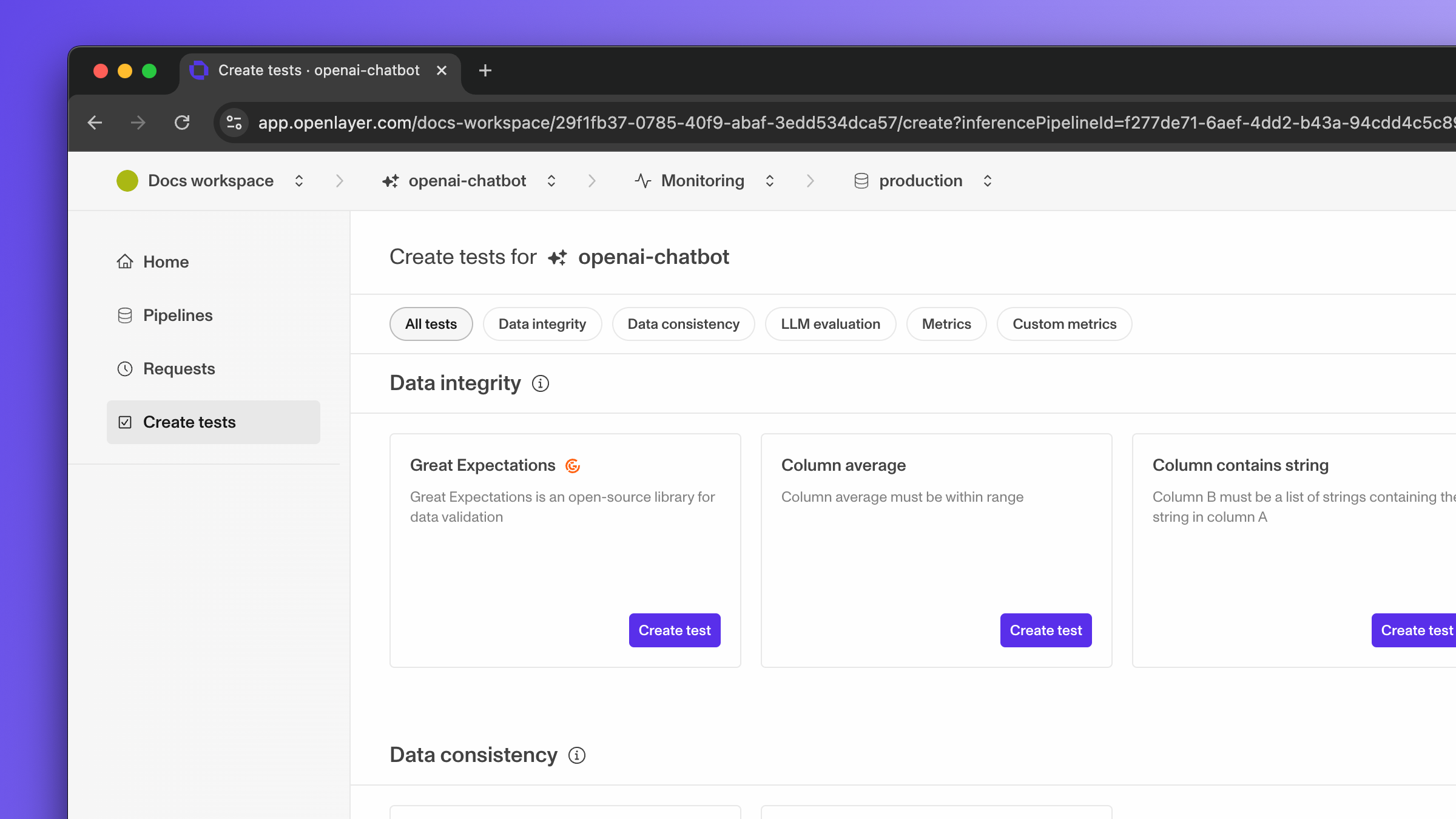
To create a GX test, click on "Create test" for the "Great expectations" test.
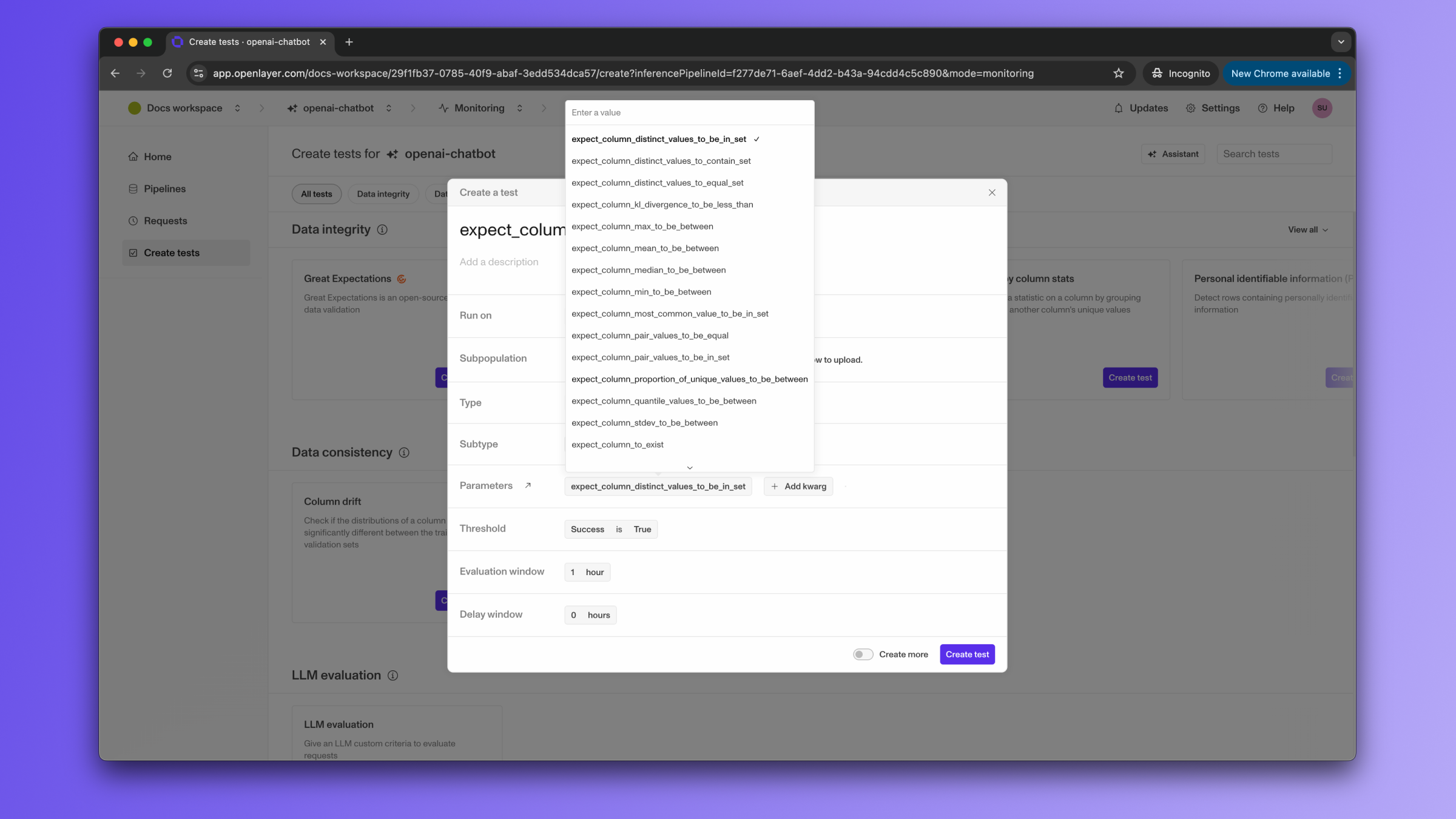
 Then, once the modal is open, select the expectation you are interested in from the dropdown
menu next to "Parameters." For example, let's select the `expect_column_mean_to_be_between`.
Then, once the modal is open, select the expectation you are interested in from the dropdown
menu next to "Parameters." For example, let's select the `expect_column_mean_to_be_between`.
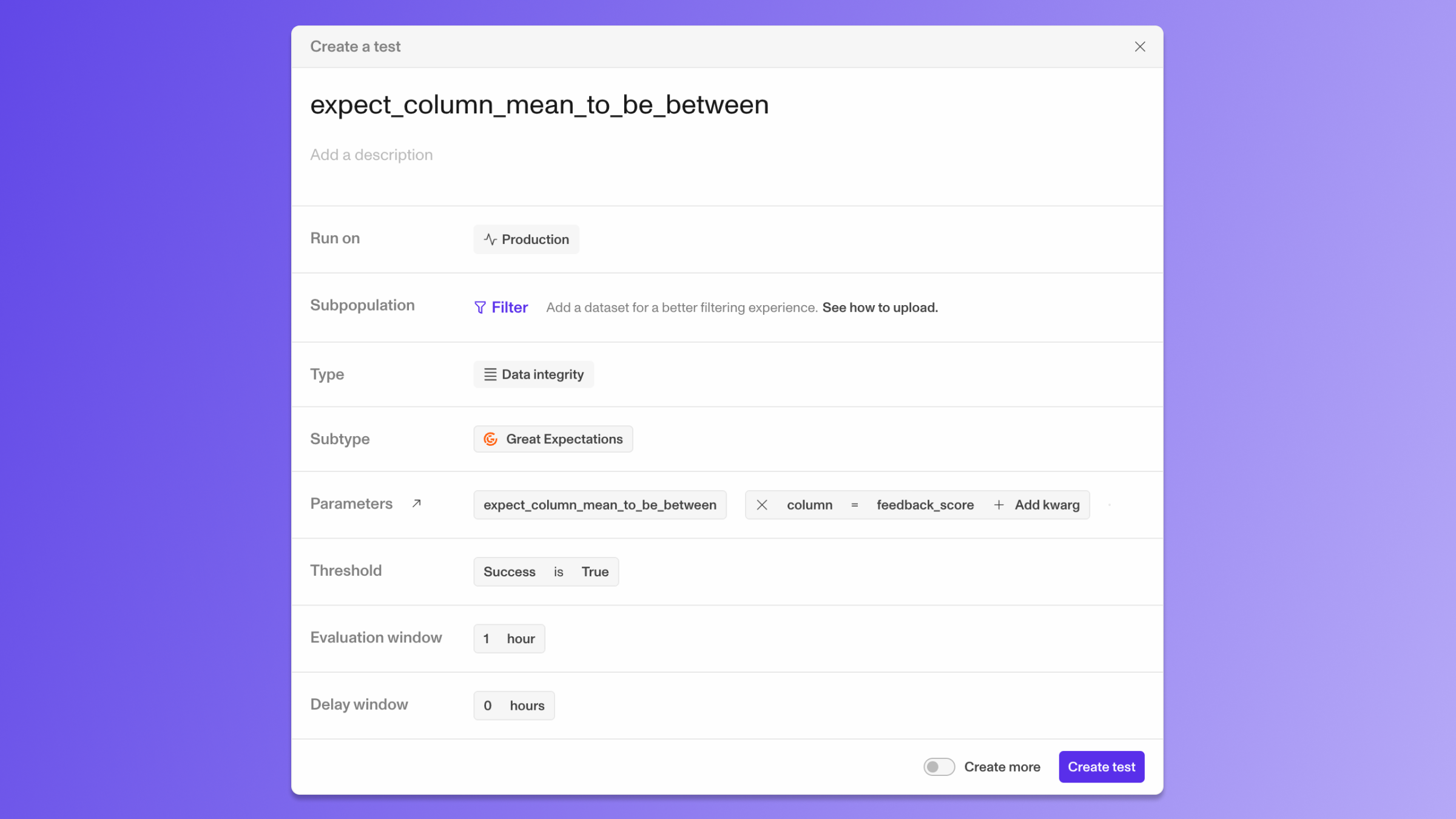
 Once you have selected the expectation, you need to provide the arguments needed to run it. You can click
the link next to "Parameters" to see the documentation for the expectation you selected. In this case, the
expectation requires a `column`, with the name of the column, a `min_value`, and a `max_value`. You can provide
these arguments by clicking on "Add kwarg".
Once you have selected the expectation, you need to provide the arguments needed to run it. You can click
the link next to "Parameters" to see the documentation for the expectation you selected. In this case, the
expectation requires a `column`, with the name of the column, a `min_value`, and a `max_value`. You can provide
these arguments by clicking on "Add kwarg".
 The "Threshold" should be kept as "Success is True," as the expectation will return `True` if the expectation is met
(in this case, the column mean is between the `min_value` and the `max_value`).
Once you have added all the arguments, you can click on "Create test" to create the test.
## Test configuration examples
If you are writing a `tests.json`, here are a few valid configurations for the character length test:
```json Development theme={null}
[
{
"name": "Expect outputs to be within 0 and 10 - GX test",
"description": "Use the `expect_column_mean_to_be_between` from GX to check min and max values for column `openlayer_output`",
"type": "integrity",
"subtype": "greatExpectations",
"thresholds": [
{
"insightName": "greatExpectations",
"insightParameters": [
{
"name": "expectation_name",
"value": "expect_column_mean_to_be_between"
},
{
"name": "expectation_kwargs",
"value": { "column": "openlayer_output", "min_value": 0, "max_value": 10 }
}
],
"measurement": "success",
"operator": "is",
"value": true
}
],
"subpopulationFilters": null,
"mode": "development",
"usesValidationDataset": true,
"usesTrainingDataset": false,
"usesMlModel": false,
"syncId": "b4dee7dc-4f15-48ca-a282-63e2c04e0689"
}
]
```
```json Monitoring theme={null}
[
{
"name": "Expect outputs to be within 0 and 10 - GX test",
"description": "Use the `expect_column_mean_to_be_between` from GX to check min and max values for column `openlayer_output`",
"type": "integrity",
"subtype": "greatExpectations",
"thresholds": [
{
"insightName": "greatExpectations",
"insightParameters": [
{
"name": "expectation_name",
"value": "expect_column_mean_to_be_between"
},
{
"name": "expectation_kwargs",
"value": {
"column": "openlayer_output",
"min_value": 0,
"max_value": 10
}
}
],
"measurement": "success",
"operator": "is",
"value": true
}
],
"subpopulationFilters": null,
"mode": "monitoring",
"usesProductionData": true,
"evaluationWindow": 3600,
"delayWindow": 0,
"syncId": "b4dee7dc-4f15-48ca-a282-63e2c04e0689"
}
]
```
## Related
* [GX expectations gallery](https://greatexpectations.io/expectations).
The "Threshold" should be kept as "Success is True," as the expectation will return `True` if the expectation is met
(in this case, the column mean is between the `min_value` and the `max_value`).
Once you have added all the arguments, you can click on "Create test" to create the test.
## Test configuration examples
If you are writing a `tests.json`, here are a few valid configurations for the character length test:
```json Development theme={null}
[
{
"name": "Expect outputs to be within 0 and 10 - GX test",
"description": "Use the `expect_column_mean_to_be_between` from GX to check min and max values for column `openlayer_output`",
"type": "integrity",
"subtype": "greatExpectations",
"thresholds": [
{
"insightName": "greatExpectations",
"insightParameters": [
{
"name": "expectation_name",
"value": "expect_column_mean_to_be_between"
},
{
"name": "expectation_kwargs",
"value": { "column": "openlayer_output", "min_value": 0, "max_value": 10 }
}
],
"measurement": "success",
"operator": "is",
"value": true
}
],
"subpopulationFilters": null,
"mode": "development",
"usesValidationDataset": true,
"usesTrainingDataset": false,
"usesMlModel": false,
"syncId": "b4dee7dc-4f15-48ca-a282-63e2c04e0689"
}
]
```
```json Monitoring theme={null}
[
{
"name": "Expect outputs to be within 0 and 10 - GX test",
"description": "Use the `expect_column_mean_to_be_between` from GX to check min and max values for column `openlayer_output`",
"type": "integrity",
"subtype": "greatExpectations",
"thresholds": [
{
"insightName": "greatExpectations",
"insightParameters": [
{
"name": "expectation_name",
"value": "expect_column_mean_to_be_between"
},
{
"name": "expectation_kwargs",
"value": {
"column": "openlayer_output",
"min_value": 0,
"max_value": 10
}
}
],
"measurement": "success",
"operator": "is",
"value": true
}
],
"subpopulationFilters": null,
"mode": "monitoring",
"usesProductionData": true,
"evaluationWindow": 3600,
"delayWindow": 0,
"syncId": "b4dee7dc-4f15-48ca-a282-63e2c04e0689"
}
]
```
## Related
* [GX expectations gallery](https://greatexpectations.io/expectations).