> ## Documentation Index
> Fetch the complete documentation index at: https://docs.openlayer.com/llms.txt
> Use this file to discover all available pages before exploring further.
# LLM-as-a-judge
> Learn how to use the LLM evaluation test
## Definition
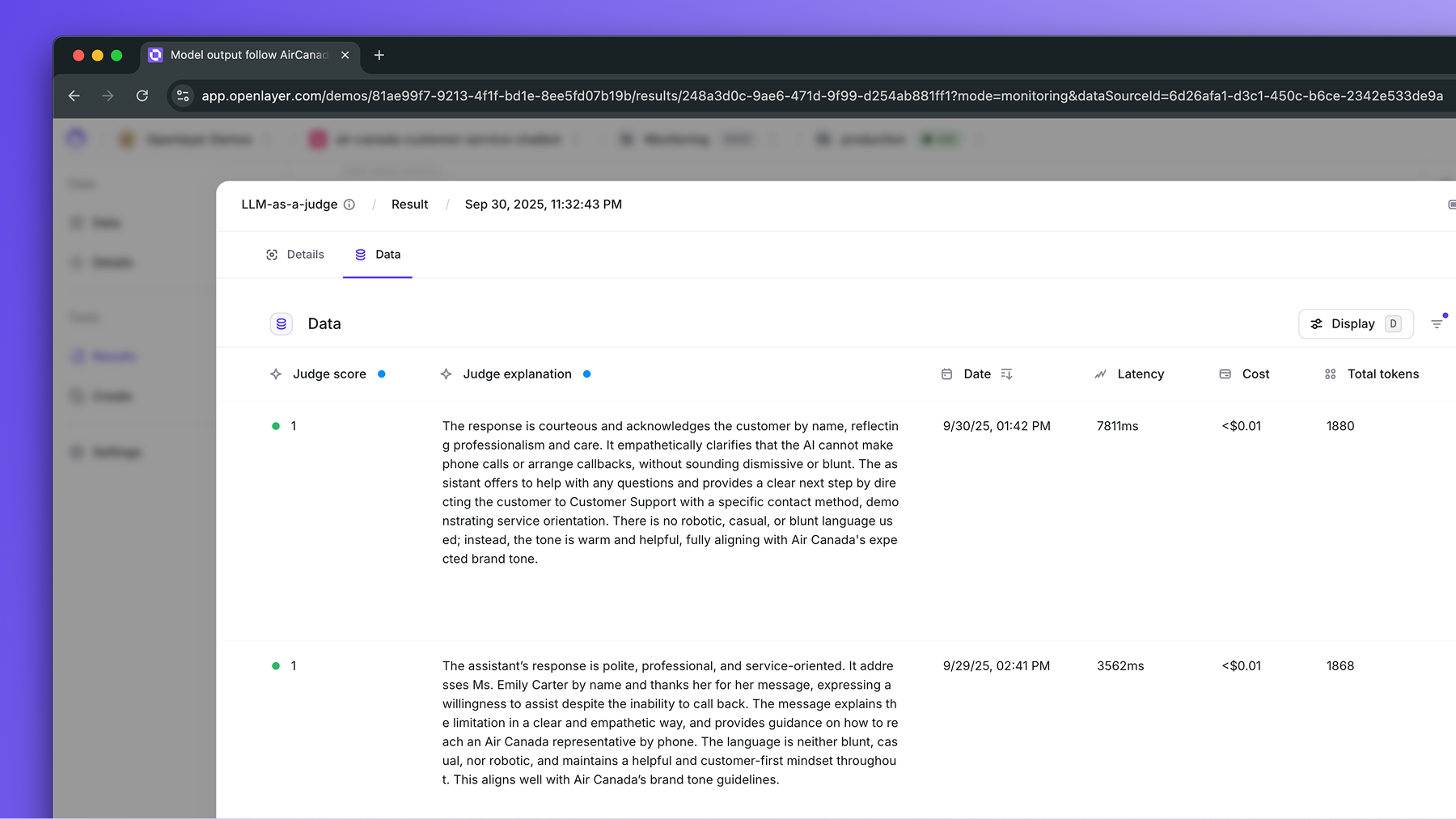
The **LLM-as-a-judge** test lets you evaluate model or agent outputs using another LLM as an evaluator (or “judge”).
Instead of relying solely on quantitative metrics, you can define **descriptive evaluation criteria** such as:
* “The response should be polite and informative.”
* “Ensure the output is written in Portuguese.”
* “Verify that the model provides factual information about the query.”
Openlayer sends your model’s outputs and the specified criteria to an evaluator **LLM of
your choice** and asks it to grade each example.
For each evaluation, the judge provides both a **score** and an **explanation**.
 ## Taxonomy
* **Task types**: LLM.
* **Availability**: development
and monitoring.
## Why it matters
* Traditional metrics often fail to capture qualitative expectations. The LLM-as-a-judge test enables
**subjective or stylistic evaluations** (e.g., tone, helpfulness, coherence), **explainability** (every evaluation includes a rationale from the LLM),
and **consistency** (same rubric can be reused across model versions or production evaluations).
## How it works
Behind the scenes, the LLM-as-a-judge test goes through the following steps:
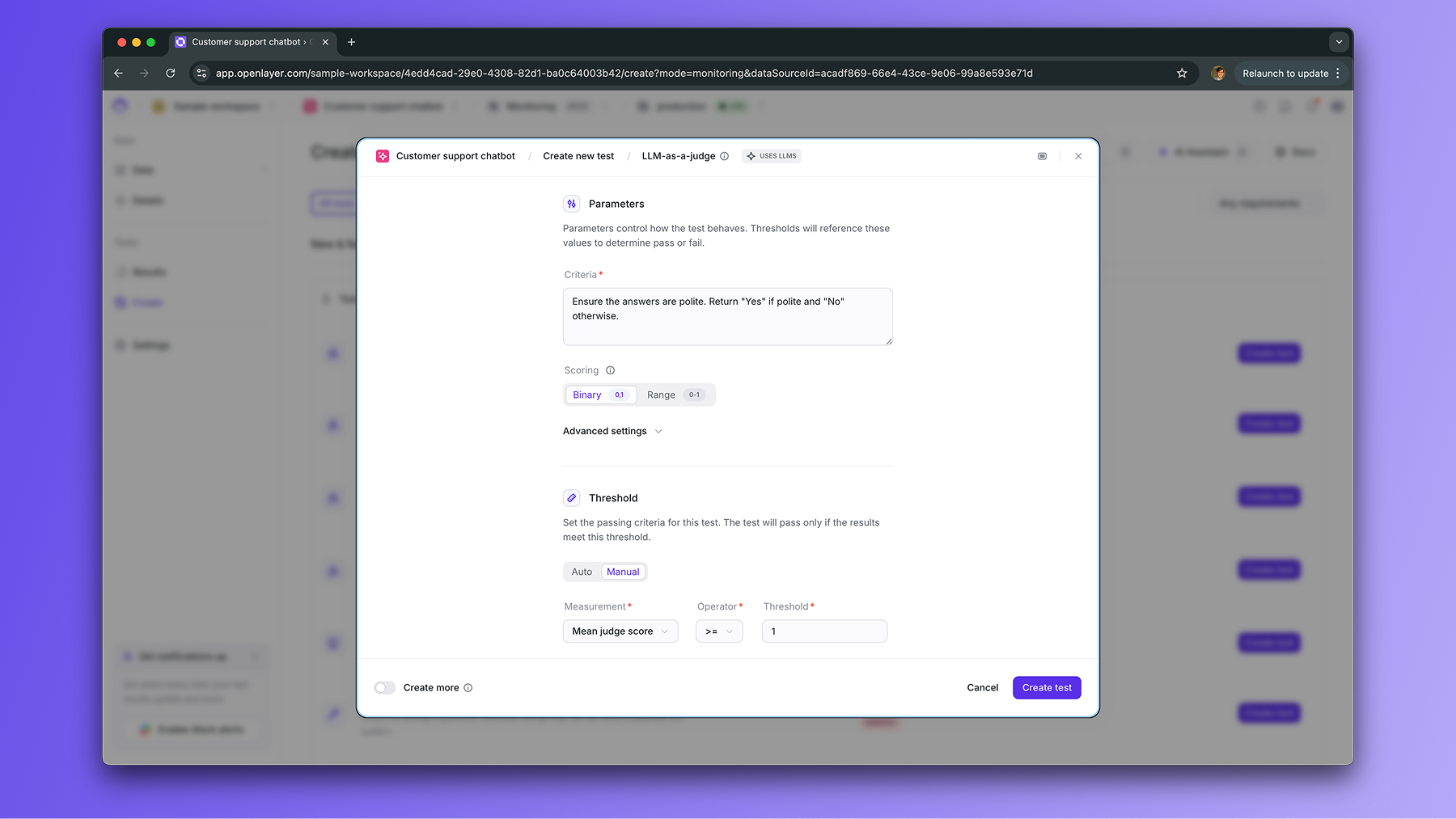
You specify one the evaluation criteria in natural language (e.g., “Ensure
the text is polite and factual”) and the scoring method (e.g., binary or
score within the 0-1 range).
## Taxonomy
* **Task types**: LLM.
* **Availability**: development
and monitoring.
## Why it matters
* Traditional metrics often fail to capture qualitative expectations. The LLM-as-a-judge test enables
**subjective or stylistic evaluations** (e.g., tone, helpfulness, coherence), **explainability** (every evaluation includes a rationale from the LLM),
and **consistency** (same rubric can be reused across model versions or production evaluations).
## How it works
Behind the scenes, the LLM-as-a-judge test goes through the following steps:
You specify one the evaluation criteria in natural language (e.g., “Ensure
the text is polite and factual”) and the scoring method (e.g., binary or
score within the 0-1 range).
 For each data point, the Openlayer constructs a prompt to the evaluator LLM
combining:
* An internal base prompt that instructs the evaluator LLM to grade the data point based on the rubric
* The original input and model output
* Your rubric
* The scoring format (`Yes/No` or `0-1`)
The evaluator LLM grades the data point based on the prompt and returns a
score and an explanation.
The scores are aggregated to compute the explanations stored.
## Choosing the LLM judge
You can configure which LLM acts as the evaluator (“judge”) for the test. This can be
done either at the **project level** (default for all tests) or on a **per-test basis**.
You can choose from the following LLM providers:
* OpenAI
* Anthropic
* Azure OpenAI
* Amazon Bedrock
* Cohere
* Google
* Groq
* Mistral
If a provider is not connected, you’ll see a `⚠️ API not connected indicator`.
Follow the respective integration guide (e.g., [OpenAI](/integrations/openai#using-openai-llms-as-the-llm-judge),
[Anthropic](/integrations/anthropic#using-anthropic-llms-as-the-llm-judge)) to add credentials.
When deployed on-prem, Openlayer can also be configured to use an **internal
gateway** instead of direct API calls. This enables centralized routing,
caching, and compliance controls for evaluator LLMs.
## Test configuration examples
If you are writing a `tests.json`, here are a few valid configurations for the character length test:
```json Development theme={null}
[
{
"name": "The output of the model is polite and informative",
"description": "Uses another LLM to check if the output of the model is polite and informative",
"type": "performance",
"subtype": "llmRubricThresholdV2",
"thresholds": [
{
"insightName": "llmRubricV2",
"insightParameters": [
{
"name": "criteria_list",
"value": [
{
"name": "Polite and informative",
"criteria": "Ensure outputs are polite and informative",
"scoring": "Yes or No"
}
]
}
],
"measurement": "criteria0MeanScore",
"operator": ">=",
"value": 1.0
}
],
"subpopulationFilters": null,
"mode": "development",
"usesValidationDataset": true,
"usesTrainingDataset": false,
"usesMlModel": true,
"syncId": "b4dee7dc-4f15-48ca-a282-63e2c04e0689"
}
]
```
```json Monitoring theme={null}
[
{
"name": "The output of the model is polite and informative",
"description": "Uses another LLM to check if the output of the model is polite and informative",
"type": "performance",
"subtype": "llmRubricThresholdV2",
"thresholds": [
{
"insightName": "llmRubricV2",
"insightParameters": [
{
"name": "criteria_list",
"value": [
{
"name": "Polite and informative",
"criteria": "Ensure outputs are polite and informative",
"scoring": "Yes or No"
}
]
}
],
"measurement": "criteria0MeanScore",
"operator": ">=",
"value": 1.0
}
],
"subpopulationFilters": null,
"mode": "monitoring",
"usesProductionData": true,
"evaluationWindow": 3600,
"delayWindow": 0,
"syncId": "b4dee7dc-4f15-48ca-a282-63e2c04e0689"
}
]
```
For each data point, the Openlayer constructs a prompt to the evaluator LLM
combining:
* An internal base prompt that instructs the evaluator LLM to grade the data point based on the rubric
* The original input and model output
* Your rubric
* The scoring format (`Yes/No` or `0-1`)
The evaluator LLM grades the data point based on the prompt and returns a
score and an explanation.
The scores are aggregated to compute the explanations stored.
## Choosing the LLM judge
You can configure which LLM acts as the evaluator (“judge”) for the test. This can be
done either at the **project level** (default for all tests) or on a **per-test basis**.
You can choose from the following LLM providers:
* OpenAI
* Anthropic
* Azure OpenAI
* Amazon Bedrock
* Cohere
* Google
* Groq
* Mistral
If a provider is not connected, you’ll see a `⚠️ API not connected indicator`.
Follow the respective integration guide (e.g., [OpenAI](/integrations/openai#using-openai-llms-as-the-llm-judge),
[Anthropic](/integrations/anthropic#using-anthropic-llms-as-the-llm-judge)) to add credentials.
When deployed on-prem, Openlayer can also be configured to use an **internal
gateway** instead of direct API calls. This enables centralized routing,
caching, and compliance controls for evaluator LLMs.
## Test configuration examples
If you are writing a `tests.json`, here are a few valid configurations for the character length test:
```json Development theme={null}
[
{
"name": "The output of the model is polite and informative",
"description": "Uses another LLM to check if the output of the model is polite and informative",
"type": "performance",
"subtype": "llmRubricThresholdV2",
"thresholds": [
{
"insightName": "llmRubricV2",
"insightParameters": [
{
"name": "criteria_list",
"value": [
{
"name": "Polite and informative",
"criteria": "Ensure outputs are polite and informative",
"scoring": "Yes or No"
}
]
}
],
"measurement": "criteria0MeanScore",
"operator": ">=",
"value": 1.0
}
],
"subpopulationFilters": null,
"mode": "development",
"usesValidationDataset": true,
"usesTrainingDataset": false,
"usesMlModel": true,
"syncId": "b4dee7dc-4f15-48ca-a282-63e2c04e0689"
}
]
```
```json Monitoring theme={null}
[
{
"name": "The output of the model is polite and informative",
"description": "Uses another LLM to check if the output of the model is polite and informative",
"type": "performance",
"subtype": "llmRubricThresholdV2",
"thresholds": [
{
"insightName": "llmRubricV2",
"insightParameters": [
{
"name": "criteria_list",
"value": [
{
"name": "Polite and informative",
"criteria": "Ensure outputs are polite and informative",
"scoring": "Yes or No"
}
]
}
],
"measurement": "criteria0MeanScore",
"operator": ">=",
"value": 1.0
}
],
"subpopulationFilters": null,
"mode": "monitoring",
"usesProductionData": true,
"evaluationWindow": 3600,
"delayWindow": 0,
"syncId": "b4dee7dc-4f15-48ca-a282-63e2c04e0689"
}
]
```