> ## Documentation Index
> Fetch the complete documentation index at: https://docs.openlayer.com/llms.txt
> Use this file to discover all available pages before exploring further.
# Tests configuration
> Learn how to configure tests in Openlayer
Each Openlayer test can be tailored to your needs. You can choose the data to run on,
adjust thresholds, tweak parameters, and more.
Most options have sensible defaults, so setup is usually minimal.
This page walks you through all available configurations.
 ## Configurations
The configurations available are:
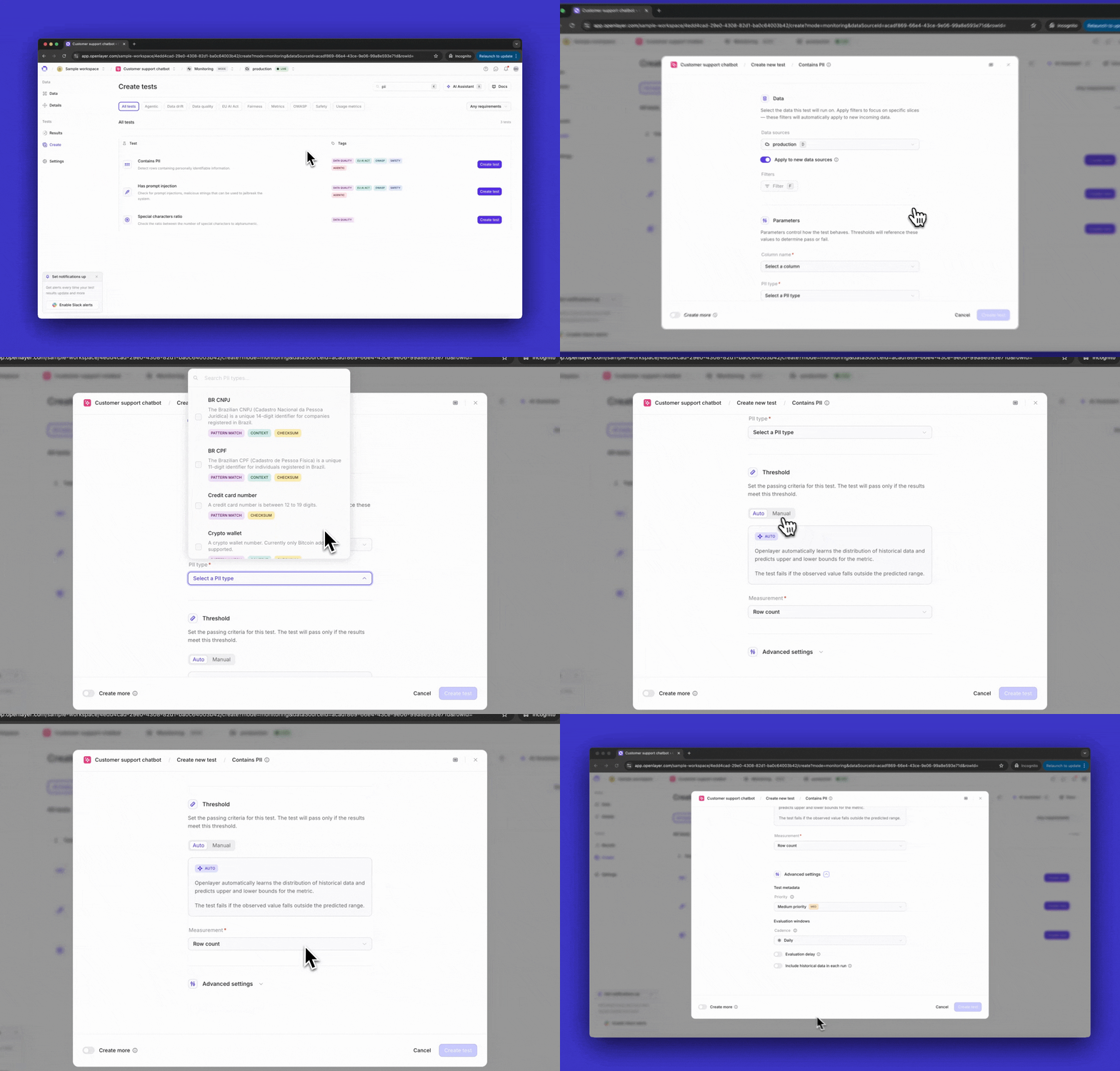
The "**Data**" section allows you to select the data on top of which this test will run.
In [monitoring mode](/monitoring/overview), it means choosing among your data
sources (e.g., production data, staging data, etc.) In
[development mode](/development/overview), it means selecting among your datasets
(e.g., training, validation, etc.)
You can also apply filters to narrow the test to specific slices of the data.
Some tests include configurable parameters that control their behavior.
For example, a test such as the [PII detection test](/tests/catalog/contains-p-i-i)
lets you specify which type of PII to detect (e.g., credit card numbers, social security numbers, etc.)
[Custom metrics](/tests/custom-metrics) can also declare their own configurable
parameters. See [Configurable parameters](/tests/custom-metrics#configurable-parameters)
for details on how to define them.
Refer to the specific test page in the [Catalog](/tests/overview) for details
on its parameters.
The "**Threshold**" section allows you to define the condition for the test to pass.
You can set the threshold manually (e.g., saying that the test passes if the
metric is greater than 0.5). However, in [monitoring mode](/monitoring/overview),
you can also use **automatic thresholds**, which is available for most tests.
When using **automatic thresholds**, Openlayer analyzes historical data and
learns a time-series model. Then, for each new observation, Openlayer
predicts an expected range. The test fails if the observed metric falls outside this range.
The "**Advanced settings**" section allows you to set additional configurations and
metadata for the test.
Here's where you can define the criticality of the test, and for monitoring,
the [evaluation and delay windows](/monitoring/evaluation-and-delay-windows).
## Configurations
The configurations available are:
The "**Data**" section allows you to select the data on top of which this test will run.
In [monitoring mode](/monitoring/overview), it means choosing among your data
sources (e.g., production data, staging data, etc.) In
[development mode](/development/overview), it means selecting among your datasets
(e.g., training, validation, etc.)
You can also apply filters to narrow the test to specific slices of the data.
Some tests include configurable parameters that control their behavior.
For example, a test such as the [PII detection test](/tests/catalog/contains-p-i-i)
lets you specify which type of PII to detect (e.g., credit card numbers, social security numbers, etc.)
[Custom metrics](/tests/custom-metrics) can also declare their own configurable
parameters. See [Configurable parameters](/tests/custom-metrics#configurable-parameters)
for details on how to define them.
Refer to the specific test page in the [Catalog](/tests/overview) for details
on its parameters.
The "**Threshold**" section allows you to define the condition for the test to pass.
You can set the threshold manually (e.g., saying that the test passes if the
metric is greater than 0.5). However, in [monitoring mode](/monitoring/overview),
you can also use **automatic thresholds**, which is available for most tests.
When using **automatic thresholds**, Openlayer analyzes historical data and
learns a time-series model. Then, for each new observation, Openlayer
predicts an expected range. The test fails if the observed metric falls outside this range.
The "**Advanced settings**" section allows you to set additional configurations and
metadata for the test.
Here's where you can define the criticality of the test, and for monitoring,
the [evaluation and delay windows](/monitoring/evaluation-and-delay-windows).