

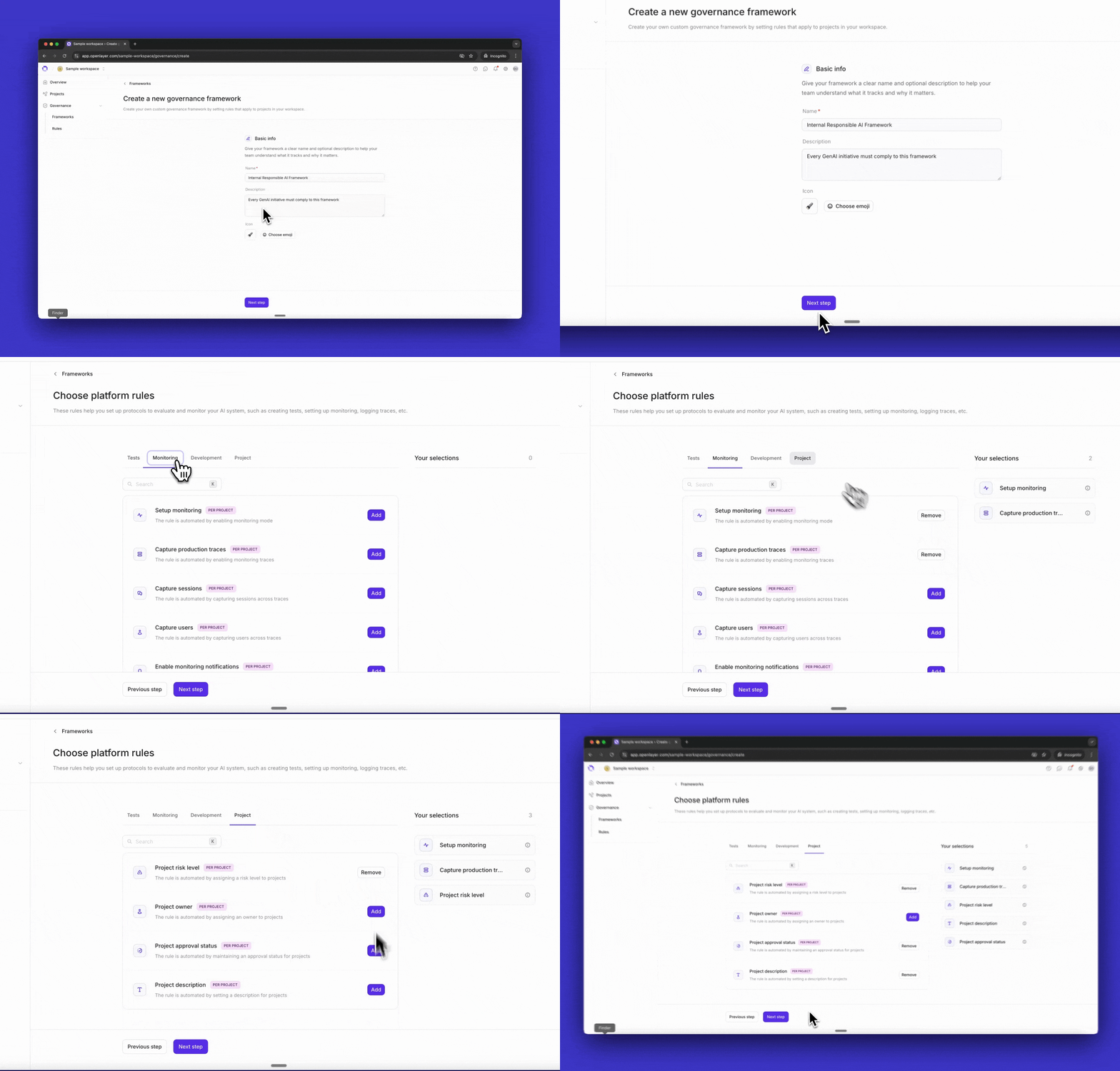
Create the framework
Navigate to Governance > Frameworks and click Create framework.Provide a name (e.g., “Internal Responsible AI Policy”), an optional description, and an icon to identify the framework at a glance.
Add platform rules
Select the platform rules your framework should enforce. Platform rules require teams to take specific actions within Openlayer — such as enabling monitoring mode, capturing production traces, or running tests in CI/CD.Your selections appear in the sidebar as you go. See Platform rules for the full list of available rules.
Add evidence-based rules
Select the evidence-based rules your framework should enforce. These require teams to upload documents or provide links as proof of compliance — security policies, model cards, risk assessments, and similar artifacts.Openlayer provides a library of common rules, including AI use case declarations, security guidelines, technical documentation, and responsible disclosure policies.To create a custom rule, click New rule and define:
- A name and description
- Scope — workspace-wide (completed once for the whole org) or per-project (each project must satisfy it individually)
- Renewal cadence — for policies that need periodic review, such as annual security audits