Understand how built-in frameworks translate standard text into actionable rules
Every built-in framework includes a Documentation tab that connects the original standard text to the specific rules you need to satisfy in Openlayer. This is the fastest way to answer: “what does Article X actually require us to do?”
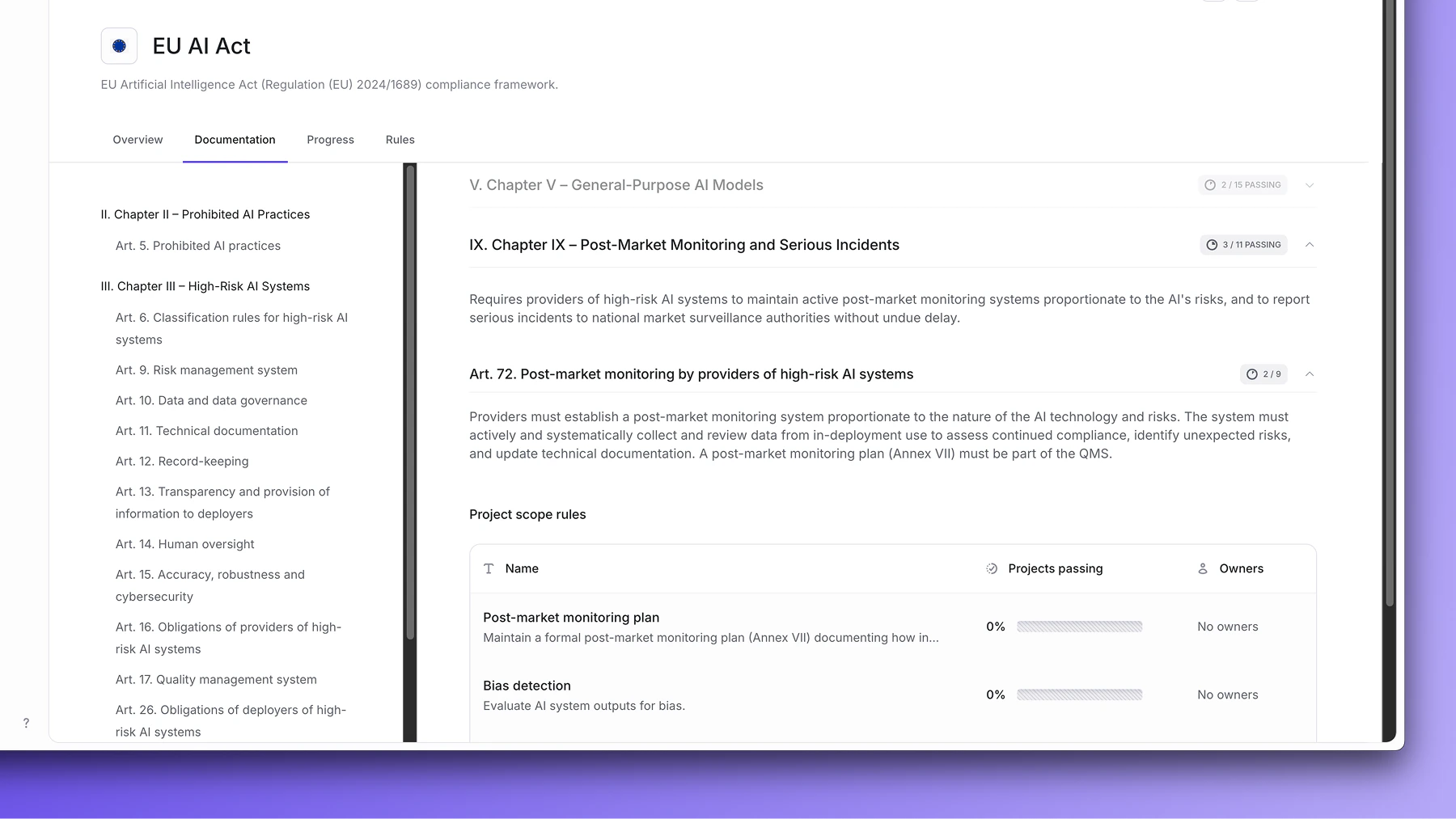
Navigate to Governance > Frameworks, click a framework, and open the Documentation tab.The left panel shows a table of contents organized by chapter and article. Clicking any article reveals:
The original standard text on the right
The Project scope rules directly below it — the Openlayer rules that satisfy that article
For each rule, you can see its name, a short description, the percentage of projects currently passing it, and the assigned owners.This view lets you trace any compliance requirement back to a concrete action in Openlayer — and see at a glance how your projects are performing against it.
Custom frameworks don’t have a Documentation tab. They display the rules list
directly, without the standard text mapping.
Each rule in the documentation is either a platform rule or an evidence-based rule. See Platform rules and Evidence-based rules for details on how each type is completed.
Was this page helpful?
Assistant
Responses are generated using AI and may contain mistakes.