

- If you are building an AI system with Google Gemini models and want to evaluate it, you can use the SDKs to make Openlayer part of your workflow.
- Some tests on Openlayer are based on a score produced by an LLM judge. You can use a Google Gemini model as the LLM judge for these tests.
Building multi-agent systems with Google Agent Development Kit? Check out
the Google ADK integration page for comprehensive
tracing of agent conversations, handoffs, and tool usage.
Evaluating Google Gemini models
You can set up Openlayer tests to evaluate your Google Gemini models in monitoring and development.Monitoring
To use the monitoring mode, you must instrument your code to publish the requests your AI system receives to the Openlayer platform. Openlayer traces the Google Gen AI SDK — thegoogle-genai
package in Python and @google/genai in TypeScript — whose entry point is a Client object.
To set it up, you must follow the steps in the code snippet below:
See full TypeScript example
generate_content and generate_content_stream (generateContent and
generateContentStream in TypeScript). Chat sessions created with client.chats go through the same object,
so they are traced without any extra setup. In Python, the asynchronous equivalents under client.aio.models
are covered too.
On Gemini 2.5 models, thinking is on by default and the Google API reports
thinking tokens separately from the answer tokens. Openlayer counts them as
completion tokens, because that is how they are billed — so the cost estimate
on the step reflects what you actually pay.
Vertex AI
The same client class serves both Google AI Studio and Vertex AI, so tracing works the same way in both. To call Gemini through Vertex AI, construct the client withvertexai=True (vertexai: true in TypeScript)
and let Google’s SDK pick up your Google Cloud credentials:
llm_system: google_vertex in their metadata,
so you can tell the two backends apart on the “Data” page.
If the Google Gemini model call is just one of the steps of your AI system,
you can use the code snippets above together with
tracing. In this case, your Gemini calls get added as a
step of a larger trace. Refer to the Tracing guide for
details.
Using the legacy google-generativeai SDK
Using the legacy google-generativeai SDK
Google’s
google-generativeai package — the one you import as
google.generativeai and use through genai.GenerativeModel — is in
maintenance mode. Openlayer still traces it, and both packages can be
installed side by side, so you can migrate at your own pace. Calls from either
package produce the same “Gemini Generation” step, which keeps your dashboards
intact across the switch.Python
See full Python example
Development
In development mode, Openlayer becomes a step in your CI/CD pipeline, and your tests get automatically evaluated after being triggered by some events. Openlayer tests often rely on your AI system’s outputs on a validation dataset. As discussed in the Configuring output generation guide, you have two options:- either provide a way for Openlayer to run your AI system on your datasets, or
- before pushing, generate the model outputs yourself and push them alongside your artifacts.
GOOGLE_AI_API_KEY.
If you don’t add the required Google AI API key, you’ll encounter a “Missing API key”
error when Openlayer tries to run your AI system to get its outputs.
Make sure to read the API key from the environment in the script you provide
as the
batchCommand in the openlayer.json:Using Google Gemini models as the LLM judge
Some tests on Openlayer rely on scores produced by an LLM judge. For example, tests that use Ragas metrics and the custom LLM evaluator test. You can use a Google Gemini model through Google AI Studio or Vertex AI as the underlying LLM judge for these tests. First, go to Settings → Environment at the workspace or project level and add one of the following authentication methods. Provider credentials are not entered on the LLM-as-a-judge page.Google AI Studio
Choose API Authentication and add yourGOOGLE_API_KEY.
Vertex AI with service-account JSON
Choose Vertex AI Service Account Authentication and add:GOOGLE_GENAI_USE_VERTEXAIwith the valuetrueGOOGLE_CLOUD_PROJECTwith your Google Cloud project IDGOOGLE_APPLICATION_CREDENTIALS_JSONwith the full contents of your service-account JSON key file
Vertex AI with self-hosted credentials
For a self-hosted Openlayer deployment, choose Vertex AI Authentication and addGOOGLE_GENAI_USE_VERTEXAI with the value true and
GOOGLE_CLOUD_PROJECT with your Google Cloud project ID.
Your deployment can then authenticate with Application Default Credentials, a
mounted service-account key file referenced by
GOOGLE_APPLICATION_CREDENTIALS, or Workload Identity.
For either Vertex AI option, you can also set GOOGLE_CLOUD_LOCATION. It
defaults to us-central1.
Select the judge model
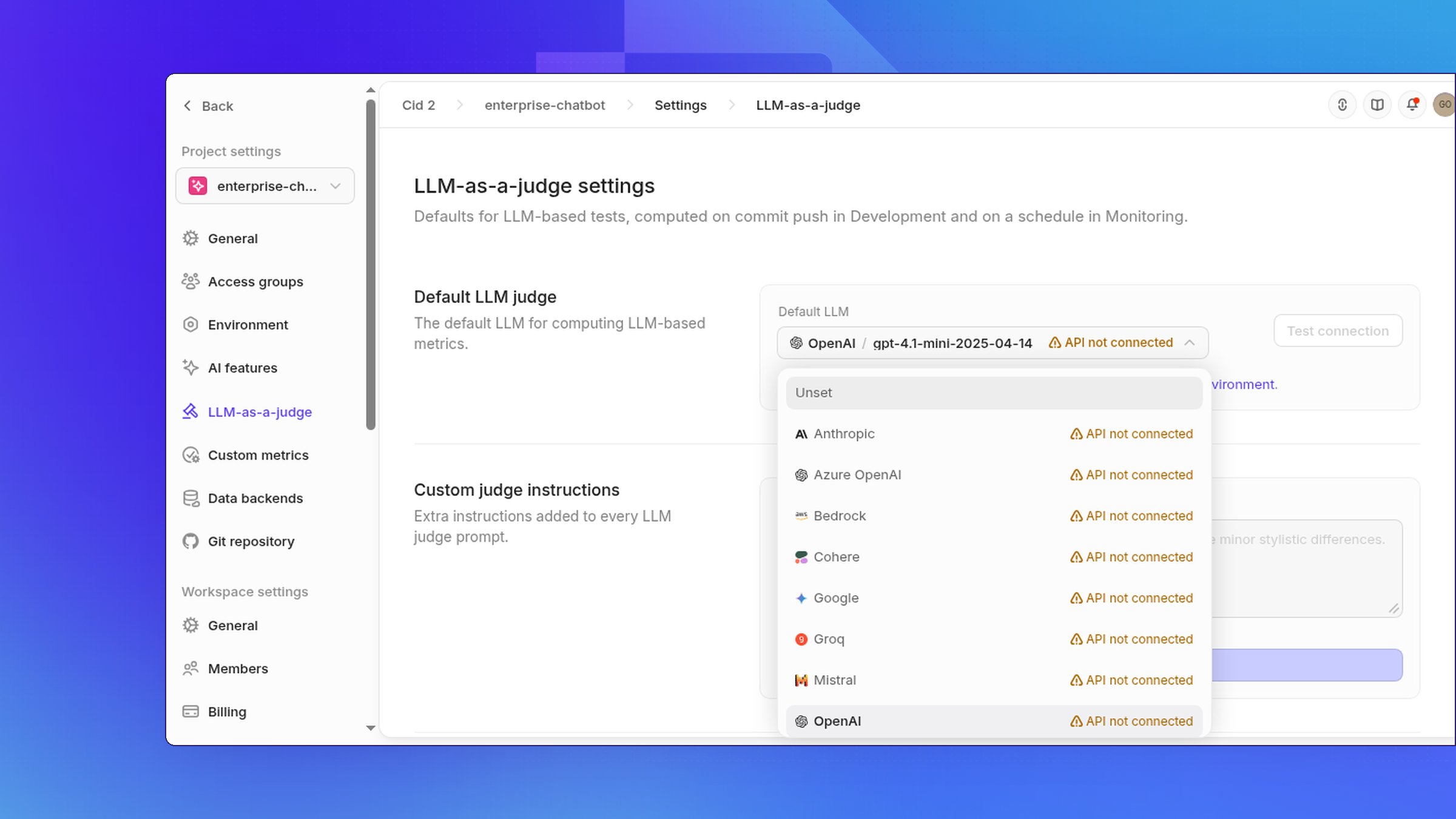
Open your project and go to Settings → LLM-as-a-judge. Under Default LLM, choose Google, type a Gemini model name, such asgemini-2.0-flash, and select Select.
Troubleshooting Vertex AI connections
- If the Vertex AI API is not enabled, enable
aiplatform.googleapis.comon the project specified byGOOGLE_CLOUD_PROJECT. - If billing is disabled, enable billing on that Google Cloud project.
- If permission is denied, grant the service account the Vertex AI User role
(
roles/aiplatform.user). - If
GOOGLE_APPLICATION_CREDENTIALS_JSONis malformed, paste the full contents of the service-account JSON key file.