

Enable attachment uploads
Attachments require
openlayer>=0.17.0 in Python (url_upload_enabled
requires openlayer>=0.17.9) and openlayer>=0.32.0 in TypeScript. Uploading
media sends that data to Openlayer, so enable uploads only when your privacy
requirements allow it.Attach media to a step
Calllog_attachment() in Python or logAttachment() in TypeScript inside any traced
function to attach media to the step currently being recorded:
The Python helpers live in
openlayer.lib.tracing, not in openlayer.lib. In
TypeScript, logAttachment is exported from openlayer/lib/tracing/tracer.Attachment you built yourself. Python
also accepts a file-like object, and TypeScript accepts a Buffer, Uint8Array, or
ArrayBuffer:
Build attachments explicitly
For more control, construct anAttachment and pass it to the helper:
Media in inputs and outputs
Attachments don’t have to hang off a step. You can pass one to a traced function, or return one, and it is uploaded and displayed like any other attachment:{ "audio": attachment }), or
when it is an array of content items. A content item nested inside
another object is not rendered as media — put the bare attachment there instead.
Multimodal messages
To model a message that is itself part text and part media — the shape a vision or audio model actually receives — use content items:TextContent, ImageContent, AudioContent, and
FileContent — and a single message can mix as many as you need. Openlayer renders the
message in order, so the text and the media it refers to stay together.
Automatic capture
Some integrations attach media for you once uploads are enabled.OpenAI (Python)
If you send multimodal messages through a traced OpenAI client in Python, Openlayer reads the content array and converts it to attachments, on both the Chat Completions and Responses APIs:Python
image_url, input_image), audio (input_audio), and files (file) are all
recognized, whether they arrive as a URL, a base64 data URL, or an uploaded file ID.
Generated images in Responses API output are captured the same way.
Azure AI Speech (Python and TypeScript)
The Azure AI Speech integration attaches synthesized audio to each synthesis step, and the audio you pass for recognition to each recognition step, in both SDKs.How attachments appear in Openlayer
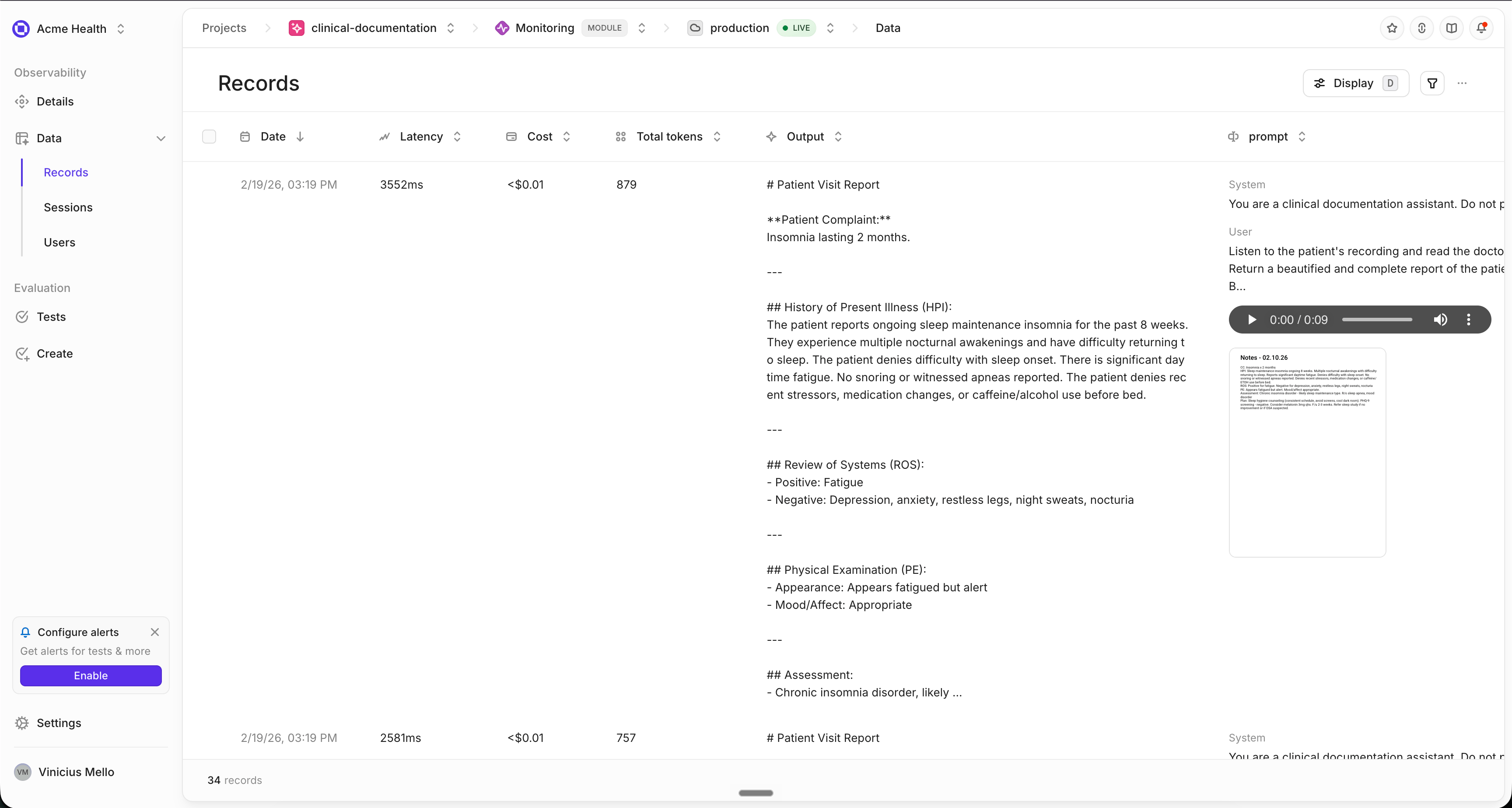
Uploaded attachments are rendered wherever the trace is shown — in the row, in the row detail view, and on the individual step:
Every attachment can be downloaded, whatever its type. Downloads keep the attachment’s
name and extension as part of the filename.
How uploads work
- When: attachments are uploaded when the trace completes, before the trace is
published, so the published trace already carries each attachment’s
storageUri. - Deduplication: attachments are deduplicated by MD5 checksum, so attaching the same image to three steps costs one upload.
- Failures: a failed upload is logged and the trace is still published — you get the trace without that media rather than an exception.
- Where: everything found on a step’s attachments and in its inputs and outputs is uploaded, including nested steps.
The attachment format
Attachments are plain JSON inside your trace, so any client that can publish a row can publish an attachment. This is what both SDKs write:storageUri is what makes an attachment displayable — it is the reference to the copy in
your workspace storage. To obtain one for media you upload yourself, request a presigned
URL, upload the bytes to it, and keep the storageUri that comes back:
url to upload to and the storageUri to record. How you upload
depends on your deployment’s storage:
- Openlayer Cloud (S3): the response also contains form
fields. Send a multipartPOSTtourlwith every field first and the file last, in a part namedfile. - Self-hosted on GCS, Azure Blob Storage, or Oracle Object Storage: there are no
fields. Send aPUTof the raw bytes tourl, with aContent-Typeheader. Azure also requiresx-ms-blob-type: BlockBlob. - Self-hosted with local storage: send a multipart
POSTtourlwith the file in a part namedfile.
Complete example
An expense claim that arrives as a photo, a voice note, and a policy document — attached to the trace, then answered by a model:Troubleshooting
My attachment does not appear in the platform
My attachment does not appear in the platform
Check that uploads are enabled first (
attachment_upload_enabled=True in
Python, attachmentUploadEnabled: true in TypeScript) — they are off by
default, and without them nothing is uploaded. If the attachment came from
from_url() / fromUrl(), you also need URL uploads enabled, otherwise
Openlayer never fetches a copy it can display.The attachment is in the trace but not rendered as media
The attachment is in the trace but not rendered as media
Check where it sits. An input or output renders as media when it is an
attachment, an object whose values are attachments, or an array of content
items. A single content item nested inside another object is not rendered —
use the bare attachment there instead.
An attachment silently disappeared from the trace
An attachment silently disappeared from the trace
Attachments with no data and no reference are dropped rather than published
— most often because a file path does not exist. The SDK logs a warning when
this happens. In Python, enable debug logging while you debug:
Will attachment uploads slow down my application?
Will attachment uploads slow down my application?
Uploads happen when the trace completes, after your traced function returns,
so your code isn’t held up while the media uploads. A failed upload is logged
and the trace is still published — you get the trace without the media
rather than an exception.
Looking to add non-media context to your traces instead? See Add metadata to
traces.