


All access is read-only. Openlayer never writes to your Databricks
workspace, never runs a Genie space, and never changes anyone’s permissions
there.
This page covers Genie conversations. To run data quality tests against
Databricks tables through a SQL warehouse, see
Databricks instead. The two are independent — you
can use either or both.
How it works
Once connected, Openlayer:- Inventories your Genie spaces — enumerates every space the integration identity can see and records its title, description, and warehouse. A space that stops appearing is marked no longer visible rather than deleted, so a permission change reads as a coverage gap instead of silently shrinking your inventory
- Applies a registration policy — each newly discovered space is auto-registered, parked for approval, or ignored, according to the policy you set on the connection
- Creates a project per registered space — a project and inference pipeline are created and attached, or you can point the space at an existing pair
- Imports conversations — walks each registered space’s conversations and writes one trace per turn, keyed on space + conversation + message, so repeated polls never duplicate a turn
- Reports coverage — every space carries a coverage state saying whether conversations are actually flowing and, when they are not, what to do about it
Prerequisites
Before connecting, you need:- A Databricks workspace with at least one Genie space.
- The workspace URL, for example
https://dbc-1234abcd-5678.cloud.databricks.com. - A Databricks personal access token for the identity Openlayer should use.
- CAN MANAGE on each Genie space you want to monitor (see below).
- An Openlayer workspace where you are an admin. Connecting, changing the policy, registering a space, and disconnecting are all admin-only actions.
Why CAN MANAGE matters
Openlayer sees exactly what the token’s identity sees, and the two permission levels do different things:
Listing another user’s conversations requires at least CAN MANAGE on the space, so a space granted
only CAN VIEW appears in the inventory and reports Missing CAN MANAGE rather than importing
anything.
Setup guide
Step 1: Open the integration
In Openlayer, go to Settings → Integrations, find Databricks AI/BI Genie, and click Enable.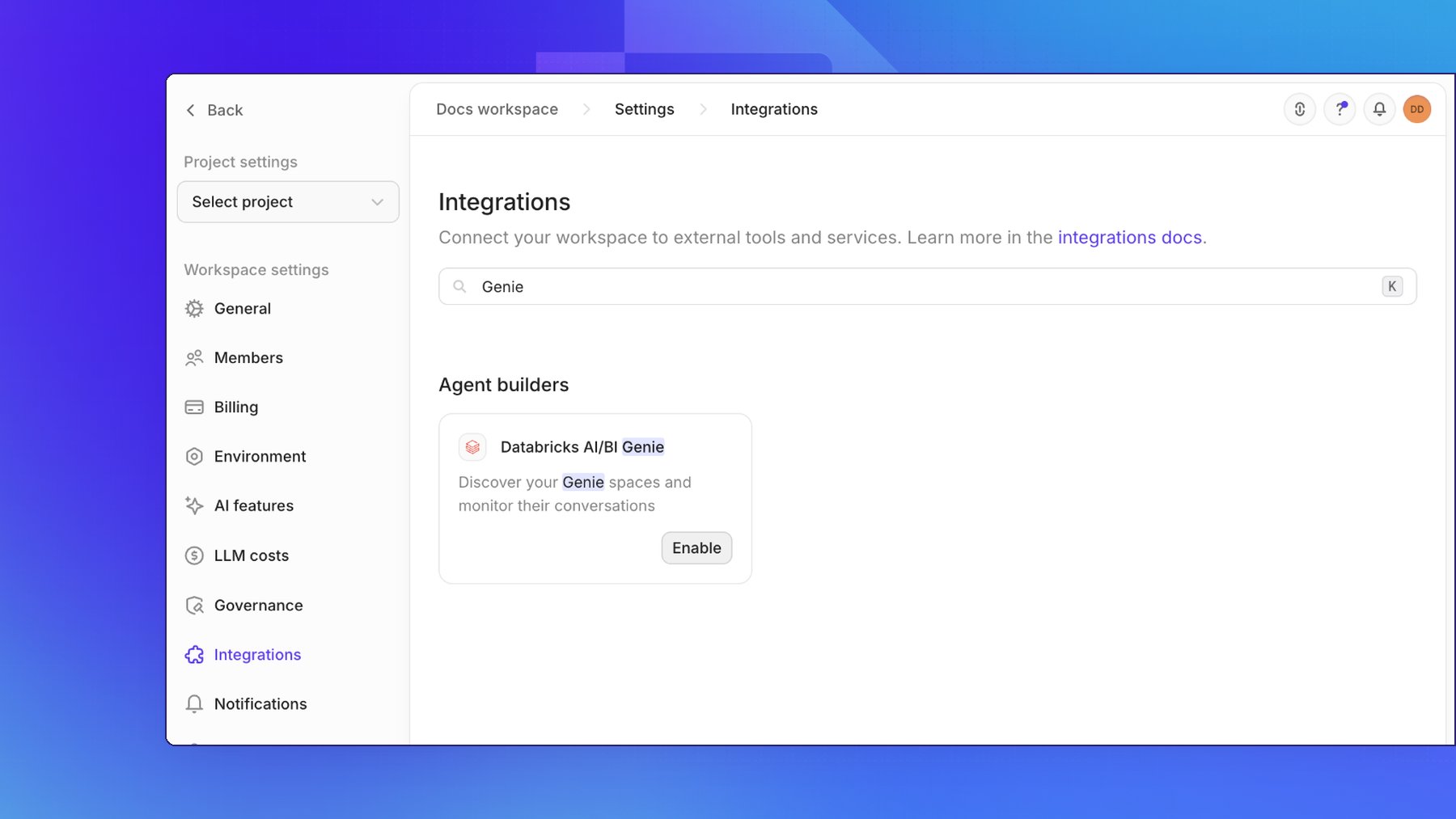
Step 2: Create a Databricks access token
In Databricks, go to User Settings → Developer → Access Tokens and generate a token for the identity Openlayer should use. Copy it — Databricks shows it only once. See the Databricks documentation for details. Then share each Genie space you want monitored with that identity at the CAN MANAGE level.Step 3: Connect
Enter your Databricks workspace URL and the access token, and choose what should happen when a new Genie space is discovered.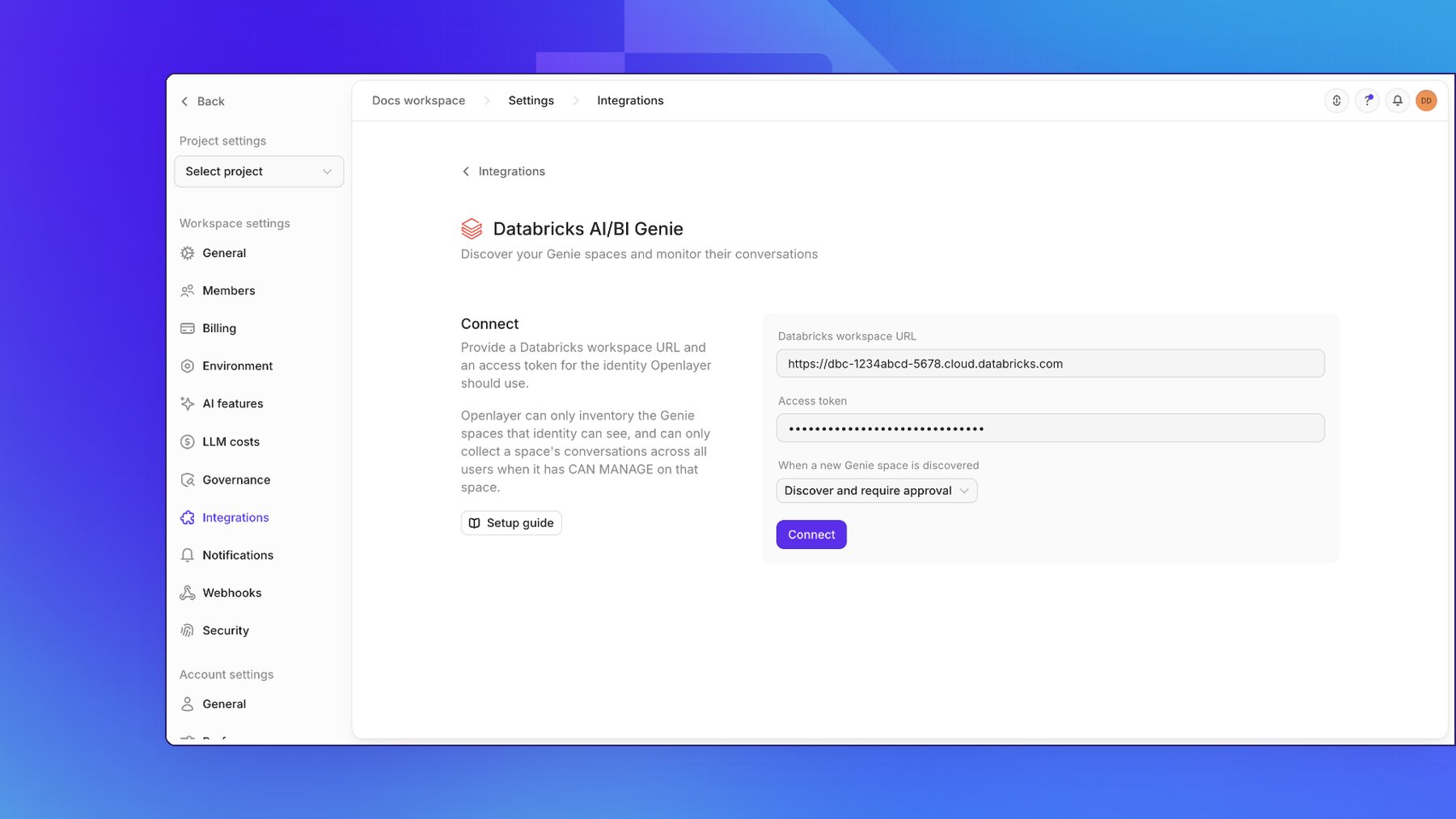
Step 4: Review coverage
The Coverage panel is the answer to “how much of my Genie estate is actually monitored?” — how many spaces the last scan could see, how many are registered, how many are waiting on someone, and when conversations last synced.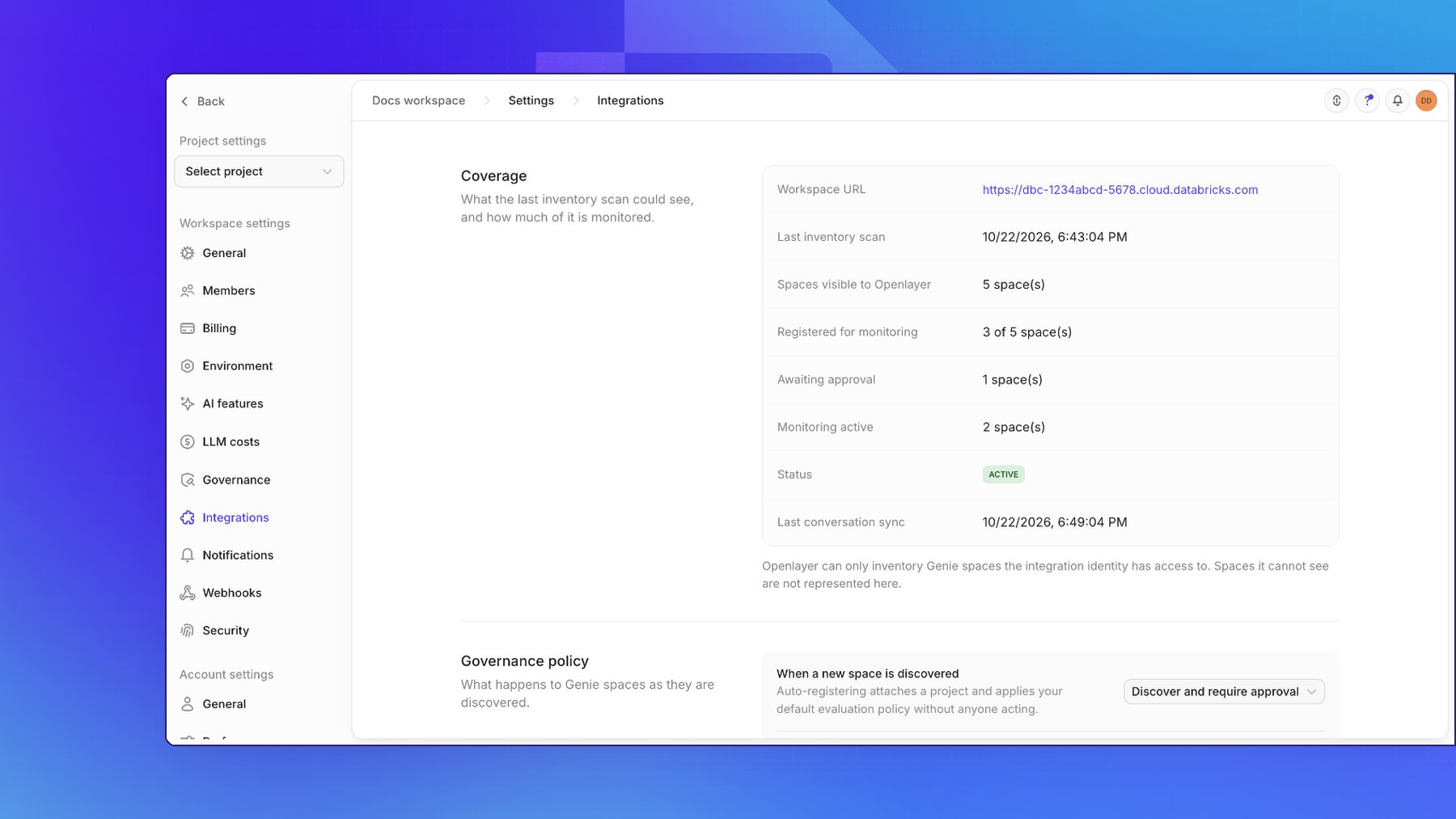
Step 5: Register your spaces
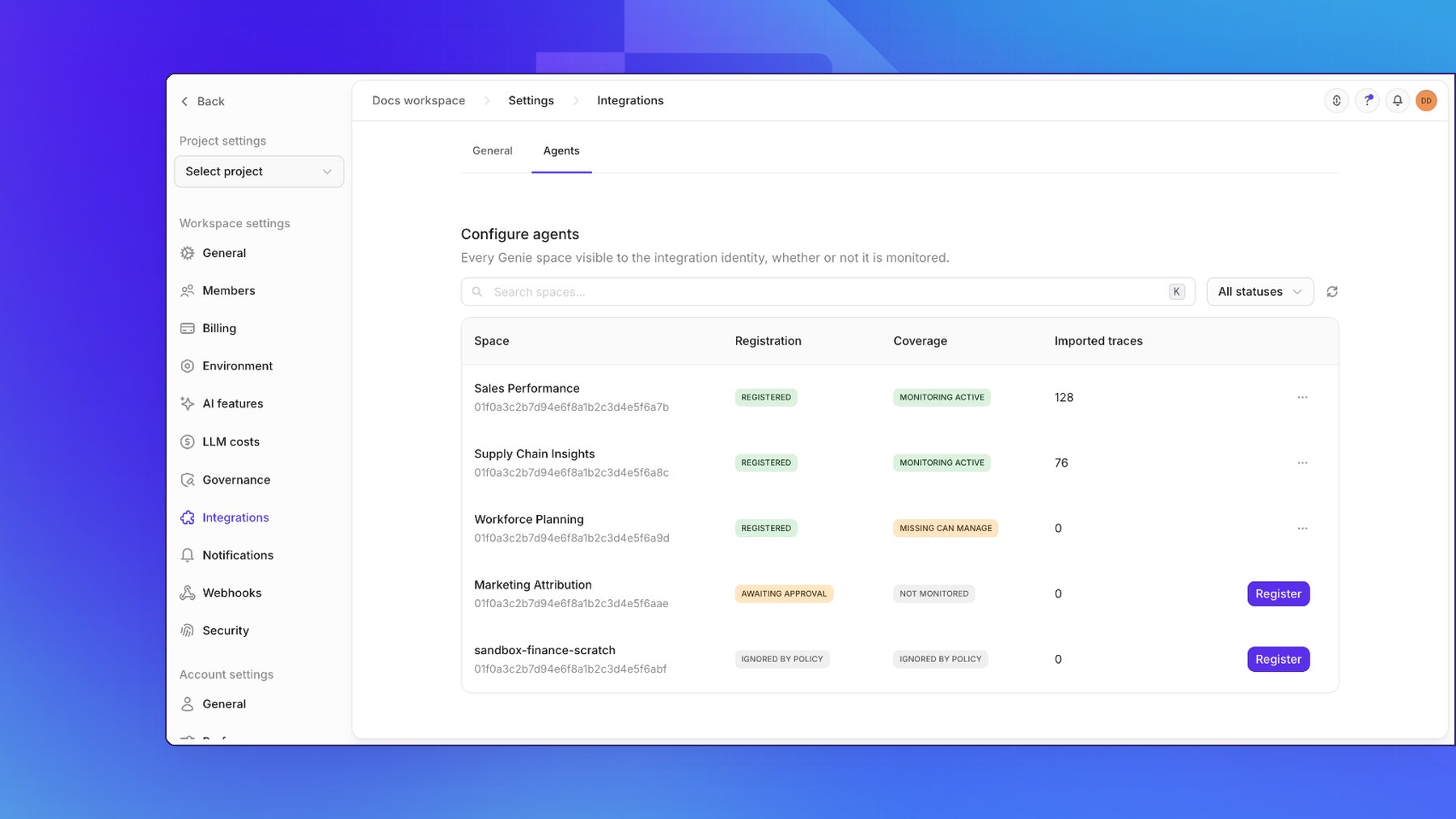
Every space the scan found appears on the Agents tab, under Configure agents, registered or not. Click Register on a space to start monitoring it: Openlayer creates a project namedDatabricks Genie - <space title> with a default pipeline, and conversation collection begins on
the next run.
Governance policy
The registration policy decides what happens to a space the moment it is discovered — including spaces created in Databricks long after you connected.
Changing the policy re-evaluates the spaces already sitting in your backlog, so switching to
auto-register picks up everything that was awaiting approval. Unregistering a space is remembered:
a later policy sweep will not re-register something a person deliberately opted out of.
Ignore rules are comma-separated glob patterns (
sandbox-*, *-scratch) matched
case-insensitively against each space’s title and id. A matching space stays in the inventory —
so it is still visible and auditable — but is never registered.
Auto-registration can also clone a template project’s production tests onto
every newly registered space, so a new Genie space arrives already evaluated
rather than merely monitored. This is set through the API, on the connection’s
defaultPolicyProjectId.What gets synced
A Genie space becomes an Openlayer project, a conversation becomes a session, and each question-and-answer turn becomes one trace:
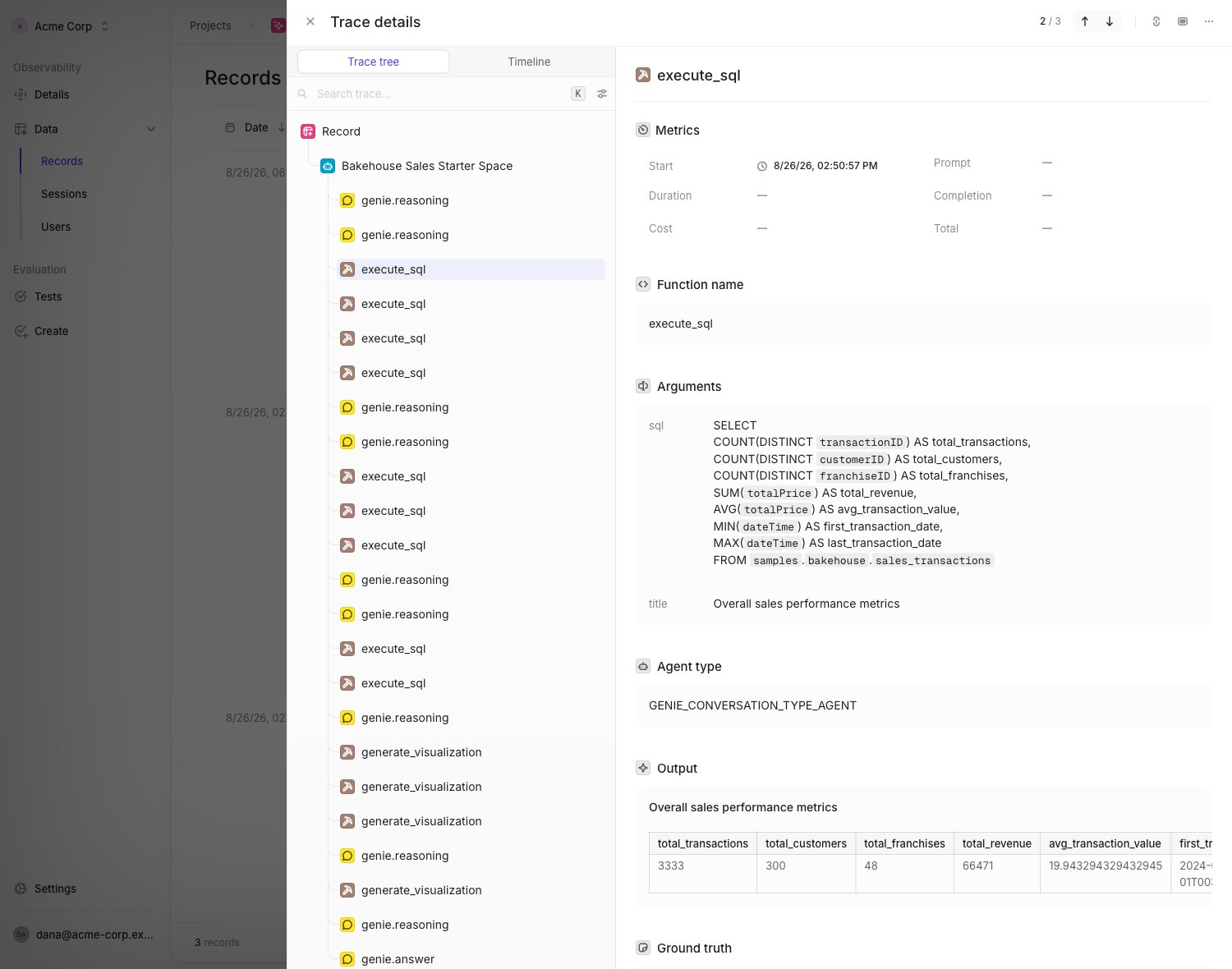
Query results are also projected into the trace’s
context — one document per query the turn ran —
which is what context-based evaluations such as groundedness and hallucination
read. A turn that ran no SQL has no context.
Genie exposes no endpoint that returns a chart image or spec, so a
generate_visualization step records which query the chart was built from
rather than the chart itself. The underlying data is already in the
corresponding execute_sql step.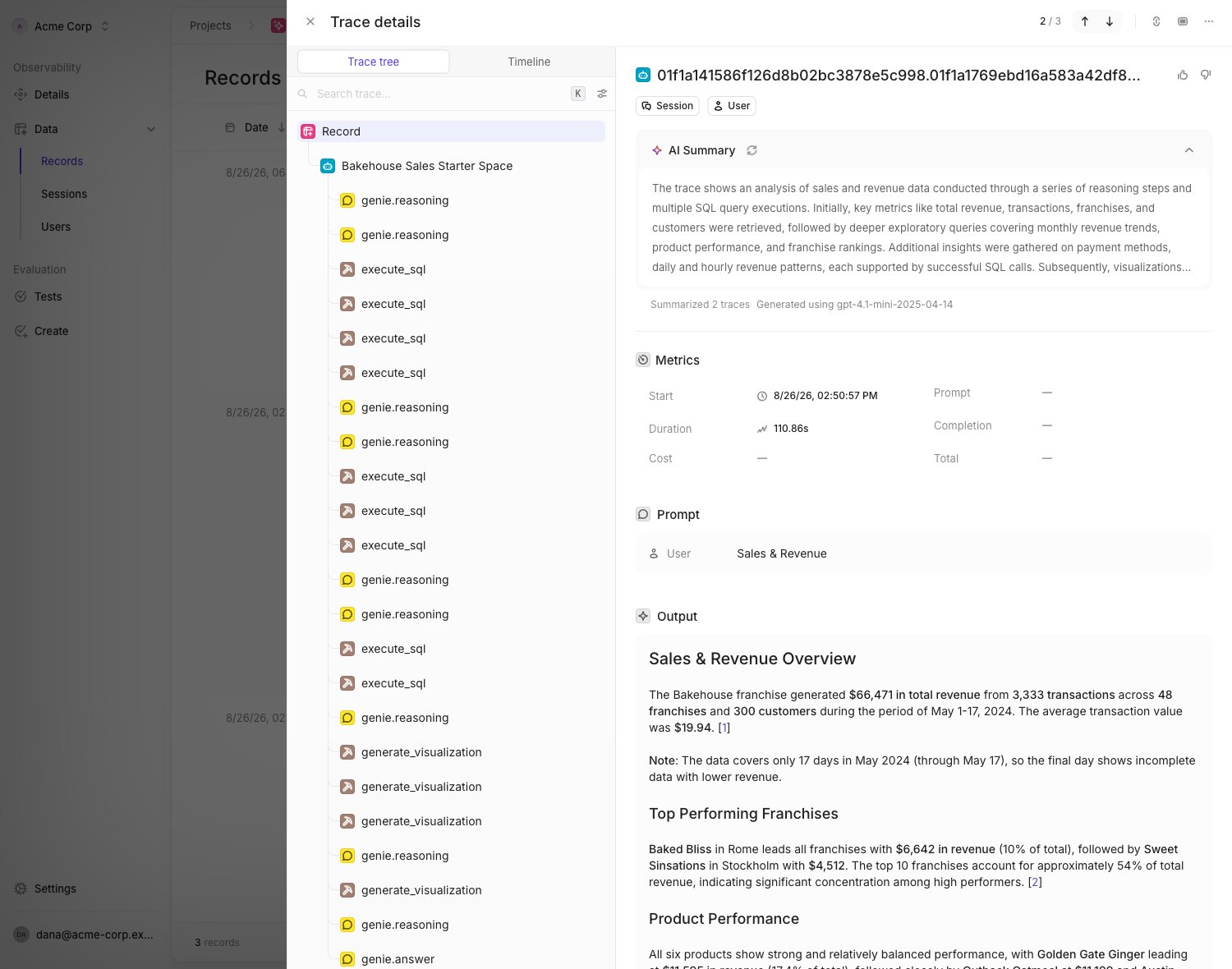
Coverage states
Registration answers “is this space under management?”. Coverage answers “are its conversations actually arriving?” — they are shown side by side because a space can be registered and still have no coverage.
Hover a coverage tag in the spaces table to see its remediation text inline.
A sync that imports nothing does not report “all good”. It has no evidence
about the content of conversations, so an existing data-level gap is left
standing rather than flapping back to healthy on the next poll.
Settings
Each has a toggle to pause it and a button — Scan now, Sync now — to run it immediately.
The first sync for a space reaches back 7 days. Every sync after that resumes from the space’s
own cursor with a rolling overlap, because a Genie turn keeps filling in after it is created: a turn
still waiting on its warehouse gains its SQL, results, and answer later. Openlayer imports a turn
only once it has reached a final status, and re-reads the overlap to catch the ones that settled
late.
Backfilling history
To re-read a window that has already been polled — or one older than the first sync’s reach — click Backfill on a space’s row. Backfill runs alongside normal polling, so recent conversations keep arriving while history fills in behind them. Turns already imported are recognized and not duplicated, so re-running a backfill is safe.Disconnecting
Removing the integration stops future discovery and conversation collection and removes the space inventory. Every conversation already imported — and the projects and pipelines holding it — is preserved.Troubleshooting
No spaces appear after connecting. The integration identity cannot see any Genie space. Genie’s spaces endpoint returns only what the identity has a permission on, with no error when the list is empty. Share the spaces with the identity in Databricks and click Scan now. A space shows Missing CAN MANAGE. The identity has CAN VIEW, which is enough to inventory the space but not to read other users’ conversations in it. Open the space in Databricks, click Share, and set the identity’s permission to Can manage. A registered space shows zero imported traces. Confirm the space has conversations inside the sync window — the first sync reaches back 7 days, and Genie writes nothing until someone actually asks a question. Use Backfill to reach further back, and Sync now to avoid waiting for the next scheduled run. Connecting fails with an unreachable-host error. Check the workspace URL. It must be the full origin,https://dbc-1234abcd-5678.cloud.databricks.com,
with no trailing path. The connect check fails fast on a bad host rather than retrying for minutes.
Traces arrive but Cost and token columns are empty.
This is expected. Genie exposes no usage or model metadata on any conversation endpoint, so
Openlayer leaves those fields unset rather than reporting zeros.
Some turns show as partial.
Private conversations and expired query results both produce turns that import without every part.
The question and whatever else was available are still imported — open the trace to see which piece
is missing and why.