

Not to be confused with the Microsoft 365 Agents
SDK: Agent
Framework (
microsoft/agent-framework) is the orchestration layer, the M365
Agents SDK (microsoft/Agents) is the channel and hosting layer for Teams and
Copilot. They compose. Agent Framework’s .NET package is
Microsoft.Agents.AI, which despite the name is not part of the M365 Agents
SDK.Configuration
The integration works by sending trace data to Openlayer’s OpenTelemetry endpoint. The steps below use the Python SDK; the .NET and Go SDKs emit the same spans, but the setup calls differ.1
Install the dependencies
Agent Framework depends on the OpenTelemetry API only and ships no exporter, so install one:
2
Set the environment variables
- Set the protocol explicitly. It defaults to OTLP over gRPC, and Openlayer’s endpoint speaks OTLP over HTTP — without this variable, no traces arrive.
- Use the traces-specific variables. They create only a trace exporter. The generic
OTEL_EXPORTER_OTLP_ENDPOINTalso builds metric and log exporters, pointed at endpoints Openlayer does not serve.
3
Configure the OpenTelemetry providers
Call this before creating your agents:If you already configure OpenTelemetry yourself — Azure Monitor distro, an OTel Collector,
your own
TracerProvider — skip that call. Agent Framework’s instrumentation is on by
default and emits into whatever providers are globally registered; you only need to opt in
to message content:4
Use agents as usual
Trace data is captured and exported automatically. The example below is a travel concierge
with several function tools, a retrieval tool that embeds its query, and a specialist
sub-agent exposed as a tool:
Capturing prompts and responses
Agent Framework captures no message content by default. Without opting in, prompts, completions and tool arguments/results are all omitted, and traces arrive looking healthy but carry nothing to evaluate. Opt in withENABLE_SENSITIVE_DATA=true, or programmatically:
ENABLE_SENSITIVE_DATA gates the agent, chat and tool code paths only. It
does not apply to workflow spans, which carry structural metadata either way —
see Workflow tracing.Resulting traces
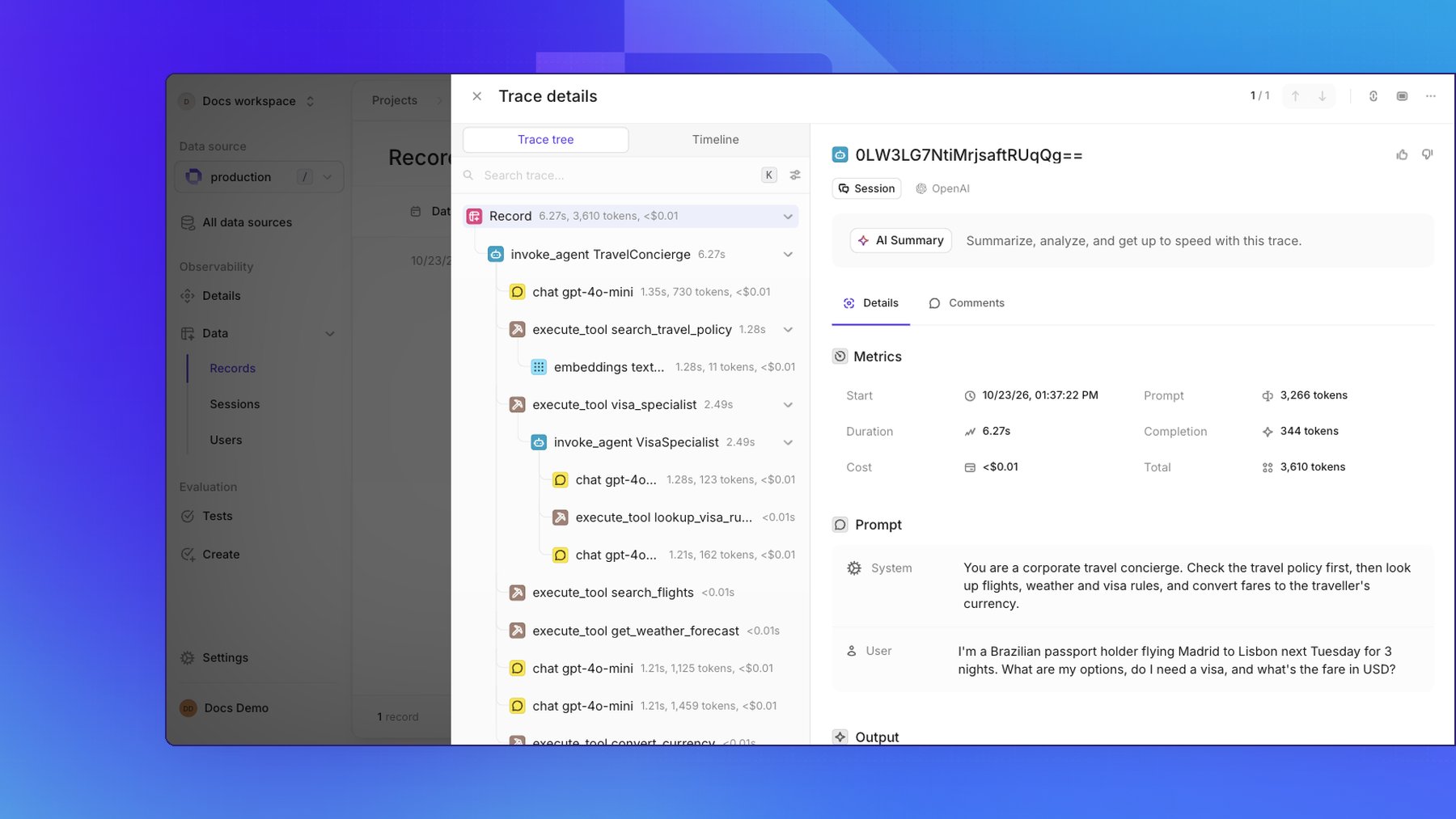
Your Agent Framework interactions are published to Openlayer as:- Agent invocations —
invoke_agentspans, with agent names and instructions. Sub-agents invoked throughas_tool()nest inside the caller’sexecute_toolspan. - LLM calls —
chatspans, with messages, model parameters, token usage, and cost. - Tool calls —
execute_toolspans, with function names, arguments, and results. - Embedding calls —
embeddingsspans, with model and token usage. Callingget_embeddings()inside a tool keeps the span in the same trace.
Workflow tracing
Agent Framework’s graph workflow engine emits its own spans outside the GenAI semantic conventions:workflow.build, workflow.run, executor.process, edge_group.process and
message.send. Executor and edge-group spans nest under workflow.run, and are stored as
generic steps with their attributes preserved under “Other fields.”
Because Agent Framework opens a separate root span per top-level operation and never wraps them
in a shared parent, an agent run followed by a workflow run arrives as three records:
workflow.build fires when the graph is constructed, not when it runs — so a real application
that builds once at startup gets one such record per process, not one per request.
Routing decisions are the useful part: every edge evaluation is recorded, including messages
silently dropped because a condition did not match.
edge_group.delivery_status is one of delivered, buffered, exception, dropped type mismatch, dropped target mismatch, or dropped condition evaluated to false.
Two limitations:
- Executor inputs and outputs are not on the spans. Agent Framework exposes them as workflow
events, so no telemetry setting surfaces them. Read the
executor_invokedandexecutor_completedevents offworkflow.run(..., stream=True)and record them yourself. - Causality between executors uses span links. A
message.sendspan and theexecutor.processspan it feeds are connected by an OpenTelemetry link rather than nesting, since executors do not nest. The tree still renders correctly — every span is a child ofworkflow.run— but the link edges are not shown.
Caveats
- Duplicate content. Instrumenting the chat client and the agent captures prompts and responses twice.
- MCP trace propagation. Agent Framework injects
traceparentintotools/callfor MCP sessions your process opens (MCPStreamableHTTPTool,MCPStdioTool,MCPWebsocketTool), but not for hosted connectors likeFoundryChatClient.get_mcp_tool(...), where the provider runtime issues the call. Traces stop at that boundary — use a client-opened transport for end-to-end tracing. - No
.envauto-loading. Callload_dotenv()before configuring the providers, or passconfigure_otel_providers(env_file_path=".env").